
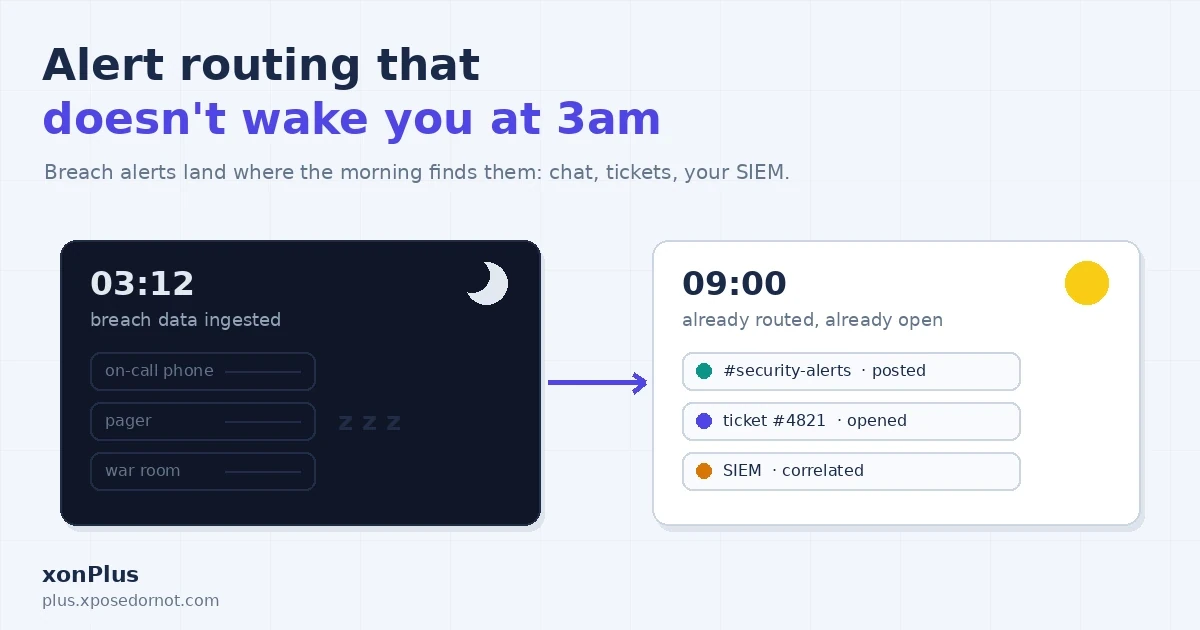
Alert Routing That Doesn't Wake You at 3am
A breach alert is urgent. It is almost never a page.
When breach data surfaces containing addresses from a domain you monitor, someone on your team needs to see the alert soon, in the right place, with enough context to act. That is a routing problem, and xonPlus gives you four channels to solve it: email, Slack, Microsoft Teams, and a custom webhook to any HTTPS endpoint you control. All four are configured per domain, and they work in any combination.
The channel menu
Slack, Teams, and custom webhooks are wired up under the Enterprise module of the console , and every channel is a per-domain configuration: one setup per domain, though multiple domains can share the same destination.
- Slack takes an Incoming Webhook URL (it starts with
hooks.slack.com/services/). Console, Enterprise, Slack: pick the verified domain, paste the URL, verify, done. - Microsoft Teams works the same way with one wrinkle: Microsoft is phasing out the legacy Incoming Webhooks connector, so the recommended path is a Power Automate workflow ("When a webhook request is received") on the target channel. Valid URLs carry a Microsoft domain such as
powerplatform.comorlogic.azure.com. - A custom webhook delivers the alert as JSON to any publicly reachable HTTPS endpoint: your SIEM intake, a ticketing queue, an automation platform. Plain HTTP, localhost, and private addresses are rejected. If your endpoint expects authentication, attach custom headers (a bearer token, a shared secret) and xonPlus sends them with every request.
Each alert carries the breach name, the breach date, the exposed record count, the types of data compromised, a severity, and recommended response actions. Enough to triage without opening a dashboard.
Pattern 1: many domains, one channel
The simplest setup that works. Verify every domain you own, point them all at a single #security-alerts channel, and you have one place to watch instead of five.
Most teams should start here, and for agencies or MSSPs watching client domains it is often the permanent answer: the "whose domain is this, who do we call" logic already lives in your runbook.
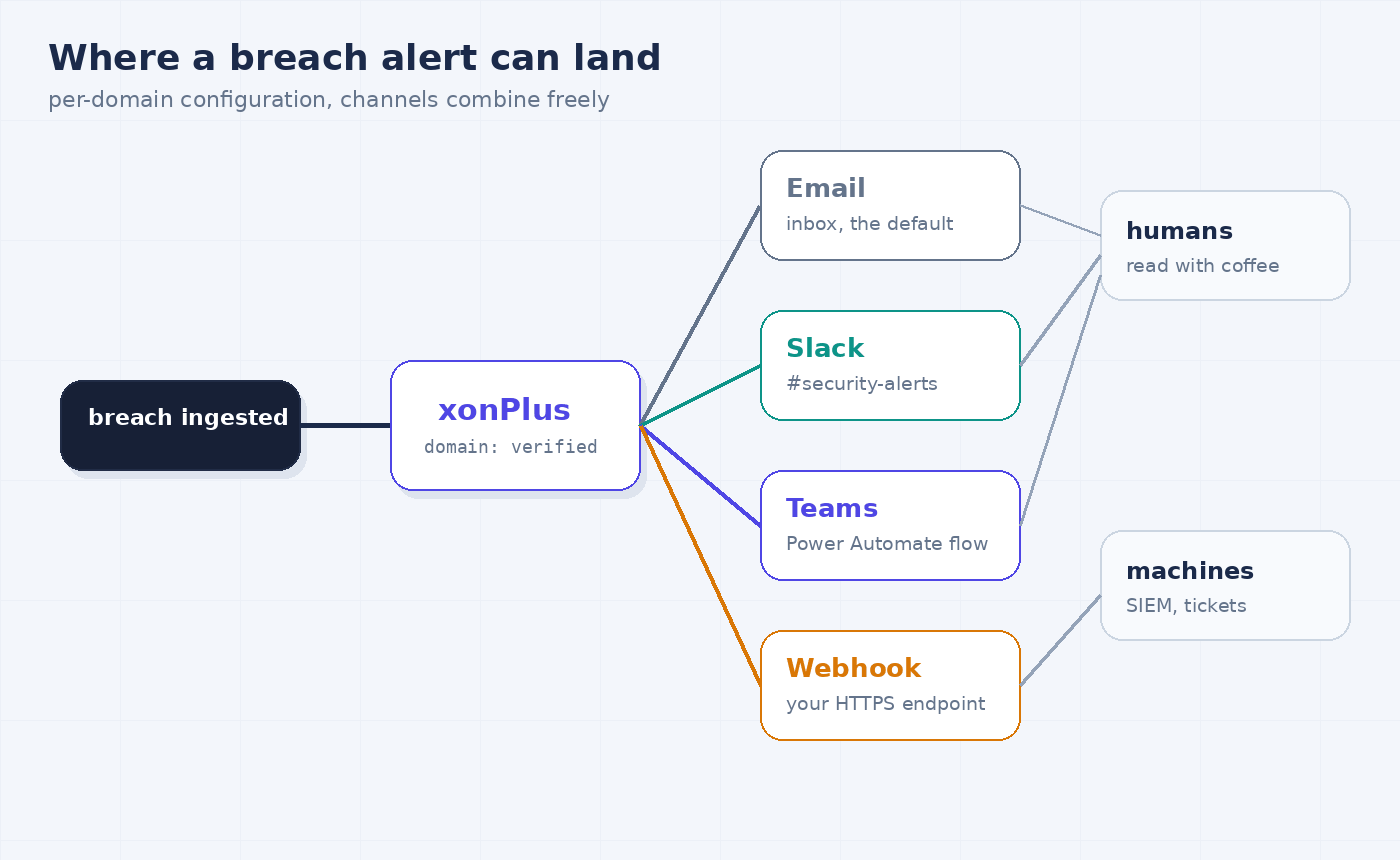
Pattern 2: chat for humans, webhook for machines
The pattern we recommend once alerts have consequences. Send Slack or Teams alerts where people will read them in the morning, and send the same domain's alerts to a webhook feeding your SIEM or ticket queue.
The chat copy is for awareness: the team sees the breach name and severity with coffee. The webhook copy is for process: it opens a ticket, lands in the SIEM, and starts whatever your incident playbook does next. Neither depends on someone being awake when the alert fires, which is the whole point. Breach data surfacing is not an outage; the correct response is a triaged morning workflow, not a 3am scramble.
This split also survives personnel changes. Chat channels get archived and renamed; the ticket queue is forever.
Pattern 3: routing rules live downstream
xonPlus concentrates on getting the alert to the channels you configured for that domain, reliably. Fine-grained routing rules ("only page on severity high", "route retail domains to the retail team") work best downstream, where you already have the tools for them:
- On Teams, the Power Automate flow that receives the alert can inspect the payload before posting: format the message, branch on severity, tag people.
- On a custom webhook, your receiving endpoint reads the JSON and applies whatever routing your team actually uses: severity thresholds, per-domain owners, business hours.
Keeping the rules in your own stack has a quiet advantage: your routing logic stays versioned, testable, and portable, right next to the rest of your automation.
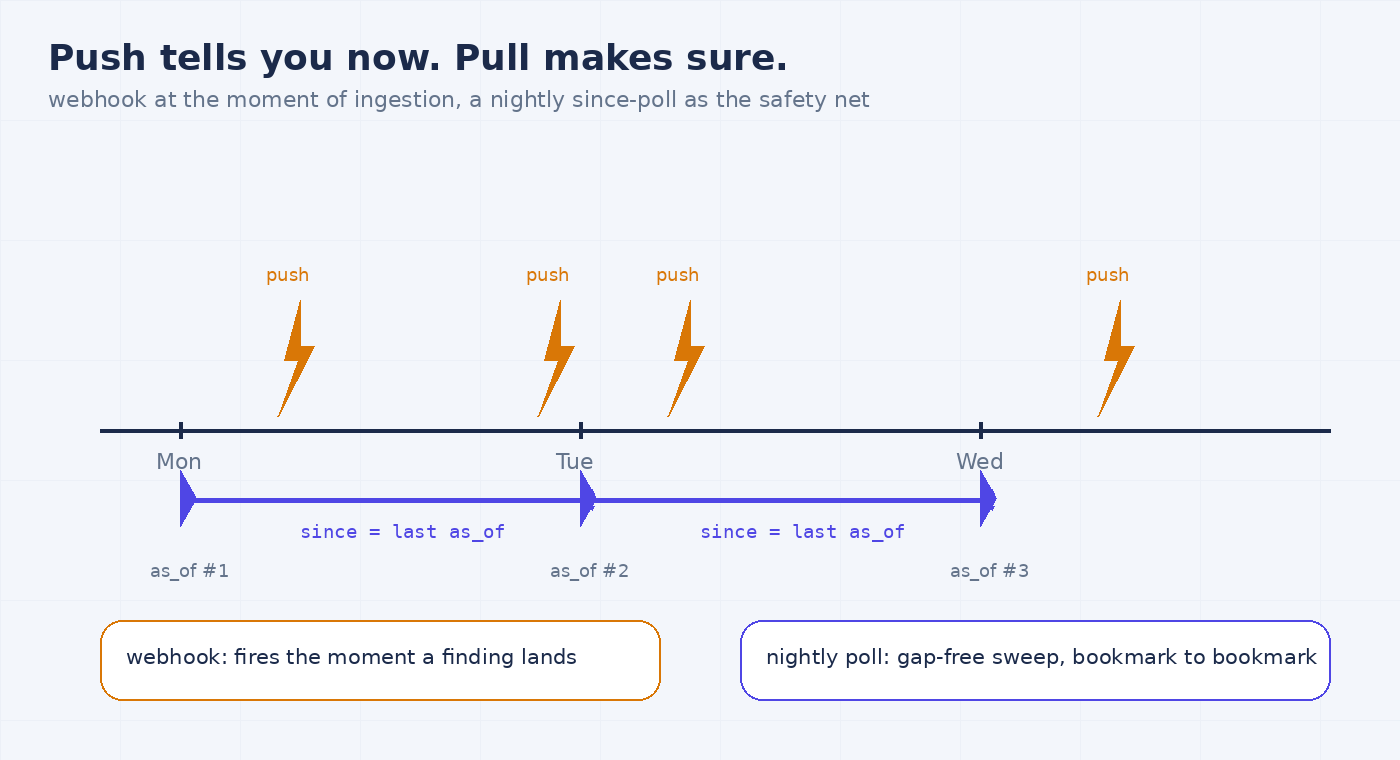
Push tells you now. Pull makes sure.
Webhooks are push: fast, convenient, and dependent on your endpoint being alive at the moment of delivery. The second automation surface is pull: the partner API's domain-summary endpoint takes a since parameter built for scheduled catch-up reads.
curl -X GET "https://plus-api.xposedornot.com/v2/partner/domain-summary?domain=example.com&details=true&since=2026-08-01T00:00:00Z" \
  -H "X-API-Key: YOUR_API_KEY"
Three behaviors make since a reliable reconciliation loop rather than a plain date filter:
- It filters by acquisition time, not breach date.
sincerestricts the response to breaches ingested into the platform after that instant. An old breach acquired yesterday is a new finding, exactly what a monitoring loop needs; each row still carries its historicalbreached_date. - The bookmark is gap-free by design. Every freshly computed response carries an
as_oftimestamp, stamped before the data is read. Save it, pass it back assinceon the next poll, and a breach ingested mid-request lands after the bookmark and is picked up next time. No findings fall between polls. - It bypasses the summary cache.
sinceresponses skip the 24-hour summary cache, so the poll reads current data.
Our recommendation: run both. The webhook for immediacy, a scheduled since poll (nightly is plenty for most teams) as the reconciliation pass. If the webhook missed something, the poll catches it; if both agree there is nothing new, that agreement is itself a health check on your alerting.
Why every channel makes you verify
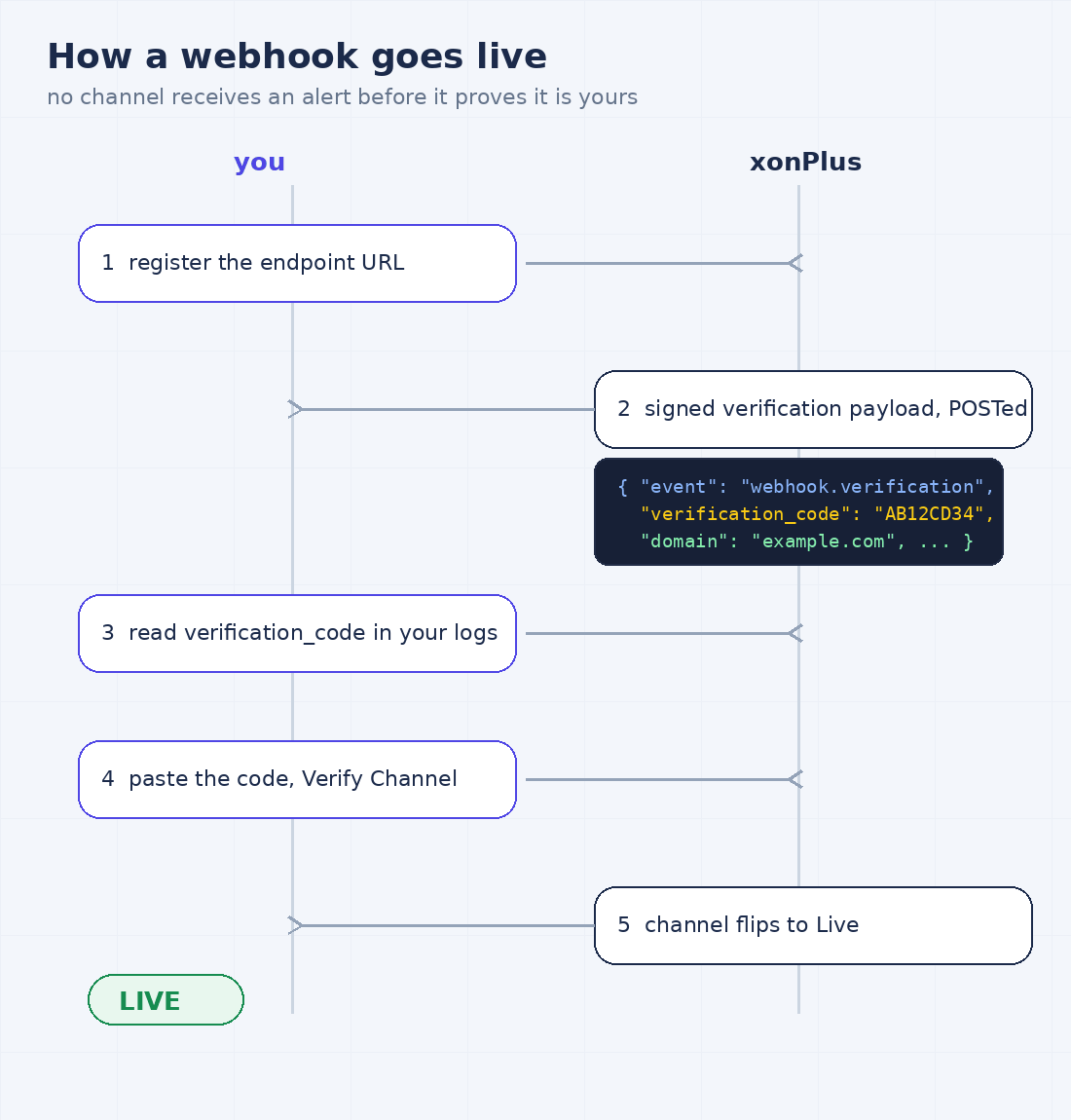
The first thing any new channel receives is not an alert. It is a verification challenge. (Email is the exception: it goes to an address you already control. The other three have to prove it.)
Slack and Teams get an 8-character code posted into the channel itself; you paste it back into the console to confirm. A custom webhook gets a signed verification payload POSTed to the endpoint:
{
  "event": "webhook.verification",
  "domain": "example.com",
  "verification_code": "AB12CD34",
  "timestamp": 1718800000
}
You read the verification_code out of your endpoint's logs, paste it into the console, and the channel flips to Live.
The reason is the same in all three cases: breach alerts describe exposure inside your organization, and the verification step proves the destination is actually yours before a single alert flows. A mistyped webhook URL fails at setup time, loudly, instead of quietly delivering your security notifications to a stranger's endpoint for a year.
The failure modes nobody notices
Alert channels fail silently: the alert that does not arrive looks exactly like the quiet week. Four things to check on a schedule, all drawn from what actually goes wrong:
- Archived or deleted chat channels. An archived or deleted channel receives nothing. If a delivery fails, xonPlus retries before giving up, but a dead channel stays dead until you reinitialize it with a fresh URL.
- Phased-out Teams connectors. If your Teams alerts run through the legacy Incoming Webhooks connector, migrate the configuration to a Power Automate flow before Microsoft turns the old path off for you.
- Endpoints that stopped answering. A custom webhook target that returns errors or is no longer publicly reachable receives nothing. Your endpoint's own logs are the place to look.
- Zero verified domains. Every alert channel hangs off a verified domain. If a domain was removed, or never finished verification, the channels attached to it have nothing to fire on.
The console shows each channel's verification status, and for webhooks the endpoint and timestamps too, so a quarterly two-minute review of that page is cheap insurance. Wire the check into the same calendar slot as your access reviews.
Better still, let the since poll stand permanent guard: compare what the poll returns against what your channels received, and every one of these silent failures becomes a loud one.
Building this into your own product?
Everything above reads as advice for an internal security team, but the same two surfaces are how partners ship breach intelligence under their own roof.
If you are an MSSP, the patterns map directly onto a client portfolio: verify each client domain, share alert channels where your SOC structure calls for it, and land the webhook plus since poll in the stack you already run for correlation and ticketing. The alerting conversation with your client becomes a report you generate, not a dashboard you forward.
If you are a security product or platform vendor, invert the picture: your application is the destination. The webhook becomes your product's ingest, the since loop becomes your sync job, and your users see domain breach exposure rendered in your interface, on your data pipeline, without ever touching our console. That arrangement, our data inside your product, is exactly what xonThreatIntel+ licenses.
Where this fits
Channel setup is a short, per-domain task, covered step by step in the console documentation , and the since polling details live in the partner API reference alongside it.
Route the alert well and 3am stays quiet. The breach will still be there at 9, ticket already open, your morning check reduced to reading what the machines agreed on overnight.