
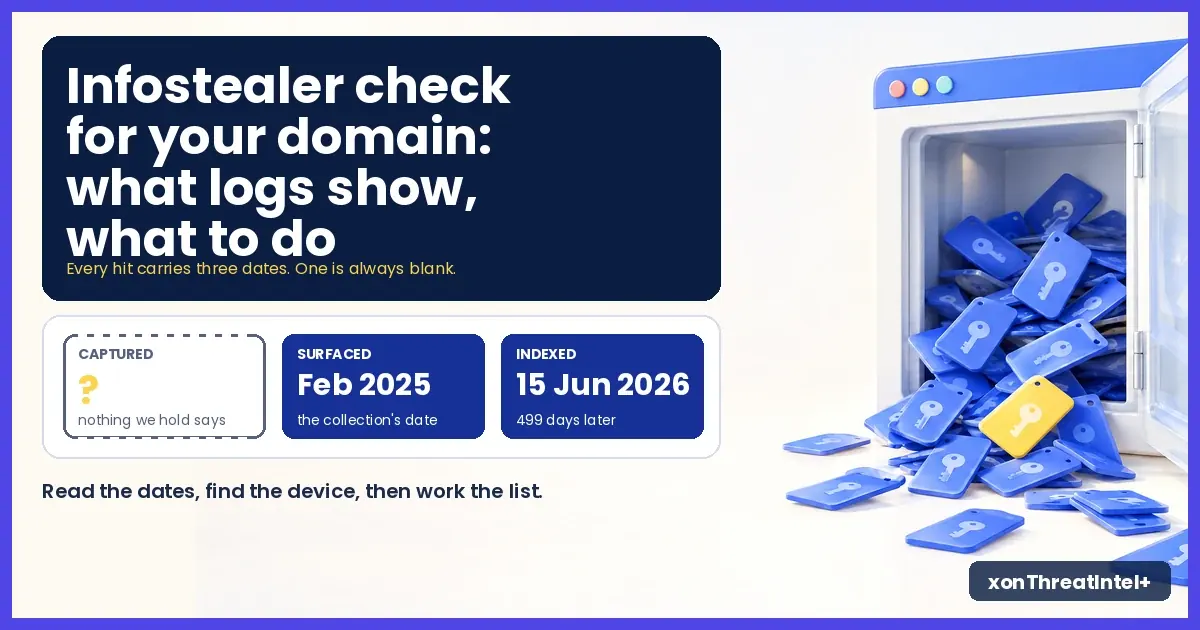
Infostealer Check for Your Domain: What Logs Show, What to Do
A stealer-log hit on your domain means one thing. Somebody with an address on your domain saved a login in a browser, the machine got infected, and the malware took what the browser held.
It doesn't mean your company was breached. In our experience it usually wasn't.
That distinction decides everything you do next. So read the hit before you react to it. What the check shows, what it can't, and the order to work in.
A word on who's writing. XposedOrNot keeps a public breach index, 796 breaches and 11.7 billion+ records as of 23 October 2026 by our live API's count, and stealer-log exposure is part of every free email search and domain scan on it. xonThreatIntel+ is the same index for people who watch domains that aren't their own.
What is a stealer log, and how is it different from a breach?
Think of where the data was sitting. A breach was sitting on a company's server. A stealer log was sitting in one person's browser, so it carries every login that browser had saved, work and personal, from the same infected laptop.
We've written up the MSSP view of stealer logs already, so here's only what a domain owner needs.
How many logins is "every saved login"? A peer-reviewed study of 170,298 infected users (Paju and colleagues, 2026 , who call them victims) put the average at 147 saved logins per person. One infected machine, 147 logins, and yours is one of them.
The same study found that nearly 89% of those users reused passwords across sites. Keep that number for the checklist later, because it changes what you tell the person.
Today our index holds its first stealer-log source, with more coming. It's the collection known as ALIEN TXTBASE. In our catalog it's listed as AlienStealerLogs .
By our catalog's description, 23 billion rows came out of a Telegram channel in February 2025. Our extraction resolves them to 299,646,818 unique email addresses, the sixth-largest entry of the 796 we hold.
How do I check my domain for stealer-log exposure?
Two routes, and which one you take depends on whose domain it is.
Your own domain. Type it into the free domain check . Back come the breach count, the exposed-address count and a last-seen date, in seconds and with no signup. Stealer logs are in that count.
Verify the domain (an email link, a DNS record or an HTML file). The address list and the breach names open up. Email alerts run from then on.
Domains you don't own. Client domains, or your users' domains inside a product you're building, go through the xonThreatIntel+ partner API. Onboard the domain, wait for it to be approved (most take minutes), then ask for the summary with details:
curl "https://plus-api.xposedornot.com/v2/partner/domain-summary?domain=example.com&details=true" \
  -H "X-API-Key: YOUR_API_KEY" \
  -A "YourProduct/1.0"
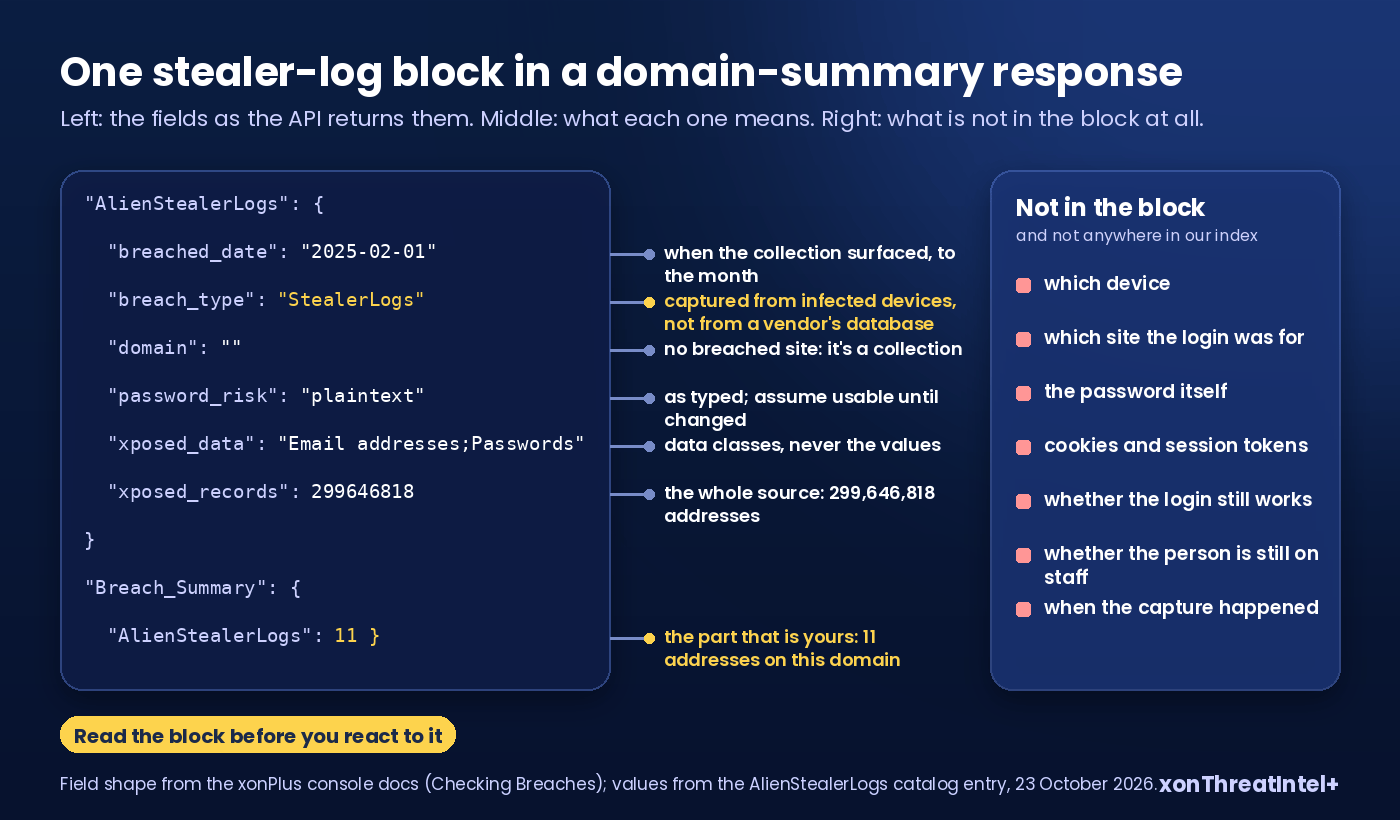
The response carries a block per breach the domain appears in. For a stealer-log source it looks like this (field shape from the API docs , values from our catalog page; trimmed):
"Detailed_Breach_Info": {
  "AlienStealerLogs": {
    "breached_date": "2025-02-01T00:00:00+00:00",
    "breach_type": "StealerLogs",
    "domain": "",
    "password_risk": "plaintext",
    "xposed_data": "Email addresses;Passwords",
    "xposed_records": 299646818,
    "xposure_desc": "ALIEN TXTBASE, a stealer log collection, was exposed in February 2025 ..."
  }
},
"Breach_Summary": { "AlienStealerLogs": 11 }
Eleven. That's the number that's yours in this example: eleven addresses on the domain appear in the source. Everything else in the block describes the source, not you.
One address only? GET /v3/check-email/{email}?detailed=true answers for any single address, no onboarding, on any xonThreatIntel+ or xonAPI+ key.
What a stealer-log hit shows, field by field
| Field | What you'll see | What it actually means |
|---|---|---|
| Breach name | AlienStealerLogs | A collection rather than a company. It has a catalog page with its description and both dates. |
breach_type | StealerLogs | Captured from infected devices. A DataBreach row next to it is a different kind of problem (a vendor's database). |
breached_date | 2025-02-01 | When the collection surfaced, to the month. It is not when any one login was captured, and we'll come back to that. |
xposed_data | Email addresses;Passwords | The data classes the source carried. Classes, not the values. |
password_risk | plaintext | Those passwords were in the source as typed. Assume they're usable until changed. |
xposed_records | 299,646,818 | The whole source. Your share is the Breach_Summary count, and the details rows break it down per breach. |
domain | empty | The breached site's own domain, where there is one. A collection has none. |
| Seniority tiers | c_suite, vp, director | Filled in after enrichment runs for the domain, so a freshly onboarded domain shows zeros first. |
On the free side the same information arrives with fewer labels. In a verified domain's dashboard the entry appears under its name and type. In an email search, a hit is marked "Stealer Log" next to the normal breaches.
What the hit can't tell you
Of the 29 ranking pages we read this week, none covers this part, and it's the part that stops people overreacting.
- Which device. The log came from a machine. We never see the machine, only the addresses in the result.
- Which site the login was for. The original collection paired each address with the website it was typed into. Our index keeps the address for matching, and that pairing is not what we return.
- The password. The source carried passwords. Our lookups match on email addresses and domains, and we don't hand back the credentials themselves (the data page has the full list of what's kept).
- Cookies, session tokens, autofill, wallets. Stealers take all of them. None of it reaches an index built on email addresses.
- Whether the login still works, or whether the person still works for you.
- When the capture happened. Not even the researchers get this one. The Paju study records a single date per log, the day it was collected, and says plainly that the logs "record neither when a stealer produced them nor when they were first published".
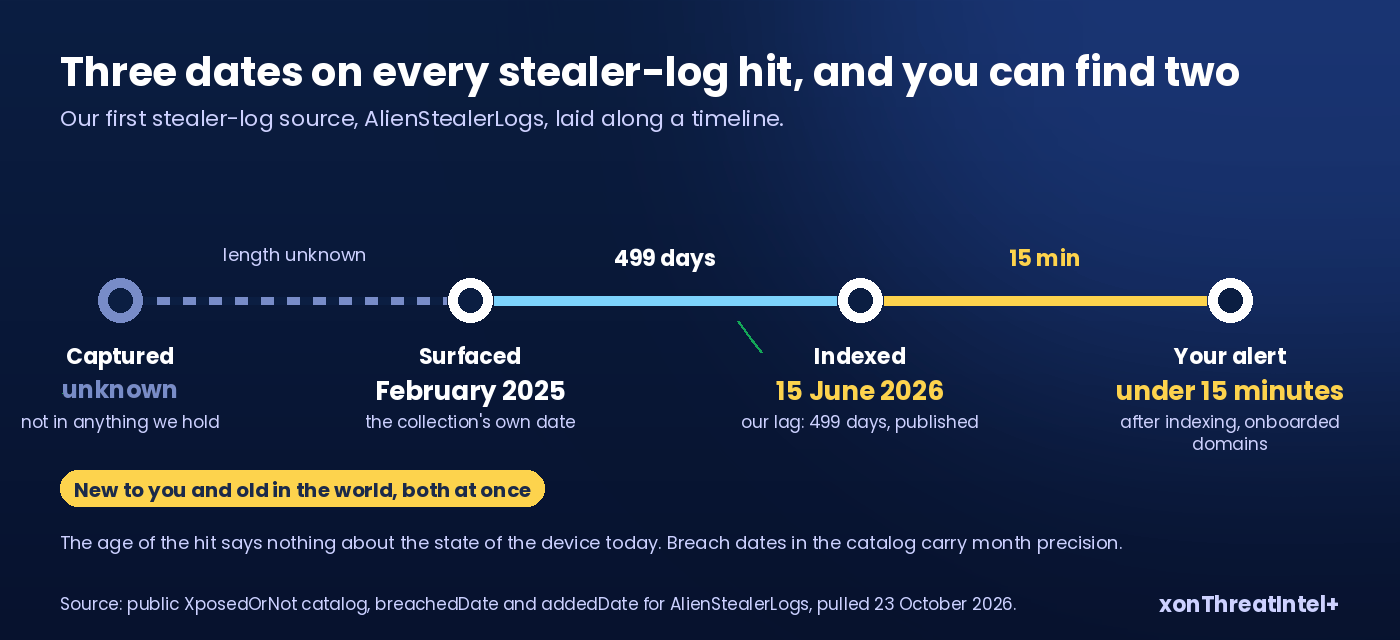
So there are three dates on every stealer-log hit, and you can find two of them. The collection date is on the hit itself: February 2025 for this source. The indexing date is on the catalog page, 15 June 2026, and that's roughly when your alert arrived if the domain was already being watched.
That's 499 days between the two, and the lag is ours, published on the catalog page for anyone to see. The capture date is blank in everything we index, and it was blank in the 170,298-user dataset too.
A hit that reaches you in October 2026 from this source is new to you and old in the world, both at once. Our post on the clocks in breach monitoring takes that apart. The practical point here: the age of the hit says nothing about the state of the device today.
Does a stealer-log hit mean we were hacked?
Usually not in the sense people mean when they ask. The machine was compromised. Your systems may never have been touched.
Whose machine, though? The Verizon 2025 DBIR looked at the infected systems in the logs it sampled and estimated that about 30% were enterprise-licensed devices.
Among systems that held a likely business login, 46% were not enterprise-managed. Verizon adds a caveat of its own. It doesn't know whether those companies had a BYOD policy, "or if folks just logged in with whatever computer they had available".
Read those two numbers as a domain owner and the shape of your problem appears. In Verizon's sample, close to half the machines carrying a work login were outside anyone's management. Often that's a home laptop with the work password saved in the browser.
And nobody picked you. Infostealers are a volume business.
Microsoft counted over 394,000 Windows computers infected with Lumma between 16 March and 16 May 2025, before the takedown it led with Europol and the US Department of Justice. One family, two months. The address on your domain was in a browser caught in that kind of net.
Where it does become your problem is what else sat in the same browser. The Paju dataset held saved logins for 50,219 hosts addressed by raw IP and for 4,385 internal-only domains.
Intranets, admin panels, things never meant to be opened with a saved password. If your people save internal-tool logins in the browser, the log holds those next to the webmail.
Back in the DBIR, 54% of a sample of organisations named on ransomware extortion sites had their domain in at least one infostealer log or marketplace posting. And 40% of those logs contained corporate email addresses. Correlation with caveats, Verizon says, but it's why a stealer-log hit deserves a ticket.
What to do, in order
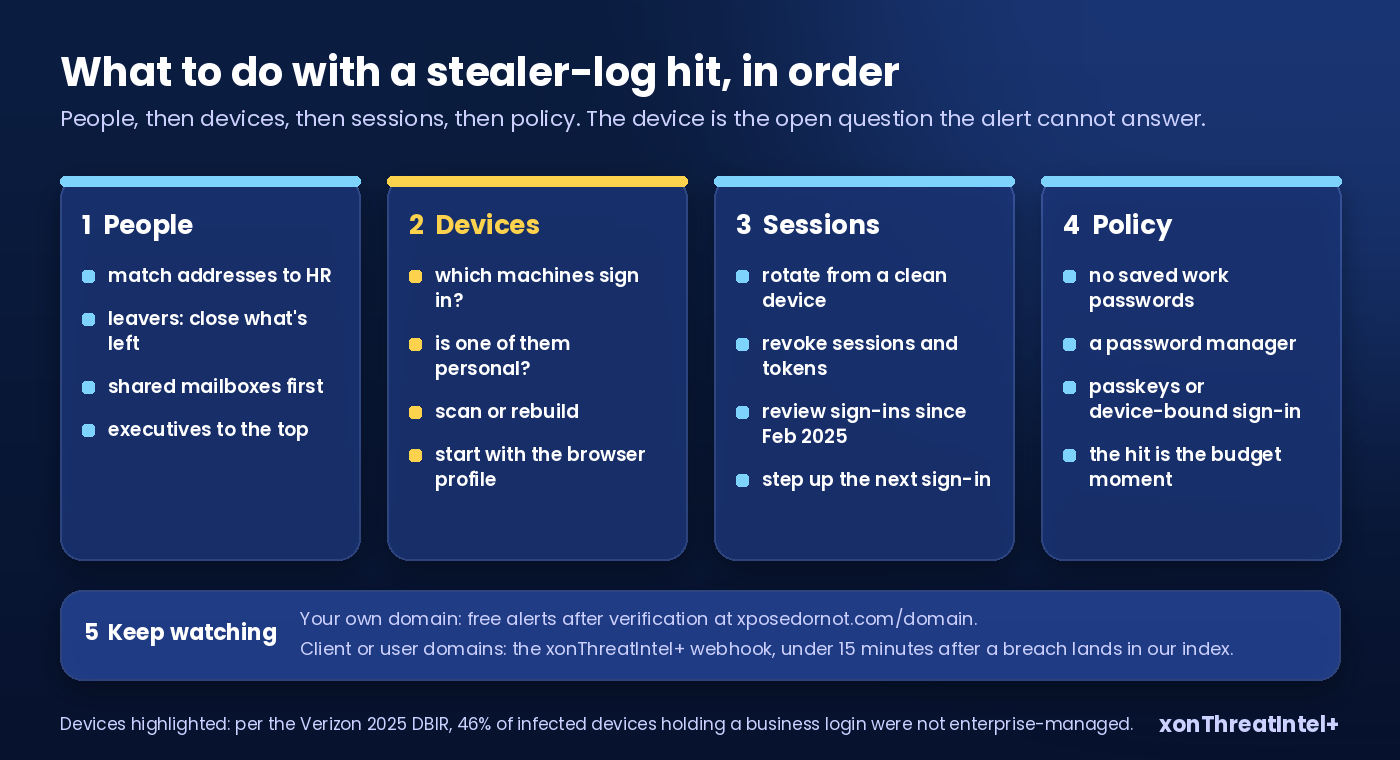
People first. Pull the address list (the verified free dashboard, or the per-domain detail rows on xonThreatIntel+) and match it to HR. Current staff, leavers, shared mailboxes, executives. The seniority tiers in the response are there to pull the executives to the top of that list.
Leavers get their remaining access checked and closed. Shared mailboxes are the worse news, because you don't know whose browser they were saved in. Current staff go to the next step.
Devices second. For each current person, hand two questions to whoever owns endpoints: which machines does this person sign in from, and is one of them personal? Ask the personal one out loud, because Verizon's 46% was counted on machines just like these, infected and holding a work login.
The machine gets scanned or rebuilt, starting with the browser profile that held the saved password.
Sessions third, not only passwords. Rotate the exposed logins from a clean device. Then revoke sessions and tokens, because a stolen cookie survives a password reset. (The Paju team's first recommendation is device-bound sessions, for exactly this reason.)
Review sign-ins on that account in your identity provider, as far back as it keeps them (February 2025 is the latest the capture could have happened, not the earliest). Then step up the next sign-in, the way we described for new breach exposure.
Tell the person plainly. In the Paju sample nearly nine in ten people reused at least one password, so assume the leaked one lives somewhere else too. And the somewhere else is theirs to fix.
Policy fourth. Work browser profiles that don't store passwords, and a password manager instead. Passkeys or device-bound sign-in where the identity provider supports it. None of it is new advice, but the hit is the moment it gets budget.
Then keep watching. Your own domain: verified on the free side, you get an email when it appears in a new source. Client domains or your users' domains: the xonThreatIntel+ account webhook fires under 15 minutes for onboarded domains, after a breach lands in our index, and the since filter on domain-summary, fed with the last response's as_of, lets you poll for only what's new.
A few things we've watched go wrong. Don't send the whole company a "we were hacked" email over a 2025 collection. Asking the person for their password to "check it" is worse.
And don't close the ticket because the source is old. The device is the open question, and the alert can't answer it for you.
How much of this is in the index?
Enough to shape how the alerts arrive. As of 23 October 2026:
| Entry type | Entries | Records | Share of records |
|---|---|---|---|
| Breach (one company's data) | 789 | 8,744,234,127 | 74.6% |
| Combolist | 5 | 2,547,587,444 | 21.7% |
| Stealer log | 1 | 299,646,818 | 2.6% |
| Scrape | 1 | 125,724,601 | 1.1% |
| Total | 796 | 11,717,192,990 | 100% |
Six of the 796 entries are combolists or stealer logs, and between them they hold a quarter of every record we index, 24.3% to be exact. (Records, one per address per source. The same address in two sources counts twice, and nothing here is a count of people.)
The average company breach in the catalog is 11.1 million records. The average aggregate, a combolist or stealer log, is 475 million.
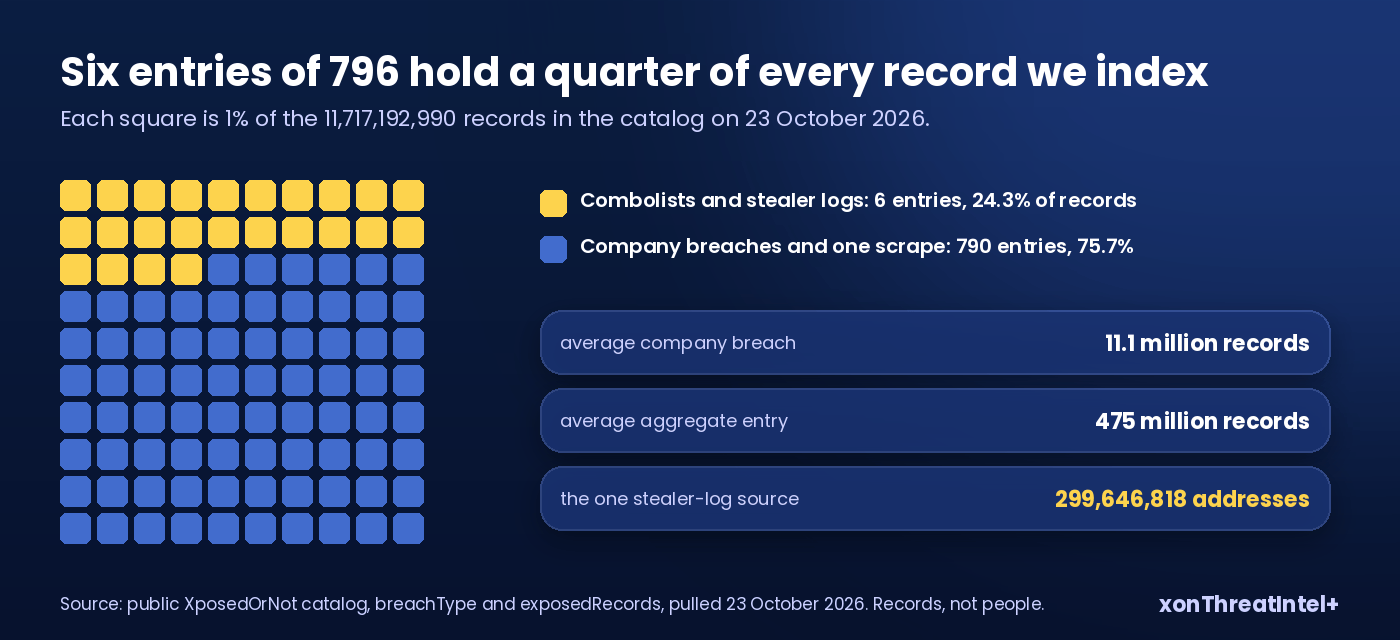
What that means at your end: this category lands in lumps. Months of ordinary breach alerts with a handful of addresses each, then one source arrives and a long list of your addresses lights up on the same morning.
That's the collection reaching the index. That doesn't mean anyone in your office caught something that week. Read the dates, then work the list.
Where the two products fit
For your own domain, everything in this post is free at xposedornot.com/domain : the check, the verified dashboard, the alerts, stealer logs included, no size limit.
For domains that aren't yours, xonThreatIntel+ is $99 a month for 10 domains, $243 for 25 and $447 for 50, flat. The API comes with every plan and the account webhook from the $243 tier. If what you need is per-address checks at volume inside your own product, that's xonAPI+, from $9 a month.
Run the free check on your own domain today. Counts in seconds, no signup. If the stealer-log row is there, you now know how to read it.
Quick answers
How do I check if my domain is in stealer logs?
Type the domain into the free check at xposedornot.com/domain-monitoring: it returns the breach count, the exposed-address count and the last-seen date, with stealer-log sources included. Verify the domain to see the address list and the breach names, with email alerts from then on. For client domains or domains inside your product, onboard them on xonThreatIntel+ and call domain-summary with details; each stealer-log source appears with breach_type set to StealerLogs.
Does a stealer-log hit mean my company was breached?
Not in the usual sense: a device used by someone with an address on your domain was infected and the browser's saved logins were taken, and your own systems may not have been touched. Verizon's 2025 DBIR found that 46% of infected devices holding a business login were not enterprise-managed, so the first job is finding the machine, and it may be a personal one.
Why does the alert say February 2025 when I only heard about it now?
Because the date on the hit is when the collection surfaced, not when any login was captured and not when we indexed it. Our one stealer-log source is dated February 2025 and entered the index on 15 June 2026, and nothing in the collection as we hold it says when any one login was captured. So the device tells you whether the problem is current, and the date can't.
What's the difference between a stealer-log hit and a combolist hit on my domain?
A stealer log comes from infected devices and originally pairs each login with the site it was used on. A combolist is a pile of email and password pairs assembled from older breaches and logs, usually with no site attached, built to be fed into automated login attempts. Both carry plaintext passwords in our index, and both get the same first steps: people, devices, sessions.
Where the numbers came from
- Catalog figures (796 breaches, 11,717,192,990 records; entries and records by type; the AlienStealerLogs entry's dates, count and data classes): the public XposedOrNot catalog at api.xposedornot.com/v1/breaches , fields breachType, breachedDate, addedDate, exposedRecords, pulled 23 October 2026.
- AlienStealerLogs: our extraction of the ALIEN TXTBASE collection, 299,646,818 unique email addresses; attributed to February 2025; added to the index 15 June 2026; catalog page ; launch post on the community blog , 17 June 2026.
- Response fields and endpoints: xonPlus console documentation, Partner API Checking Breaches and Onboarding Domains pages, read 23 October 2026.
- Free domain check behaviour (counts, then verification): xposedornot.com/domain-monitoring and the methodology page , read 23 October 2026.
- A. Paju, J. Nurmi, D. Arroyo, S. Chica Manjarrez, F. Casino, M. Niemelä, J. Itkonen, J. Scanlan, C. Patsakis and G. Smaragdakis, "A Data-Driven Analysis of Infostealer Malware Victims", Computers & Security (Elsevier), 2026, doi:10.1016/j.cose.2026.105176 ; preprint arXiv:2609.30070 , 24 September 2026: 170,298 infostealer victims, 147.09 credential sets per victim, 88.99% of victims reusing at least one password, saved logins for 50,219 IP-addressed hosts and 4,385 internal-only domains, and a single collection date per log (capture and publication dates not recoverable from the data). The authors note their sample is drawn from freely shared logs.
- Verizon, 2025 Data Breach Investigations Report , pages 56 and 57: about 30% of sampled infected systems estimated to be enterprise-licensed; 46% of devices with a likely business login not enterprise-managed; 54% of a sample of organisations named on ransomware extortion sites had domains in an infostealer log or marketplace posting, 40% of those logs with corporate email addresses (Figure 62, n=503).
- Microsoft, "Disrupting Lumma Stealer: Microsoft leads global action against favored cybercrime tool" , 21 May 2025: over 394,000 Windows computers infected between 16 March and 16 May 2025; about 2,300 malicious domains seized, taken down or blocked under a US court order, with the US Department of Justice, Europol EC3 and Japan's JC3 acting alongside.
- Alert timing: under 15 minutes for onboarded domains, after a breach lands in our index (plus.xposedornot.com/products/threat-intel).
- Earlier posts: Stealer logs, explained for MSSPs: what they are and how to monitor for them; Dark Web Monitoring API: What "Real Time" Actually Means; Stop Account Takeover: Step Up Auth on New Breach Exposure.