
Stop Account Takeover: Step Up Auth on New Breach Exposure
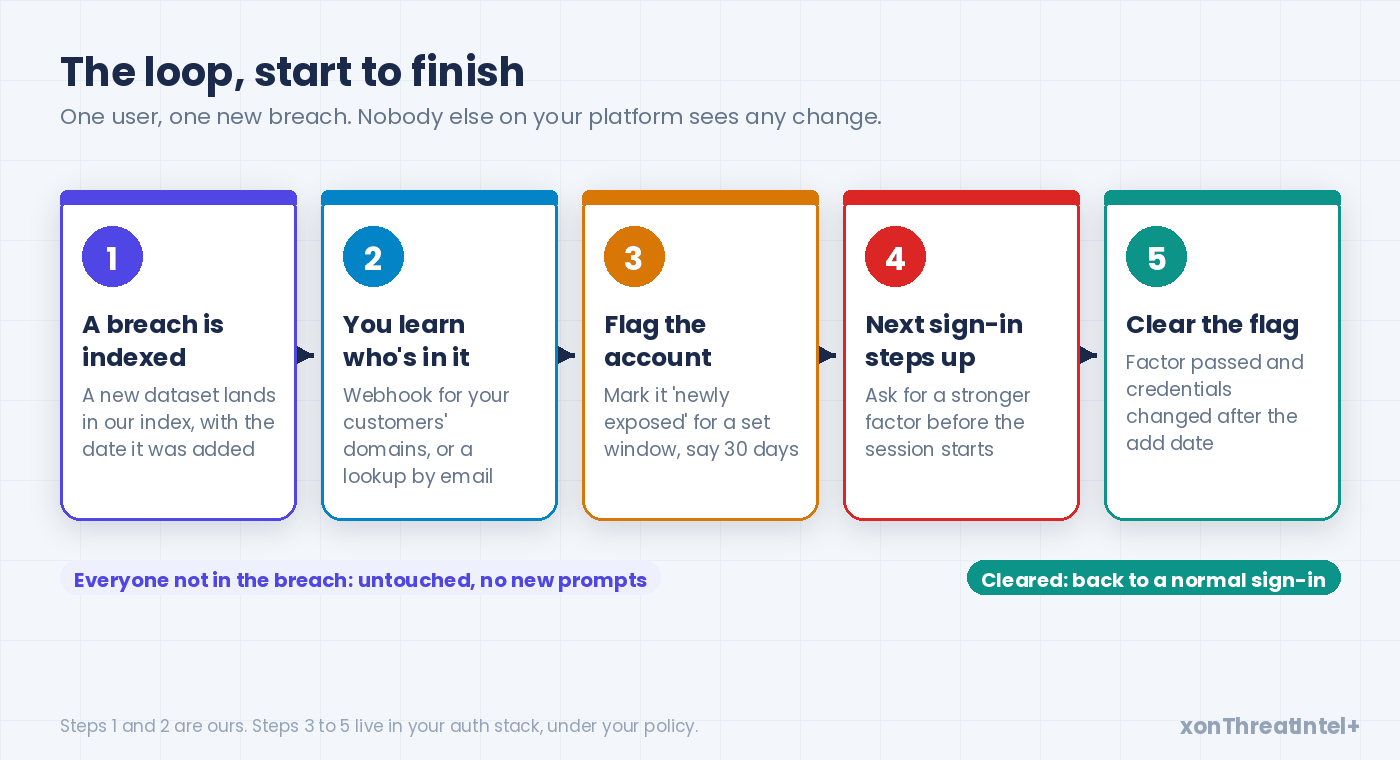
When a user's email address turns up in a newly indexed data breach, raise the risk on that one account and ask for a stronger check at its next sign-in.
Keep the flag for a set window. Clear it once the user passes a strong factor and changes their credentials. Everyone else signs in exactly as they did yesterday.
That's the whole idea, and it's cheap. Often it lands before an attacker's first try, instead of after the third failed one.
The short version
- One large study of 1.9 billion leaked usernames and passwords found the matching accounts were roughly 10 times likelier to be hijacked than a random account (ACM CCS 2017).
- Every challenge costs you. When Google challenged sign-ins it already found suspicious, 52% of the real users failed at first (WWW 2019). So challenge the exposed few.
- New exposure isn't rare, either. We added 149 breaches to our catalog in the 52 weeks to 28 September 2026, and only seven of those weeks passed without one.
What is step-up authentication?
Step-up authentication is simple to describe. You ask for more proof only when a sign-in (or something the user is about to do) looks riskier than usual. A normal login gets the normal flow, and a risky one gets an extra factor, a fresh check, or a block.
Most identity stacks already work this way. They weigh device, location, time of day and behaviour (that's the "adaptive" or "risk-based" part), then pick a response.
The standards allow for it, too. NIST SP 800-63B-4 says indicators of potential fraud "MAY be used to lower the risk of misauthentication" at every assurance level. And when fraud is suspected mid-session, the service "SHOULD" reauthenticate, end the session or notify support.
OWASP's credential stuffing cheat sheet lands in the same place. Ask for the second factor "only in specific circumstances where there is reason to suspect that the login attempt may not be legitimate."
So the machinery is there. What it usually lacks is a reason that shows up before the attacker does.
Why breach exposure belongs in your risk engine
Device and location signals fire when someone is already at your login page. Breach exposure fires earlier.
It tells you a user's email address (and often a lot more) has just gone into circulation. Often nobody has tried it on your platform yet. So you may still get the first move.
The research on what happens next is blunt. Thomas et al. , a Google and UC Berkeley team, matched 1.9 billion leaked usernames and passwords to Google accounts (ACM CCS 2017). Those accounts were "roughly 10x" likelier to be hijacked than a random Google user.
And across all the hijacked accounts in that study, the median user took 168 days to re-secure theirs. Half a year. Breaches without passwords are a weaker signal than that, which is why the policy further down weighs what leaked (the account takeover guide covers how a takeover starts).
Why would a breach at some other company become your problem? Reuse, mostly.
Das et al. (NDSS 2014) estimated that 43 to 51% of users reuse the same password across sites. OWASP's own definition of credential stuffing notes that the stolen usernames are "often email addresses", taken from "publicly available breach data dumps." So your users' email addresses are often half of every attempt.
And the attempts don't stop. Verizon's 2025 DBIR research looked at single sign-on logs. Credential stuffing made up a median 19% of all daily authentication attempts there, 25% at larger organisations, and 44% on the worst single day.
Verizon's 2026 report still has credential abuse on top. Count every point in an attack rather than the first step alone, and it turns up in 39% of breaches.
So for a platform team the reading is simple. A fresh breach tells you whose accounts are likeliest to turn up in that traffic next.
It's expensive when it lands. Javelin's 2026 Identity Fraud Study puts US account takeover losses above $15 billion for 2025, the costliest fraud type it tracks. Six million people were affected, and each spent 17 hours, on average, sorting it out.
The FBI's IC3 logged about 4,700 account takeover complaints and $359.7 million in reported losses in its 2025 report . Some of those hours end up as tickets on your support queue.
What we give you is the earlier signal. Which of your users just landed in a new breach, and what leaked with their email.
How often does "new exposure" actually happen?
More often than most teams expect. Every entry in our public breach catalog carries the date we added it, so the cadence is easy to see.
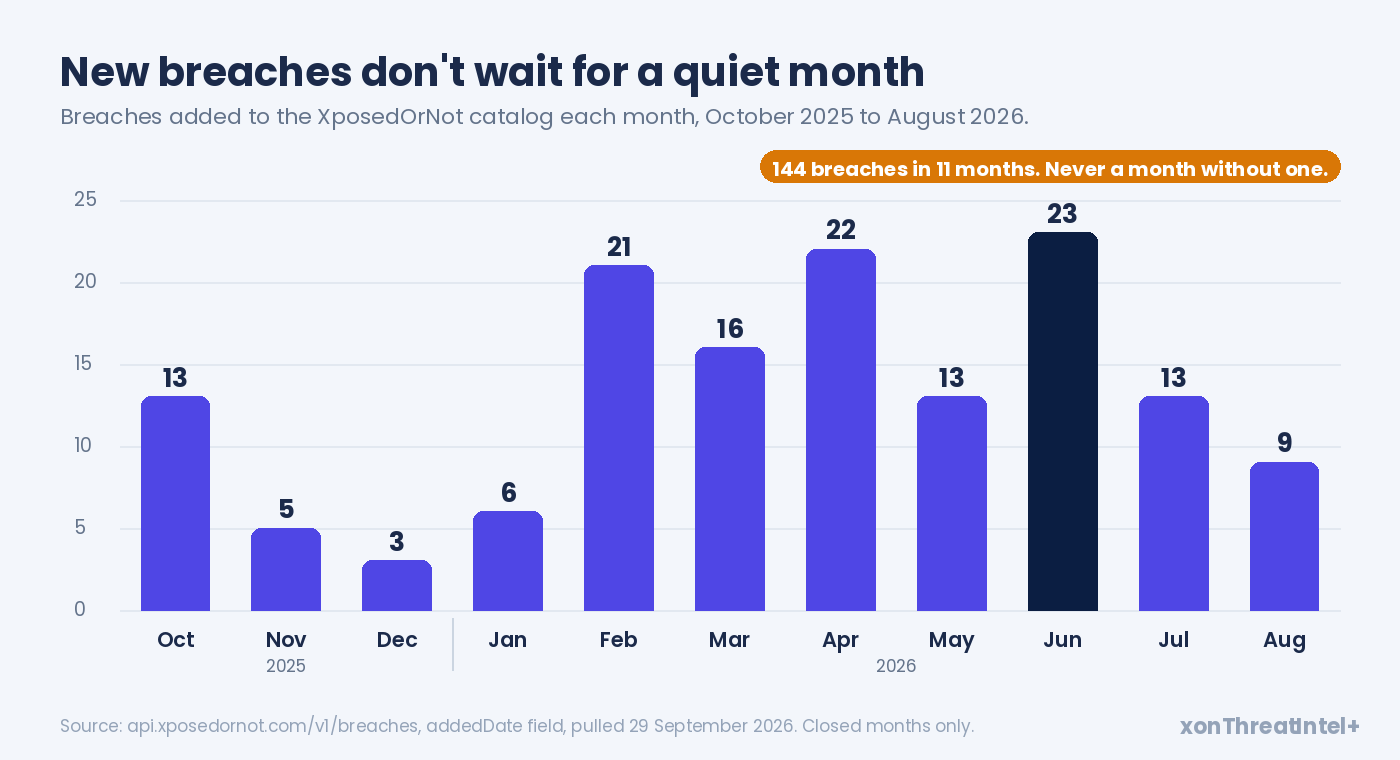
From October 2025 to August 2026 we added 144 breaches. Even the quietest month, December, brought three. June brought 23.
Stretch it to the full year to 28 September 2026 and you get 149 breaches, 1,178,129,424 records, and just seven weeks with nothing new. Records, not people: one address that sits in five breaches is counted five times.
There's a wrinkle, though. New to our index isn't always new to the world.
Of the 123 breaches we added between January and August 2026, 35 had happened more than a year before they reached us. The median gap was about two months. (Our breach disclosure lag analysis goes into why.)
Does an old breach stop mattering? Not really. The user may never have been told, and in our experience a breach that's just surfaced is often one that's just started circulating.
So treat the add date as the trigger. The breach date is one input to how hard you step up.
What leaked decides which check you ask for
From what we've seen, this is the part teams skip. A breach tells you more than "this user is exposed." It says what came out alongside the email, and that changes which factor you can still trust.
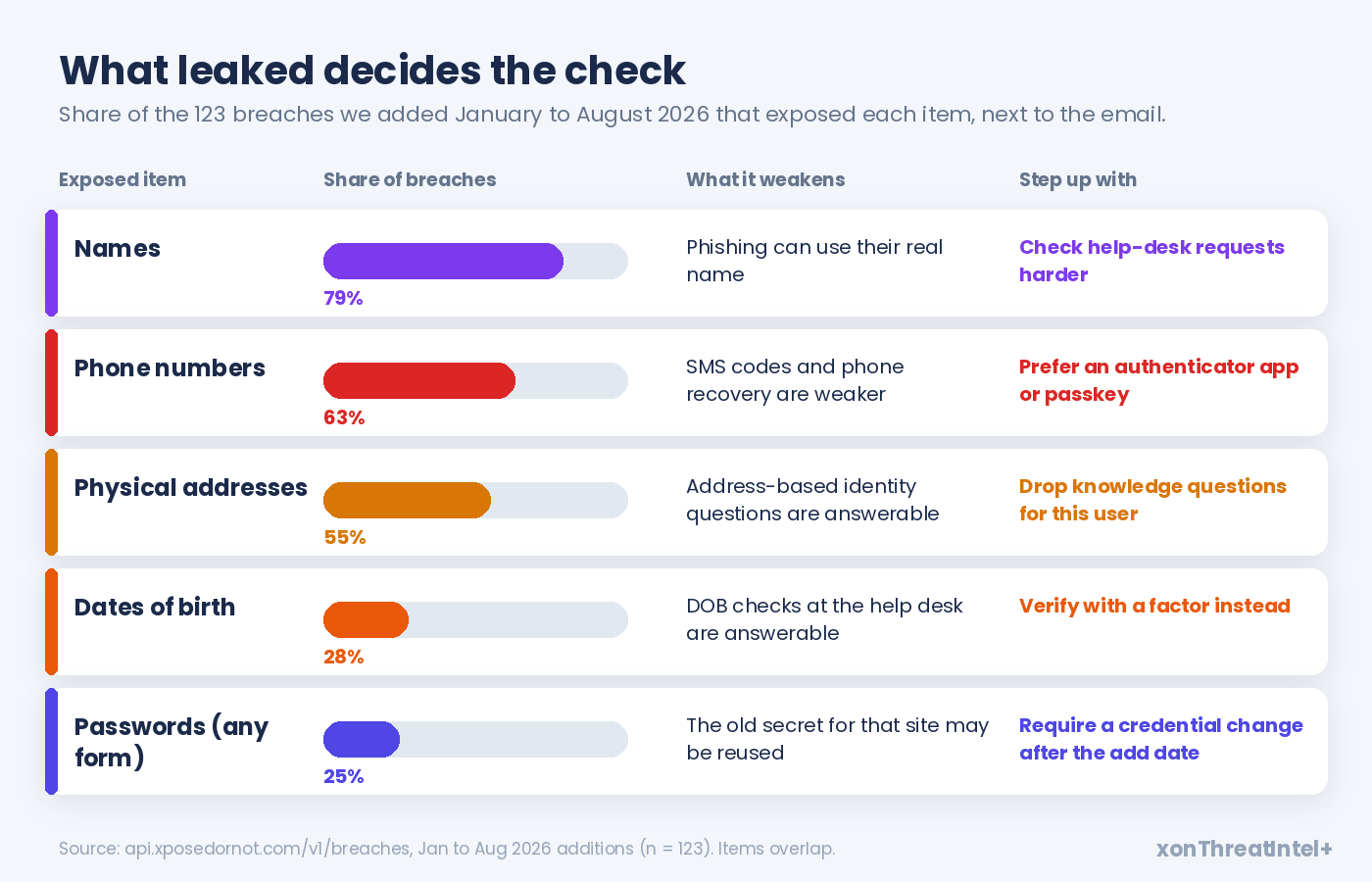
Every breach in our catalog includes email addresses, because that's what we match on (here's why email sits in all of them ). Across the 123 breaches we added from January to August 2026, this is what else came out:
| Exposed next to the email | Breaches | Share of 123 | What it makes weaker |
|---|---|---|---|
| Names | 97 | 79% | Phishing that uses their real name, help-desk social engineering |
| Phone numbers | 77 | 63% | SMS codes, phone-based recovery |
| Physical addresses | 68 | 55% | Knowledge-based questions |
| Dates of birth | 34 | 28% | Birth-date checks at support |
| Passwords, in any form | 31 | 25% | The old secret for that site, if it was reused |
Three in four of those breaches (92 of 123) exposed a phone number, a home address or a date of birth. Those are exactly the facts that security questions and a lot of recovery flows lean on.
So match the factor to the leak. A leaked phone number makes SMS the weak choice (Microsoft's own 2023 study , not peer reviewed, found SMS 40.8% less effective than an authenticator app).
Security questions are the next casualty once the address and birth date are out there. Doerfler et al. (Google, WWW 2019) found knowledge-based challenges stopped as few as 10% of takeover attempts that started with phishing.
Device-based checks are the ones to reach for. In the same Google research , on-device prompts helped block 100% of automated bots, 99% of bulk phishing and 90% of targeted attacks, while SMS codes fell to 76% against targeted attacks.
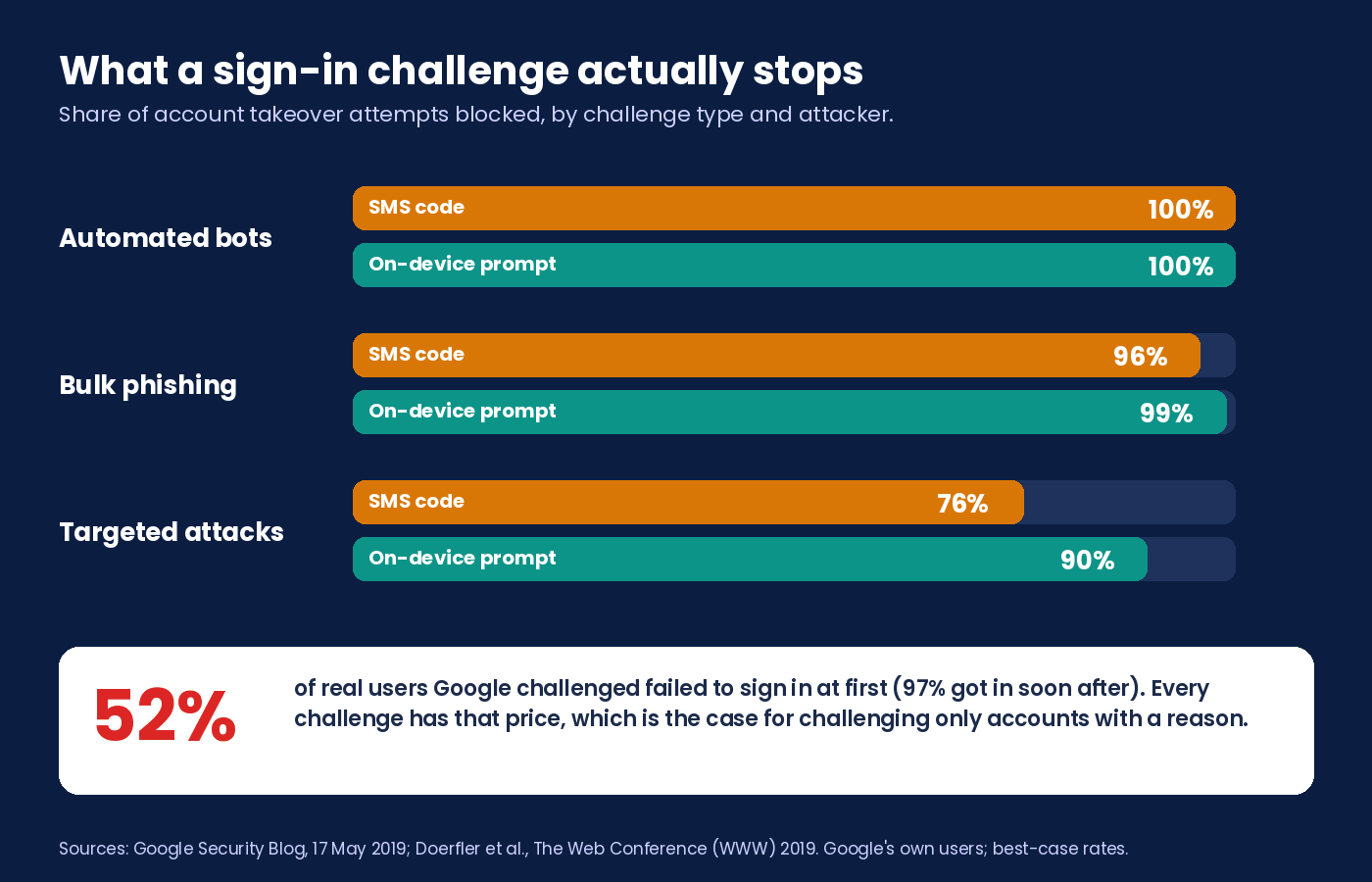
Those are Google's rates, on Google's users. Read them as a ceiling for your platform.
Why not challenge everyone?
Because the friction is real, and your users pay it on every login.
In Doerfler et al.'s study, Google challenged only sign-ins it already found suspicious, and 52% of the real users failed at first (97% got in soon after). A SOUPS 2019 usability study by Reese et al. timed sign-ins with each method: a median 11.8 seconds with a push prompt, 15.1 with an app code and 16.6 with SMS.
Targeted step-up avoids most of that. Wiefling et al. studied risk-based authentication on a live service with 3.3 million users and 31.3 million login attempts (ACM TOPS, 2022). It "rarely requests re-authentication in practice, even when blocking more than 99% of attacks" that used the user's own credentials.
There's a limit, and the same paper shows it. Tuned to block 99.5% of naive attackers, the system asked the average legitimate user to re-authenticate every second login.
That's where our exposure data earns its keep. It gives you one dated, factual reason to challenge one account, instead of a looser threshold for everybody.
Users seem to prefer it, for what it's worth. In a lab study at ACSAC 2020 , people rated risk-based checks as more usable than the 2FA variants tested, and about as secure.
A step-up policy you can ship
Here's the policy we'd start from. Tune the window and thresholds to your own risk appetite (think of it as a first draft).
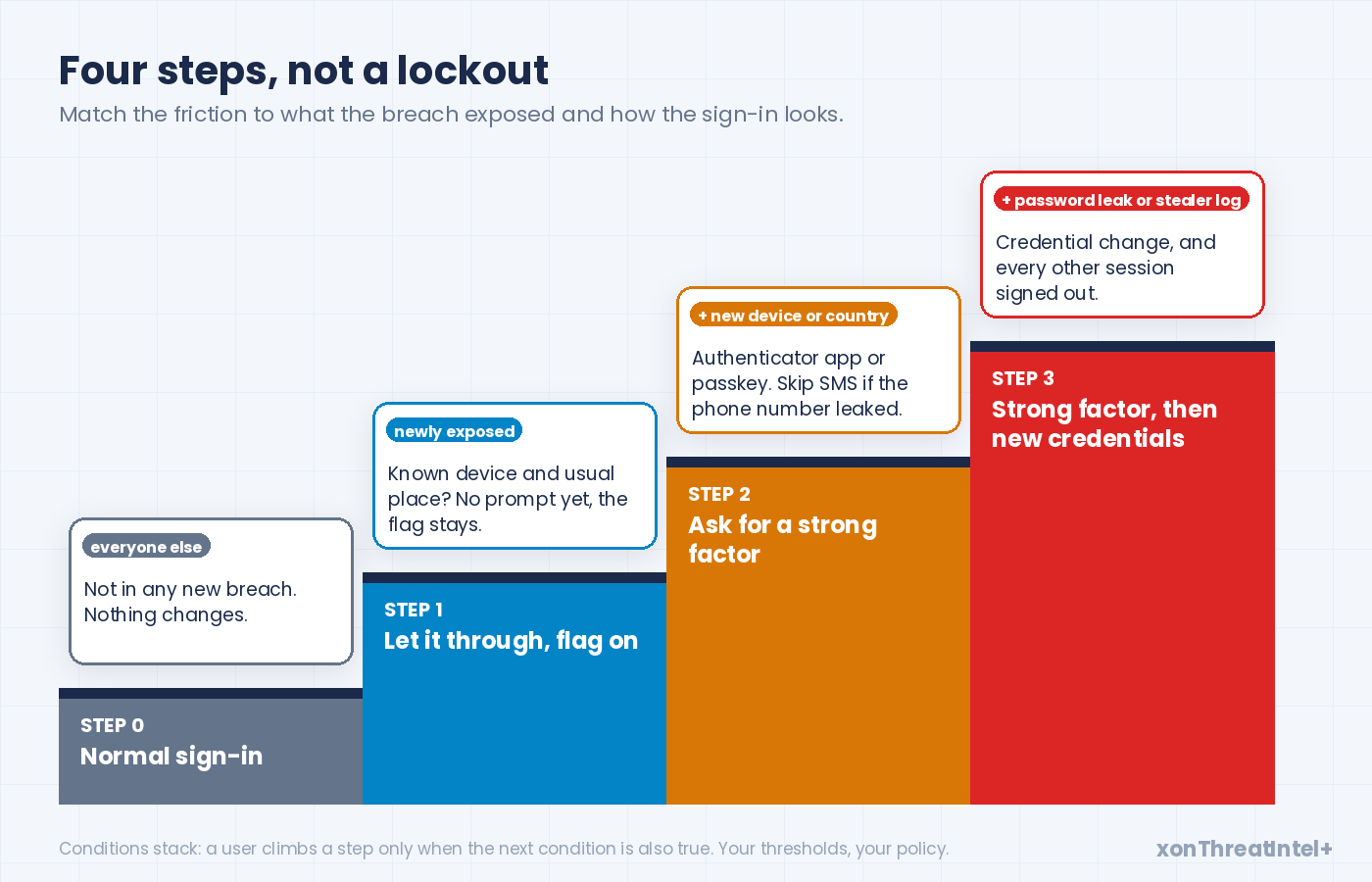
| What you know about the account and the sign-in | What you do |
|---|---|
| No new breach for this user | Normal sign-in |
| Newly exposed, known device, usual country | Let it through, keep the flag for the window |
| Newly exposed, new device or country | Strong factor: authenticator app or passkey, and not SMS if the phone number leaked |
| Newly exposed, passwords among the breach's data, or a stealer-log source | Strong factor, then a credential change and sign-out of every other session |
| Flagged user changes email, phone or payout details | Strong factor first, whatever the device |
The last row matters more than it looks. OWASP suggests step-up before "a high risk activity" (its examples are big payments and admin changes). A changed email or phone is how a takeover becomes permanent, so we'd treat it the same way.
A few details decide whether the policy helps or just annoys people.
How long should the flag last? Thirty days is a sensible default. A small honey-account study from UCL (ACM IMC 2016) found 80% of unique accesses to test accounts leaked on paste sites came within 25 days.
Clear on action. Drop the flag once the user passes a strong factor and has changed credentials after the breach's add date. If neither happens, let it lapse at the end of the window.
Weight what you know. A recent, verified breach with passwords among its data outranks a five-year-old dump of names and emails. Our breach records carry the breach date, the data types, the password storage label and a verified flag. Write the rule from those.
And say why. Your engine eats the facts and the user only sees a prompt, so give them one line (if you want them to see more, show them the breach itself, no score): "Your email appeared in a recently published data breach, so we're asking for an extra check."
Link that line to a page that explains what to do after a breach hit . A surprise prompt then reads like a favour.
Two ways to wire it
Where the "newly exposed" list comes from depends on whose email addresses your users sign in with.
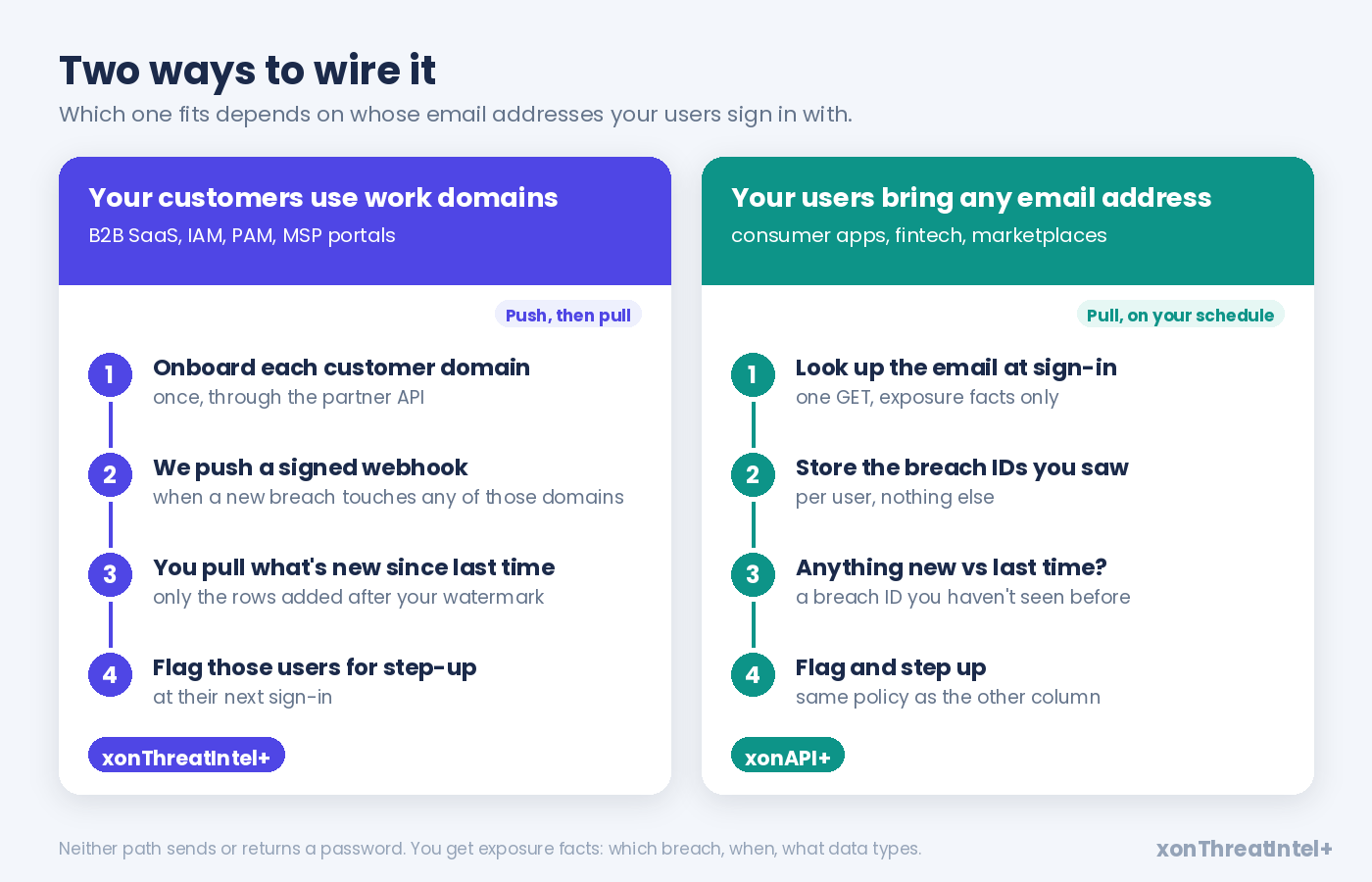
If your customers use their own work domains
Think B2B SaaS, identity and access platforms, password and privileged-access vaults, MSP portals. You onboard each customer's domain once through the xonThreatIntel+ partner API and register one webhook for your account.
When a new breach touching any of those domains goes into our index, we send a signed webhook (HMAC-SHA256, with a timestamp). It carries per-domain counts and a watermark, "never email-level data", by design. You then pull the rows added since that watermark and flag the matching users.
Two properties make this fit the policy above. The partner docs call the since-filter "gap-free by design", so as long as you keep your last watermark and pull from it, a missed webhook doesn't mean a missed breach.
And it filters on when we acquired the data: "an old breach acquired yesterday is a new finding." That's exactly the trigger you want.
If your users bring any email address
Consumer apps, fintech, marketplaces. There's no domain to onboard for a webmail address, so this path is a lookup.
Call the xonAPI+ check-email endpoint at sign-in, or on a schedule. Store the breach IDs you saw for that user, and flag anything new the next time round.
It's one GET per check, and the answer is exposure facts (breach, date, data types, password storage label), never a password or a raw record.
The product page puts the privacy side plainly: "Stateless lookups. We never store or log submitted emails."
If re-checking every user daily sounds wasteful, it is. Watch the add dates on our free breaches endpoint and re-check only when the catalog moves.
xonAPI+ plans run from 50 requests a minute (from $9 a month) up to 25,000 a minute, with no monthly cap. Match the plan to your peak sign-ins per minute. Or check only the sign-ins that already look a little off.
How do you know it's working?
Ship it with numbers, or you won't know which way to tune it. Log these from the first day:
- the step-up rate, overall and among flagged users
- how many flagged users completed the check, and how many gave up
- takeover reports and fraud losses in the flagged group against everyone else
- support tickets that mention the new prompt
- how long users stay flagged, and whether they clear by action or by expiry
Fewer takeovers among flagged accounts, with a flat step-up rate for everyone else? The policy's earning its place. If abandonment climbs, loosen step 1 before you touch steps 2 and 3.
Where xonThreatIntel+ and xonAPI+ fit
We supply the first two steps of the loop: the breach data, and the answer to "who's in it". Your auth stack keeps the rest, under your policy, and your customers keep their relationship with you.
That split is deliberate. As of 29 September 2026 our catalog holds 786 breaches and 11,626,309,365 records, every one with email addresses, 752 of them marked verified. We index data once it's public, and our data page says we "do not purchase stolen data, trade with threat actors, or commission breaches."
It already runs at this scale. Verosint, an identity threat detection platform, runs around 300,000 breach-history checks a day through our API. It passes that signal straight to its own clients, "flagging accounts that come back compromised at the point of access" (read the case study).
Selling to businesses on their own domains? That's xonThreatIntel+, with webhooks from the Growth plan ($243 a month for up to 25 domains, volume pricing past 50). Consumer platforms take the per-email route with xonAPI+, and the xonAPI+ quickstart gets you to a first call.
Not a platform? If you only care about your own organisation, free domain monitoring covers a domain you own. And anyone can check an email address on XposedOrNot in a few seconds.
Your first-sprint checklist
- Pick the path: work domains (webhook, then pull) or any email (lookup at sign-in)
- Add a "newly exposed until" date to the user record
- Map data types to factors: no SMS if the phone leaked, no security questions if the address or birth date did
- Set the window (30 days to start) and the rule that clears it
- Put step-up on email, phone and payout changes for flagged users
- Write the one-line explanation users see, and the help page behind it
- Log the five numbers above from day one
- Review after four weeks, and tune step 1 first
Quick answers
What is step-up authentication?
It's an extra check, like an authenticator app code or a passkey, that you only ask for when a sign-in or an action looks riskier than normal. Low-risk sign-ins go through with the usual flow. NIST SP 800-63B-4 allows fraud indicators to trigger these extra controls at every assurance level.
Should we force MFA on every user after a big breach?
Usually not. When Google challenged sign-ins it already found suspicious, 52% of the real users failed at first, so blanket prompts cost you real sign-ins. Step up only the accounts whose email appeared in the new breach, and only for a set window.
Is breach exposure enough to block a login on its own?
No. It's a reason to ask for more proof, not proof of an attack. Combine it with device, location and behaviour signals, and block only when several of them line up.
Do we need password data to do this?
No. The signal is that the user's email address appeared in a newly indexed breach, plus what else that breach exposed. Our APIs return exposure facts (breach, date, data types, password storage label) and never a password.
Where the numbers came from
- Catalog figures (786 breaches, 11,626,309,365 records, 752 verified, every breach with email addresses; 149 breaches and 1,178,129,424 records added in the 52 weeks from 30 September 2025 to 28 September 2026, with additions in 45 of those weeks; 144 added October 2025 to August 2026; the January to August 2026 cohort of 123 breaches, its data types and its add-date gaps): the public endpoint api.xposedornot.com/v1/breaches , fields addedDate, breachedDate, exposedData, exposedRecords and verified, pulled 29 September 2026. Records, not people.
- 1.9 billion credentials, "roughly 10x" hijack likelihood, 168 days to re-secure: Thomas et al., "Data Breaches, Phishing, or Malware? Understanding the Risks of Stolen Credentials" , ACM CCS, October 2017.
- 52% and 97%, knowledge-based "as few as 10%": Doerfler et al., "Evaluating Login Challenges as a Defense Against Account Takeover" , The Web Conference (WWW), May 2019.
- Block rates by challenge type (100/96/76 and 100/99/90): Google Online Security Blog , 17 May 2019.
- 80% of unique accesses within 25 days: Onaolapo, Mariconti and Stringhini, "What Happens After You Are Pwnd" , ACM IMC, November 2016.
- 43 to 51% reuse: Das et al., "The Tangled Web of Password Reuse" , NDSS, February 2014.
- 3.3 million users, 31.3 million logins, "rarely requests re-authentication", the 99.5% trade-off: Wiefling et al., "Pump Up Password Security!" , ACM Transactions on Privacy and Security, November 2022.
- Risk-based checks rated more usable than 2FA: Wiefling, Dürmuth and Lo Iacono, "More Than Just Good Passwords?" , ACSAC, December 2020.
- SMS 40.8% less effective than an authenticator app: Meyer et al., "How effective is multifactor authentication at deterring cyberattacks?" , Microsoft, May 2023 (not peer reviewed).
- 11.8, 15.1 and 16.6 seconds: Reese et al., "A Usability Study of Five Two-Factor Authentication Methods" , SOUPS, August 2019.
- 19%, 25% and 44% of authentication attempts: Verizon, "Additional 2025 DBIR research on credential stuffing" , 2025.
- 39% credential abuse at any point: Verizon 2026 Data Breach Investigations Report , May 2026, p.16.
- Over $15 billion, 6 million people, 17 hours: Javelin Strategy & Research, 2026 Identity Fraud Study , April 2026 (US).
- About 4,700 complaints and $359.7 million: FBI IC3, 2025 Internet Crime Report , April 2026, p.12.
- "MAY be used", "SHOULD" reauthenticate: NIST SP 800-63B-4 , sections 2 and 5.3, July 2025.
- "often email addresses", "publicly available breach data dumps": OWASP, OAT-008 Credential Stuffing .
- "reason to suspect", "a high risk activity": OWASP, Credential Stuffing Prevention Cheat Sheet , read September 2026.
- Webhook, watermark and since-filter wording: xonThreatIntel+ partner docs , read 29 September 2026. Plans and webhook tier: plus.xposedornot.com/products/threat-intel/integrate, same day.
- "Stateless lookups", xonAPI+ plan limits and prices: plus.xposedornot.com/products/api, read 29 September 2026.
- Verosint figures and quote: Verosint case study, read 29 September 2026. Data sourcing wording: plus.xposedornot.com/our-data, same day.