xonThreatIntel+ Is Now an MCP Server for AI Agents: Eight Tools, One Key
We've just shipped an MCP server. The hardest decision in the whole build was which operation to leave out.
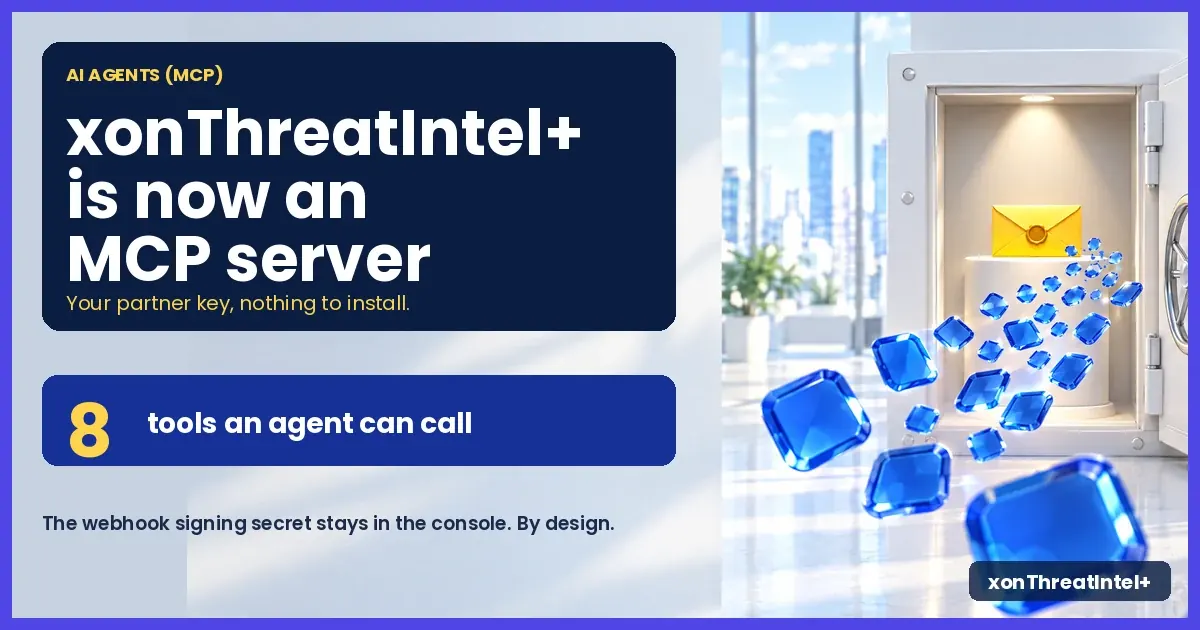
Everything else was mechanical: xonThreatIntel+ now answers at https://plus-api.xposedornot.com/mcp, a hosted Model Context Protocol server. Point Claude Code, Cursor or Cline at it with the partner key you already hold. The agent gets eight tools: the operations your scripts already call over REST, limited and metered exactly as before.
Nothing to install. Nothing to run. One header.
So what did we leave out, and why? Start there, because it's the question to ask of any MCP server you connect to an account that matters.
(For anyone new here: XposedOrNot runs the public breach index, and xonThreatIntel+ is the partner product on top of it, for MSSPs and platforms that watch domains that aren't their own. The free side has had its own MCP server since October 2025, six tools and no key. This is the paid one.)
What is MCP, and why should an MSSP care?
The Model Context Protocol is the open standard AI assistants use to call outside tools. A client such as Claude Code connects to a server, asks what tools it has, and the model decides when to call one. Each tool carries a name, a description written for the model, and a schema for its arguments.
That's all the protocol is, and it's simple on purpose.
Why should an MSSP care? Because your analysts already live in these clients, and an MCP server turns "open the console, find the client, read the summary" into one sentence typed where the work already happens.
And because the agent calls the real API on your real account, what it can and can't do is worth a close read first.
Which tools does a partner key get?
Eight. This is the list the model sees when you connect with an xonThreatIntel+ key.
| Tool | What it does |
|---|---|
check_email | Breaches an email address appears in (detailed and analytics are opt-in) |
partner_domain_summary | Breach summary for one of your approved domains; details=true pages the matched addresses |
partner_list_domains | Your submitted domains with status, cursor-paged |
partner_quota | Domain slots used and available |
partner_batch_status | Progress of a bulk submission |
partner_submit_domain | Add one domain to your portfolio (confirm: true required) |
partner_submit_domains | Add a list of domains in one call, the bulk upload without a file (confirm: true required) |
partner_delete_domain | Remove a domain from your portfolio (confirm: true required) |
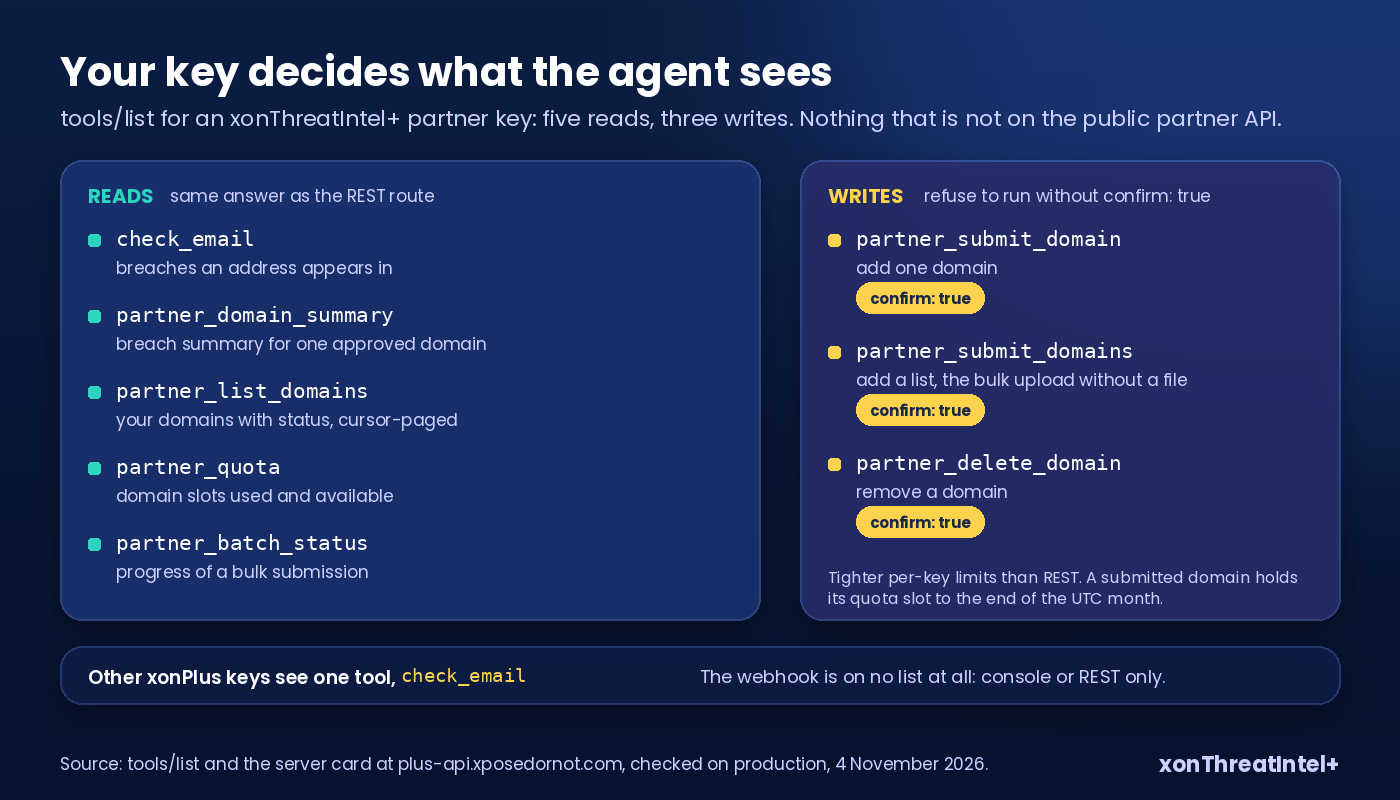
The rule for what made the list: one tool for every operation in the public REST documentation, and nothing else (one exception, below). Console routes, billing and two-factor flows aren't on the public API, so they aren't tools. If you can't find it in the API reference, an agent can't call it either.
tools/list is filtered by key. Other xonPlus keys see check_email alone, so a model is never shown a tool it can't call and never burns a turn finding that out.
The one operation we refused to expose
The threat-intel webhook. It's a documented partner operation, and it's the one that didn't make it.
Registering a webhook, or rotating its secret, returns the HMAC signing secret your endpoint uses to check that a delivery really came from us.
Over REST that secret travels from our server to your code and stops there. Over MCP it would travel from our server to the agent host, into the model's context and possibly into the provider's logs. And then into the chat transcript somebody pastes into a ticket three weeks later.
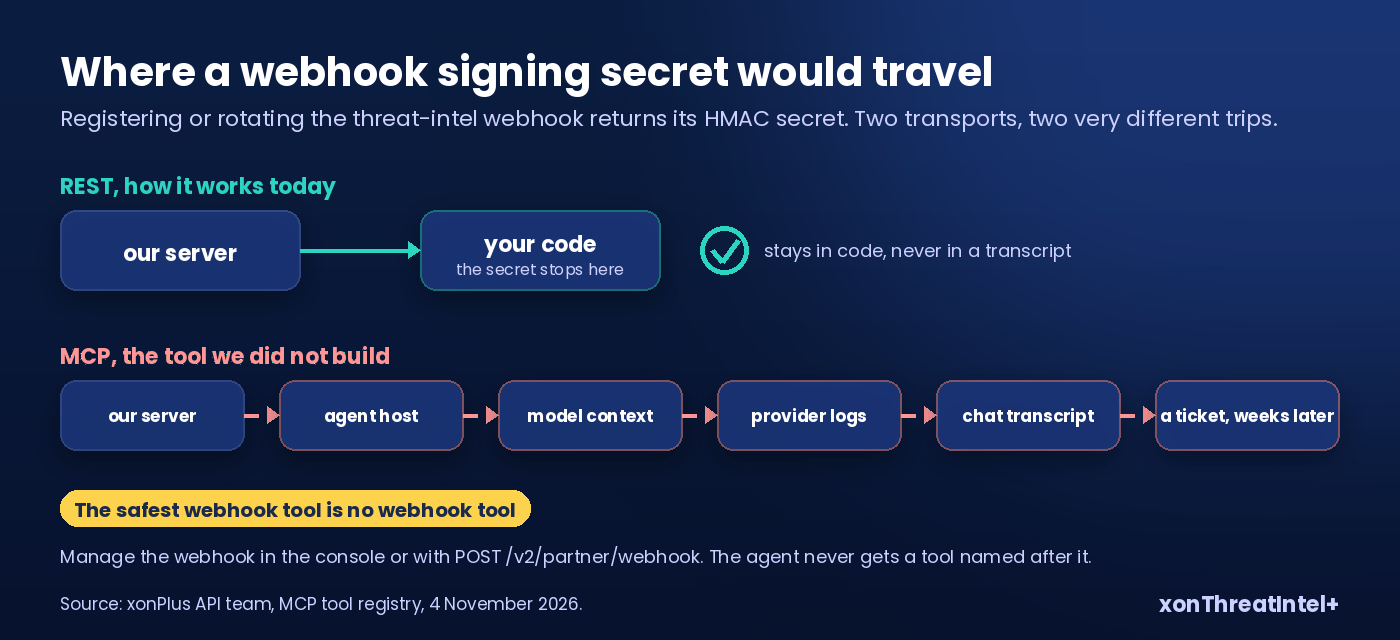
We did consider a trimmed tool: verify, delete, read the config, nothing that returns the secret. We dropped the idea. A tool named after the webhook invites the model to try the setup action, get refused, and ask the user to "just paste the secret here".
The safest webhook tool is no webhook tool. So it stays in the console and on POST /v2/partner/webhook, where the secret lands in code. (How the webhook is signed, and how since and as_of pair up, is in what "real time" means in a breach API.)
Look at what each tool hands back, then at what it does. That's the standard we'd hold any MCP server to, ours included.
One key, every request
The server takes one credential: your xonThreatIntel+ partner key in the x-api-key header. Every request needs it, the initialize handshake and tools/list included. No sign-in dance, no second credential made for agents, no bearer alias.
That narrowing is deliberate. The partner API documents one way to authenticate, so the MCP server accepts exactly that one.
A key that works in curl works in your agent, and a key you revoke in the console dies in both at the same instant.
One recommendation on top: create a dedicated key for each agent. The key you hand an agent carries the full power of the partner API on your account. Give it a key of its own and you can revoke the agent without touching the integration that feeds your SIEM.
Built inside the API, not beside it
Most MCP servers are a second implementation: a wrapper that calls the REST endpoints over HTTP and reshapes the answers. Two implementations drift, in our experience. The wrapper misses a new parameter, applies a different limit, returns a slightly different error, and nobody notices until an agent does something odd.
Ours isn't a wrapper. The MCP endpoint lives inside the same FastAPI application as the REST API and dispatches in-process into the same route handlers. When an agent calls partner_quota, the code that runs is the code behind GET /v2/partner/quota, with the same validator, the same rate limiter and the same usage meter. (The route side of that path is the one we walked in how our breach check works.)
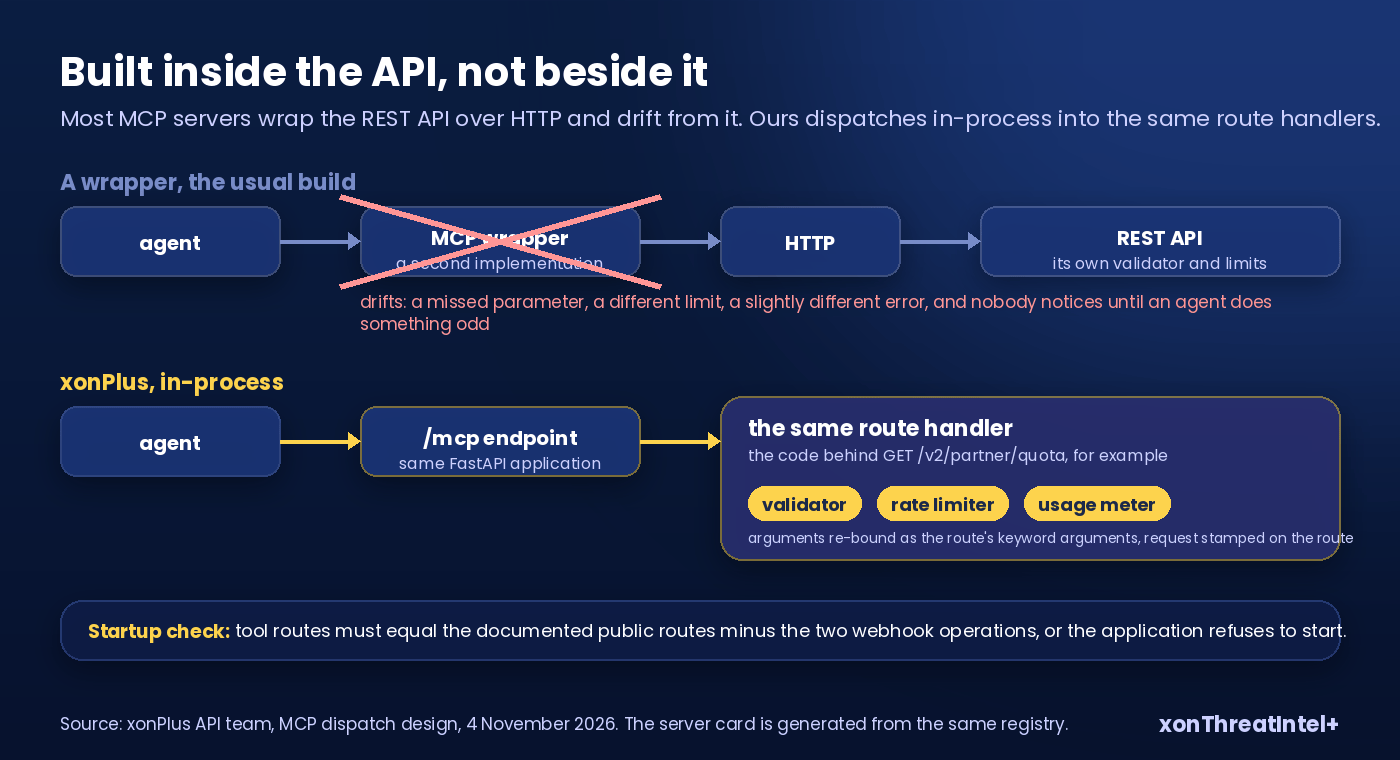
The tool layer does three things and nothing more.
It takes the agent's arguments and binds them to the route the way FastAPI would on an HTTP call (types, ranges, enums, maximum lengths). It stamps the request so the limiter and the meter count it as a call on that route. And then it hands the route's answer back as an MCP result.
Because the dispatch is in-process, the server can check itself at startup. It asserts that the set of tool routes equals the set of documented public routes minus the two webhook operations. Add a public route without a tool, or a tool on a route that isn't public, and the application refuses to start.
The server card is generated from the same registry, so what we advertise and what we serve are one object.
Errors follow the same rule. Say the REST route would have answered 403, or 409, or 429. The tool answers with an isError result carrying that status and message, word for word, and the model reads it and corrects course.
Hit a rate limit and the result tells you how long to wait, as retry_after in seconds. Only protocol problems (malformed JSON, an unknown method, an unknown tool, a missing key) are JSON-RPC errors.
Agents loop faster than people
An analyst submitting domains clicks a button a few times a minute. An agent that misreads an instruction can submit a thousand domains in the time it takes you to look up from your coffee. Three things stop that.
Every write needs confirm: true. The three tools that change your portfolio refuse to run without that flag in the call. Agent hosts show tool arguments before the call runs (unless you've switched that prompt off), so a model acting on a loose instruction can't add or delete a domain without the flag visibly set.
And submitting counts as a write. An accepted domain holds its quota slot until the end of the UTC month even if it's deleted a minute later, and the tool annotations say so (destructiveHint: true).
Writes have their own, tighter limits. The REST routes are paced for humans and scripts, and the MCP tools sit well under them:
| Tool | MCP per-key limit | REST route limit |
|---|---|---|
partner_submit_domain | 2/s, 30/h, 100/d | 10/s, 100/h, 500/d |
partner_submit_domains | 1/s, 10/h, 30/d | 5/s, 50/h, 200/d |
partner_delete_domain | 2/s, 30/h, 100/d | 5/s, 100/h, 300/d |
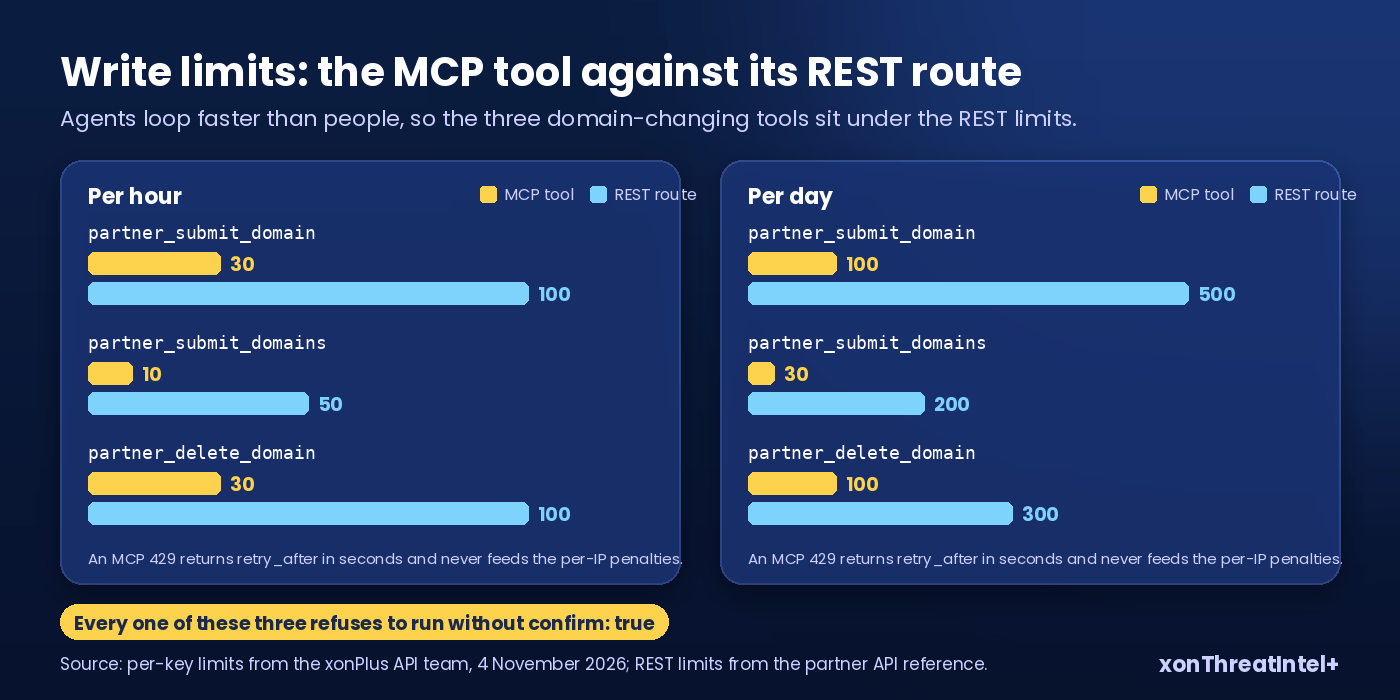
An MCP 429 is a clean retry_after. It doesn't feed the per-IP penalties that guard the public endpoints, because hosted agents share egress addresses, and one noisy agent shouldn't lock out everyone else coming from the same host.
Defaults fit a tool call. The REST domain summary can stream a whole domain in one chunked response. The tool always pages: a thousand rows by default, resumable with next_cursor, because a model paying per token shouldn't receive ten thousand rows it never asked for. The domain list defaults to a hundred rows, five hundred at most, and the descriptions tell the model how to page and never to guess page numbers.
The tool descriptions are the product
Nobody sees the descriptions in a demo. The model reads them to decide when to call a tool and how. So ours are written as instructions to a careful operator: which key the tool needs, what one call costs against the limit, how to page, when the heavier response shapes are worth asking for, and what a wrong-tenant error looks like.
Two lines worth quoting. check_email says a malformed address returns a not-found result and that passwords are never returned, so the model doesn't retry a typo five times or promise something the API will never give. And partner_submit_domain says "check partner_quota first and submit only domains the user named", which is the sentence that stops a model from helpfully adding every subdomain it noticed in a report.
With the confirm flag on top, the account owner decides what spends a slot. The model only asks.
How do I connect xonThreatIntel+ to Claude Code or Cursor?
Three ways in, all pointing at the same URL. Claude Code first, one command:
claude mcp add --transport http xonplus https://plus-api.xposedornot.com/mcp \
  --header "x-api-key: YOUR_PARTNER_KEY"
Cursor wants a file instead. Drop the block below into .cursor/mcp.json if it's for one project, or into ~/.cursor/mcp.json when you'd rather carry it to every project you open:
{
  "mcpServers": {
    "xonplus": {
      "url": "https://plus-api.xposedornot.com/mcp",
      "headers": { "x-api-key": "YOUR_PARTNER_KEY" }
    }
  }
}
Using something else? Every MCP client we've tried has the same three boxes somewhere in its settings. Transport (pick Streamable HTTP), URL (that one), and a custom header, where x-api-key and your key go.
Clients that can't send a custom header (some hosted connector UIs) can't authenticate to xonPlus today, so use a desktop or CLI client. The Cline block and the full tool reference are on the AI agents docs page .
No client handy? curl works too:
curl -X POST https://plus-api.xposedornot.com/mcp \
  -H "Content-Type: application/json" \
  -H "x-api-key: YOUR_PARTNER_KEY" \
  -d '{"jsonrpc":"2.0","id":1,"method":"tools/list"}'
With a partner key you'll see all eight tools come back. Leave the header off and you won't, you'll get a 401. (We checked on 4 November 2026, against production: the server card advertises eight tools, a keyless POST gets a 401 and a plain GET a 405.)
Three things an MSSP can ask it
What this looks like from a chat window, and the calls underneath each one.
Morning triage. "Which of our client domains got new breach records since yesterday?" The agent calls partner_list_domains, then partner_domain_summary with since set to yesterday's as_of for each domain, and summarises. Each page is one request against the key, the same as if a script had done it. The difference is that nobody had to write the script.
Onboarding a client. "Add these twelve domains from the signed order." The agent calls partner_quota, tells you how many slots are free, and asks before calling partner_submit_domains with confirm: true on the ones that fit. The rest wait for next month or a plan change, and nothing is submitted without you seeing the list and the flag. (One account, one quota, the domain as the unit: the model we laid out in 50 clients, one integration.)
Incident lookup. An analyst has an address on screen mid-investigation and wants to know if it's exposed. One question, and check_email with detailed=true brings back the breaches, their dates and what each one leaked, without anyone leaving the window the case is in. The answer is the API's answer, and it costs one request on the same key.
When something looks wrong
Every tool call is metered on the route it dispatched to, so the agent's calls land in your usage view with your REST calls on that route. When an agent runs into a rate limit it gets retry_after, and a well-behaved one waits. A badly behaved one still can't do much, because the key's own limits hold whatever the model's patience does.
A 403 on a domain means it isn't in your portfolio, while a 409 on a submit only means it was already there, so the retry did no harm. A tools/list shorter than eight means the key isn't a partner key.
The errors are the REST errors because the code is the REST code.
Quick answers
Is the MCP server a separate product or plan?
No. Every xonThreatIntel+ plan includes API access, and the MCP server uses that same key. Calls count against the same rate limits and usage.
Does it run on my machine?
No, we host it at plus-api.xposedornot.com/mcp. Your client sends your key in the x-api-key header over HTTPS, and that's it, nothing on your side to install and nothing to keep patched.
Can an agent change my webhook?
No. Registering or rotating it returns the signing secret, which should never pass through an agent or a chat transcript. So the webhook stays in the console and on REST.
Can an agent delete my domains?
Only if the call carries confirm: true, which your client shows you before it runs (keep that prompt on), and only within the tool's own limit of thirty deletions an hour. A deleted domain's quota slot stays used until the end of the UTC month.
What data leaves my account?
Whatever the tool returns: breach identifiers, and with details=true the matched addresses, delivered to the agent host you connected, like any other client of the REST API. Choose the host with that in mind, and give the agent a key you can revoke on its own.
Try it
If you hold an xonThreatIntel+ key, the claude mcp add line above is all the setup there is.
If you don't, xonThreatIntel+ for MSSPs starts at $99 a month for 10 domains, flat monthly, no per-user fees, and the API key comes with every plan. Your own domain? That stays free at xposedornot.com/domain .
Appendix: links and sources
- AI agents (MCP) docs page, with the Cline block and the per-key tool table: console.xposedornot.com/docs/common/ai-agents
- Server card, generated from the live tool registry: plus-api.xposedornot.com/.well-known/mcp/server-card.json
- Model Context Protocol specification and transports: modelcontextprotocol.io
- Production checks quoted above (eight tools on the card,
x-api-keyauth, protocol versions 2025-06-18 and 2025-03-26, GET 405, keyless POST 401): run by us on 4 November 2026 - Earlier posts: how our breach check works (in-process path), what "real time" means in a breach API (webhook signing,
sinceandas_of), 50 clients, one integration (one account, one quota, the domain as the unit) - The free MCP server on the community side, six tools, no key: xposedornot.com/mcp