
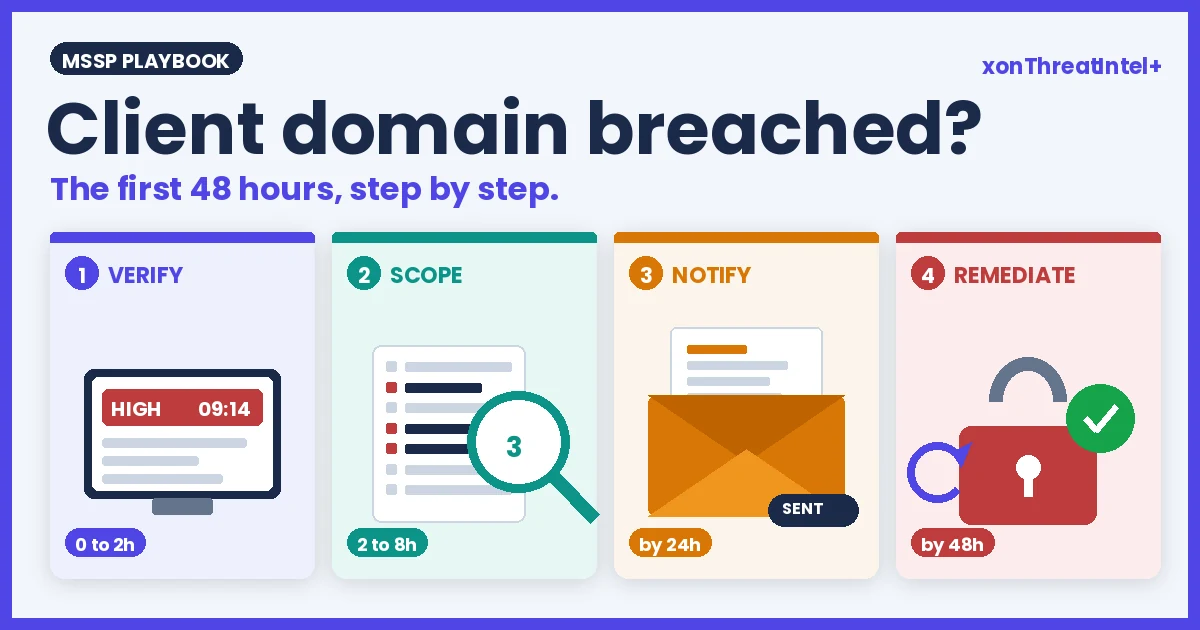
Client Domain Breached? The MSSP's First 48 Hours, Step by Step
Tuesday, 09:14. An alert lands: one of your client domains, 212 exposed addresses, a breach name you half recognise, severity High.
The client's phone will ring before yours does. What you do between now and Thursday morning decides whether this is a service they're glad they pay for or the reason they start shopping.
Here's the whole playbook in one breath. Verify that the alert is real and that it's new to this client. Scope it: how many addresses, whose, which data, and how any password was stored.
Tell the client in their own words before the day's out. Then fix the handful of things that actually change anything, and write down what you did.
Four moves. Most of the 48 hours goes on waiting for other people to reply. In our experience the work itself is closer to six hours than two days.
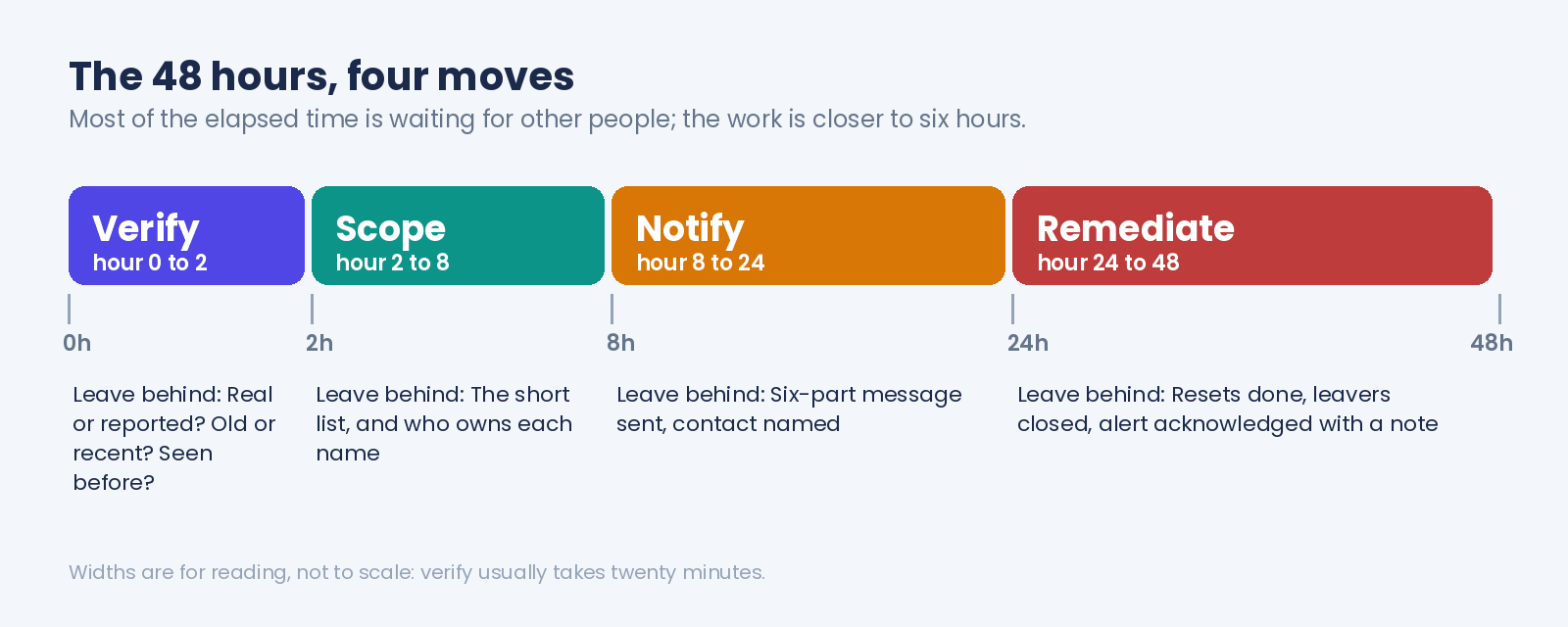
We'll go through each move with what to look at, what to skip, and the one number per step that saves you from overreacting. (Underreacting is rarer, in our experience. Alerts make people jump.)
Is it real, and is it new? (hours 0 to 2)
Two different questions, and people run them together.
Real first. Open the catalog entry behind the alert and read four fields: the breach date, the date it entered the index, the verified flag, and the data classes. Every entry in our public catalog carries all four (the open API returns them as breachedDate, addedDate, verified and exposedData), and you don't need an account to read them.
As of 23 September 2026 the catalog holds 783 breaches, and 749 of them are marked verified. The other 34 aren't, and we leave them visible with the flag set to false.
So if the alert comes from one of those, your notification says so. "Reported, not yet confirmed" is a sentence a client can live with. Finding out later that you dressed up a rumour as a fact isn't.
Then new. New to whom?
The alert fires when a breach enters our index and contains addresses from the client's domain. That's the ingestion clock, and it has very little to do with when the breach happened:
| The 783 breaches in the catalog, by age on 23 September 2026 | |
|---|---|
| Breached more than a year ago | 694 (89%) |
| More than three years ago | 608 (78%) |
| More than five years ago | 524 (67%) |
| More than ten years ago | 223 (28%) |
| Median age of an entry | about 6.8 years |
Two thirds of what we hold happened more than five years ago. So, more often than not, what's on your screen is an old breach that's only just surfaced.
Harmless? No, a password from 2019 still opens a mailbox in 2026 if nobody changed it. But it does change the first sentence you'll write to the client.
Then there's the question of whether the client's seen this one before. Same breach, previous vendor, or a report you sent them last quarter. The domain breach-health report lists the biggest breaches on the domain with their dates, and the console holds the rest, so a quick scan answers it.
Two hours is generous for this step. Twenty minutes, usually. The rest of the window is there in case the breach is in the news and you need to read the primary reporting before anyone asks you about it.
How bad is it, really? (hours 2 to 8)
Scoping comes down to four questions. Ask them in this order, since each answer shrinks the list the next one has to work through.
How many? The alert count is unique addresses, so 212 means 212 people, mailboxes or aliases. If you export the detail rows you'll see more lines than that, one per address per breach, so someone sitting in three breaches shows up three times.
Count who's affected from the address total. Count the work from the rows.
Whose? Match the exposed list to the client's directory and expect three kinds of surprise: people who left years ago but were on the company address when the breach happened, shared inboxes nobody owns on paper, and the odd service account from 2017. In our experience the leavers outnumber everyone else.
The domain summary and the report CSV also label executive addresses (C-suite, VP, director, where the enrichment has found a title), and any of those goes to the top of the list whatever its age.
What data? Read the data classes on the entry, not the breach name. Of our 783 breaches, 516 expose passwords, 277 expose phone numbers, 220 physical addresses.
A breach with emails and names only is a phishing-risk conversation. A breach with passwords is an account-takeover conversation, and the two get written up differently.
How was the password stored? This is the question that sets the urgency, and it's the one first-timers skip. Every password-leaking entry carries a storage label:
| Password storage across the 516 password-exposing breaches | |
|---|---|
| Plaintext | 83 |
| Easy to crack (weak or unsalted hashing) | 206 |
| Hard to crack | 153 |
| Unknown | 74 |
Plaintext needs no explaining: the password sits in the dump as typed. Easy to crack means weak or unsalted hashing, the kind an ordinary GPU rig gets through, so treat it the same way. Together that's 289 of the 516, so when a password breach lands on a client domain, the odds are it's one of the urgent kind.
(We never see, store or return the password itself; the label describes the breach, not the person. The longer analysis of storage practice is on the community blog if the client's IT lead wants the background.)
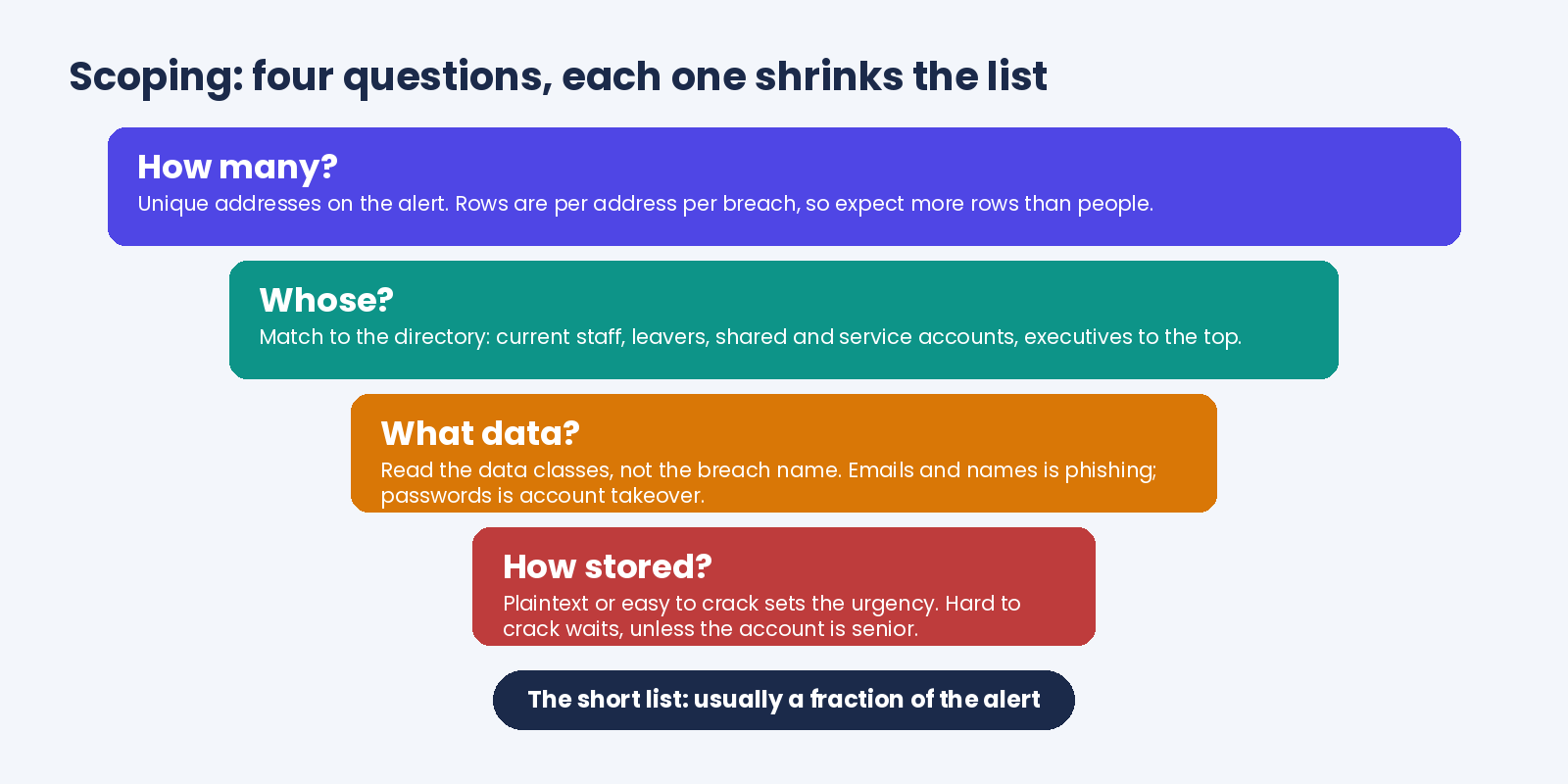
By the end of this step you've got a short list. Active accounts, in a password breach, stored plaintext or easy, plus anyone senior. In our experience it's a fraction of the alert count, and on a quiet domain it can be a handful.
One caution about severity: the console badges alerts Critical, High, Medium or Low, and the domain's risk tile is driven by breach count (Low at zero, Medium at one to four, High at five to fourteen, Critical from fifteen). Useful for sorting a queue, not a substitute for the four questions.
A "High" domain with a dozen ancient breaches and no active accounts is calmer than a "Medium" one with the CFO in a plaintext dump from March.
What do you tell the client, and when? (before hour 24)
Before they hear it from someone else. If the breach is in the news, that means today, and by phone; email is for the routine ones.
The message is six things, in this order, in words the client's office manager would use. What happened: a third-party site they or their staff had accounts on was breached, and their own systems weren't. When: the breach date, and the fact it only surfaced now.
What of theirs: how many addresses, how many of them current staff, whether passwords were included and how they were stored. What you've done since the alert.
What they need to do, which is usually the short list from the previous step plus a sentence about MFA. And when they'll hear from you next.
Lines to cut before sending? "Hacked", when the client's own systems weren't touched. "Your data was stolen", when a third party lost it.
Any raw count of records from the breach as a whole goes too; it reads like a headline and has nothing to do with them. Everything else in the script we published for the dark web question still applies here, especially the bit about not selling in the same email.
A worked example, trimmed to the shape:
Earlier this morning a 2019 breach reached our index. A recruitment site lost its user database back on 12 March 2019, and 212 of the addresses in it are at yourcompany.com: 23 current staff, 186 people who've since left, and 3 shared mailboxes. Passwords were in there too, stored unhashed, so treat them as known.
We've listed the 23 current accounts and the 3 mailboxes for your IT contact, and we recommend resetting those today and confirming MFA is on for every one of them. Nothing on your own systems was breached. We'll send the confirmation list back by Thursday.
Six sentences. Nobody on their side has to look anything up to understand it, and the one action they own is in there.
What actually changes anything? (hours 24 to 48)
Less than the alert made it feel like. In rough order:
- Reset the short list. Active accounts in a plaintext or easy-to-crack breach, and every senior address whatever the label. Do it from a clean device, and have the client confirm MFA on those accounts while they're in there.
- Close the leavers. Each one is a login nobody's watching, and there are usually more of them than anything else on the list. Deprovision what still exists; note what already went.
- Give the shared mailboxes a named owner, a person rather than a department. "IT" isn't an owner.
- Tell whoever runs the client's mail filter and identity provider. A known-exposed list of addresses is exactly what they want for a few weeks of extra attention on new-device logins and password-reset emails to those users.
- Write one line about what was decided, in your ticket or the client's file, then acknowledge the alert. On the console the acknowledgement is timestamped for the audit trail, so the timestamp and your line together are the answer when the client's auditor asks in November what happened with the March one.
That's it. No scanning the client's endpoints, no forensic engagement, no change to their firewall.
Those things belong to a breach of their systems, and this wasn't one. Say that plainly, and you'll have prevented the most expensive misunderstanding in this whole process.
The 48 hours on one page
| When | Do | Leave behind |
|---|---|---|
| Hour 0 to 2 | Read the entry: breach date, indexed date, verified flag, data classes. Check it isn't a repeat for this client. | One line: real or reported, old or recent, seen before or not |
| Hour 2 to 8 | Count addresses, match to the directory, read the data classes, read the storage label. Pick out executives, leavers, shared and service accounts. | The short list, and who owns each name on it |
| Before hour 24 | Six-part message to the client. Phone if it's in the news. | A sent timestamp and a named contact |
| Hour 24 to 48 | Resets on the short list, MFA confirmed, leavers closed, mailbox owners named, IdP and mail admins told. | The acknowledged alert, and your note filed beside it |
| Hour 48 | Confirmation back to the client: what was reset, what's still open, when the next report comes. | Their reply, filed |
Print it, if you're the printing sort. The whole runbook fits on a card, and in our experience the teams that keep one stop having "who's got this?" conversations by the third alert.
When the alert's not the first one
By the fourth or fifth alert on a domain, the 48 hours compress. You know the directory, the leaver list is short, and the storage label tells you within a minute whether anyone's day is about to change.
That's the point to set the rules that make it boring. A response deadline per severity, agreed with the client and written into their onboarding notes. A standard one-line note to file with each acknowledgement.
And a decision about which alerts warrant a same-day message and which fold into the scheduled report. A client who gets a phone call about a 2014 forum dump with two leaver addresses in it will start ignoring the calls that matter.
If you want the data to arrive somewhere other than a dashboard, the alert routing post covers the patterns. The short version: the account webhook tells your endpoint which domains have new findings and how many, never the addresses. You then pull the detail with a since bookmark, so nothing's missed between polls.
What the console gives you at each step, and what it doesn't
Fair to ask, since we sell the thing. xonThreatIntel+ is built for this loop, and here's where it helps and where it stops.
| Move | What you get | What you don't |
|---|---|---|
| Verify | The alert names the breach and the exposure count; the partner dashboard lists the domain's top breaches with breach date and storage label on each row, data classes a click away; the verified flag sits on the public catalog entry | A verdict. "Verified" means we confirmed the breach is real, not that every address in it is current |
| Scope | The domain summary endpoint returns counts, per-breach detail and the seniority split (C-suite, VP, director), one detail row per address per breach | Which of those addresses are still active accounts. That's the client's directory |
| Notify | Nothing writes the client message for you, on purpose | The words. They have to be yours |
| Record | A timestamped acknowledgement, a revert that keeps the full status history, and scheduled reports weekly, monthly or quarterly with the affected addresses as a CSV, one row per address per breach, the client domain on every row | A note field. Your one line lives in your ticket, next to the timestamp |
The right-hand column is the honest one. Matching the exposed list to the directory is your job in step two, and we'd rather say that here than have you find out at hour three.
One more thing it never does: show you a password, exposed or otherwise. The storage label is the whole story, and it's enough to set the urgency without anyone handling a credential.
Want to see what an alert on your own domain would look like before a client's arrives? The exposure check runs on any domain, no account.
Quick answers
What should an MSSP do when a client's domain shows up in a data breach?
Verify the alert against the catalog entry (breach date, indexed date, verified flag, data classes), then scope it by matching the exposed addresses to the client's directory and reading how any password was stored. Tell the client in plain words within a day, reset the active accounts in plaintext or weakly hashed breaches, confirm MFA, close leaver accounts and acknowledge the alert. In our experience most of it is done inside six working hours.
How do you tell a client their staff emails were in a breach?
Lead with what happened to a third-party site, not to them. Give the breach date, how many of their addresses were involved and how many are current staff, whether passwords were included and how they were stored, what you've done already, the one or two actions they own, and when they'll hear from you next. Avoid "hacked" and "stolen" when their own systems weren't touched.
Should every breach alert trigger a password reset?
No. Reset active accounts whose password appeared in a breach stored in plaintext or with weak hashing, and any senior address regardless. Across our catalog 289 of the 516 password-exposing breaches fall in those two buckets (as of 23 September 2026), so many alerts do warrant it, but an emails-and-names breach or a leaver's old address doesn't.
How old are the breaches behind a breach monitoring alert?
Usually old. Two thirds of our catalog (524 of 783 breaches, checked 23 September 2026) comes from breaches more than five years back, and the typical entry is nearly seven years old. The alert is telling you the data has just reached the index, which is a different thing from the breach having just happened, so put the original breach date in the client message every time.
Where the numbers came from
- Catalog size (783 breaches, 11,621,497,431 records), verified flags (749 true, 34 false), age distribution (694 / 608 / 524 / 223 older than 1 / 3 / 5 / 10 years, median about 6.8 years), data classes (516 passwords, 277 phone numbers, 220 physical addresses) and password storage labels (83 plaintext, 206 easy to crack, 153 hard to crack, 74 unknown): api.xposedornot.com/v1/breaches , fields breachedDate, addedDate, verified, exposedData and passwordRisk, pulled 23 September 2026. Ages are measured from breachedDate to the pull date; breach dates are stored to the month. Records, not people.
- Severity badges, risk-level rubric, acknowledgement timestamps and revert-to-pending: ThreatIntel+ dashboard guide , read 23 September 2026.
- Unique-address counts versus per-address-per-breach detail rows, the seniority split, and the
since/as_ofbookmark: Checking Breaches, partner API , read 23 September 2026. Webhook payloads carrying counts and never addresses: partner webhook guide , same day. - Report schedules and the attached CSV: ThreatIntel+ reports guide , read 23 September 2026.
- The email in the notify section is made up: yourcompany.com, the 212 addresses and the 2019 recruitment-site breach match no client and no catalog entry.
- Earlier posts this one leans on: How to Read a Domain Breach-Health Report, What to Tell a Client Who Asks About the Dark Web, Alert Routing: Webhook, Slack and Teams Patterns, How to Choose a Breach Monitoring Vendor, Password Storage Analysis 2026 .