Corporate Account Takeover: The MSSP's Detection Checklist
About 4,700 account takeover complaints reached the FBI in 2025 (consumer and business together), with $359.7 million in reported losses. The same 2025 IC3 report puts business email compromise at just over $3 billion. Some of that starts with a mailbox somebody else is logged into (the FBI doesn't split out how much).
So where can an MSSP actually see it coming? Earlier than most checklists start.
Four stages, really. A login leaks and someone tries it. They settle in (quietly, sometimes for days) and then go after money.
Every stage leaves its mark in some log, just never the same log twice, and that's what makes it watchable across a whole client book. Below is the list in that order, with where each signal lives. (It's long. Print it.)
We run xonThreatIntel+, the partner side of the XposedOrNot breach index. That index holds 798 breaches and 11.7 billion+ records as of 10 November 2026, by our live API's count. Our part of the chain is the first stage, and the rest belongs to your identity and email tooling (we'll say where).
What is corporate account takeover?
Corporate account takeover is a criminal getting control of a business account with stolen but valid credentials, then using it as if they were the employee. The term comes from banking. 2011 guidance from the Texas Bankers Electronic Crimes Task Force defined it as thieves taking over "a business' bank account" to send wire and ACH payments. CSBS, FS-ISAC and the US Secret Service shared it nationally.
That's still the ending, but the way in has widened.
The FBI's own definition now covers bank, payroll, health savings and social media accounts, and lists data breaches and malware among the credential sources. For an MSSP, a "corporate account" is any work login: the mailbox, the identity provider, the SaaS admin console, the bank portal.
Why it lands on your desk, not the bank's
The bank sees the wire. You can see most of what comes before it.
Look at how the 2025 Verizon DBIR describes the shape. Use of stolen credentials was the way in for 22% of breaches (p. 21). Business email compromise settled around a $50,000 median take, and wire transfers made up about 88% of the proceeds, citing FBI figures (p. 48).
And when the client's money goes, the first call is usually to whoever runs their security. In our experience that call comes with one question: why didn't anyone notice? The checklist below is how you answer it before it's asked.
The checklist, in the order an attack runs
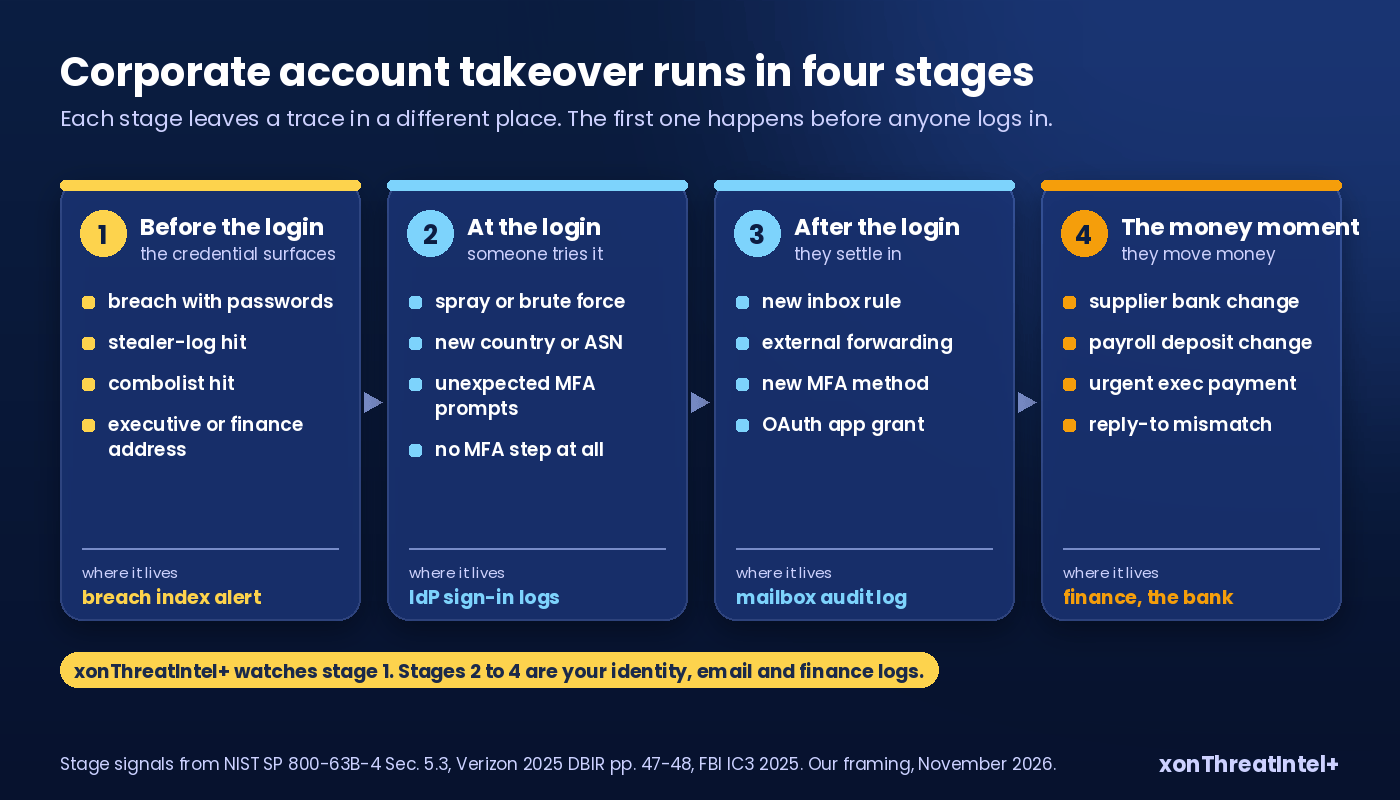
Before the login: the credential surfaces
This is the stage most checklists skip, because nothing has happened to the client yet. Something has happened to their staff's addresses, though.
- A client's domain shows up in a newly indexed breach that exposed passwords.
- A client address appears in a stealer log (malware on a device saved the login, and the log went into circulation).
- A client address sits in a combolist, the recycled bundles of email and password pairs that attackers feed to credential stuffing tools.
- An executive's address, or a shared finance mailbox, is among the hits. That one goes to the top of the pile.
How much does a surfaced login matter? A Google and UC Berkeley study (Thomas et al., ACM CCS 2017) found that credentials exposed in a data breach raised the odds of a Google account being hijacked about ten times over a random user's. Phishing-kit victims ran over 400 times (one provider, 2016 to 2017 data), a fair reminder that exposure is one road in among several.
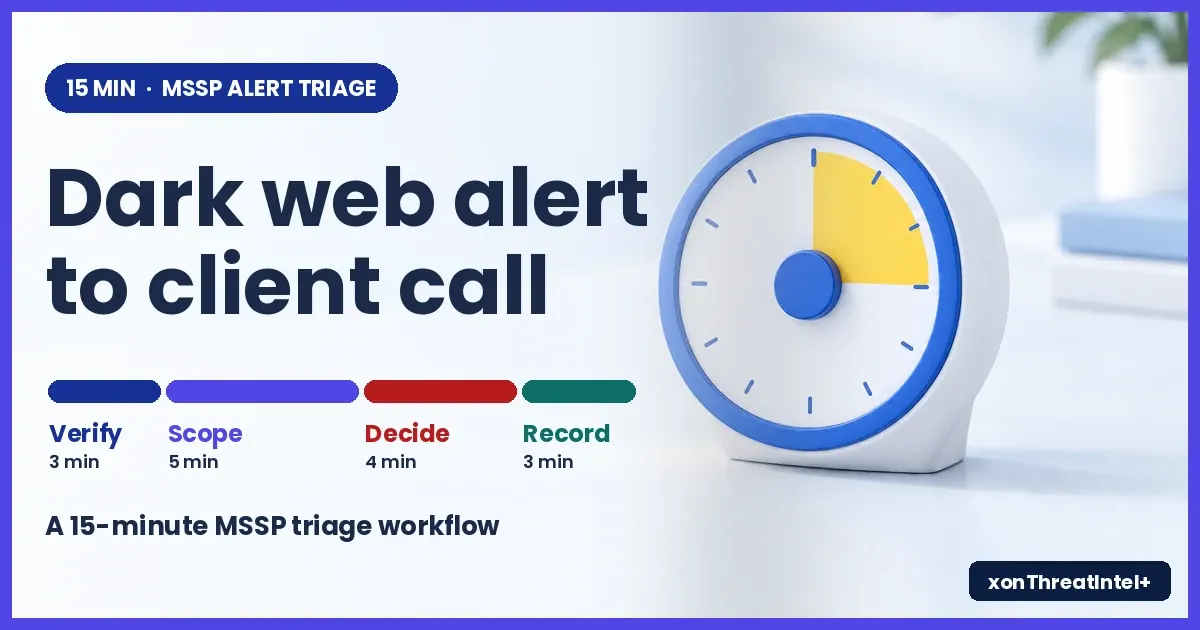
This stage is the one we watch. xonThreatIntel+ checks every breach and stealer log that lands in our index against the client domains you onboard. You get the alert under 15 minutes for onboarded domains, after a breach lands in our index. (Our account takeover monitoring guide covers the setup side.)
At the login
Now somebody tries the credential. This is identity provider territory, and the client's sign-in logs carry it.
- A burst of failed sign-ins on one account. Or one failed attempt each on many accounts, all from the same IP range. Microsoft's Digital Defense Report 2025 says more than 97% of the identity attacks in its April to June 2025 alerts were password spray or brute force (p. 16).
- A successful sign-in from a country, ASN or cloud hosting block the user has never come from.
- A new device or browser. Then an MFA prompt the user didn't expect, or several in a row.
- A sign-in with no MFA step where policy says there should be one. Legacy protocols do this.
NIST SP 800-63B-4 lists geolocation, IP address characteristics, device and browser traits, and usage velocity as session signals worth evaluating (Sec. 5.3). Our rule of thumb: if one of these lands on an address flagged at stage one, raise the challenge. Our post on step-up authentication after new breach exposure has a policy you can lift.
After the login: settling in
Here's where token theft matters. A stolen session token skips the password and the MFA step entirely. Stage two can look perfectly clean.
The DBIR looked at Microsoft 365 logs from one managed security provider. Token theft was the most common way around MFA there, at 31% of the MFA-bypass attacks (p. 47). So watch what the account does, not only how it got in.
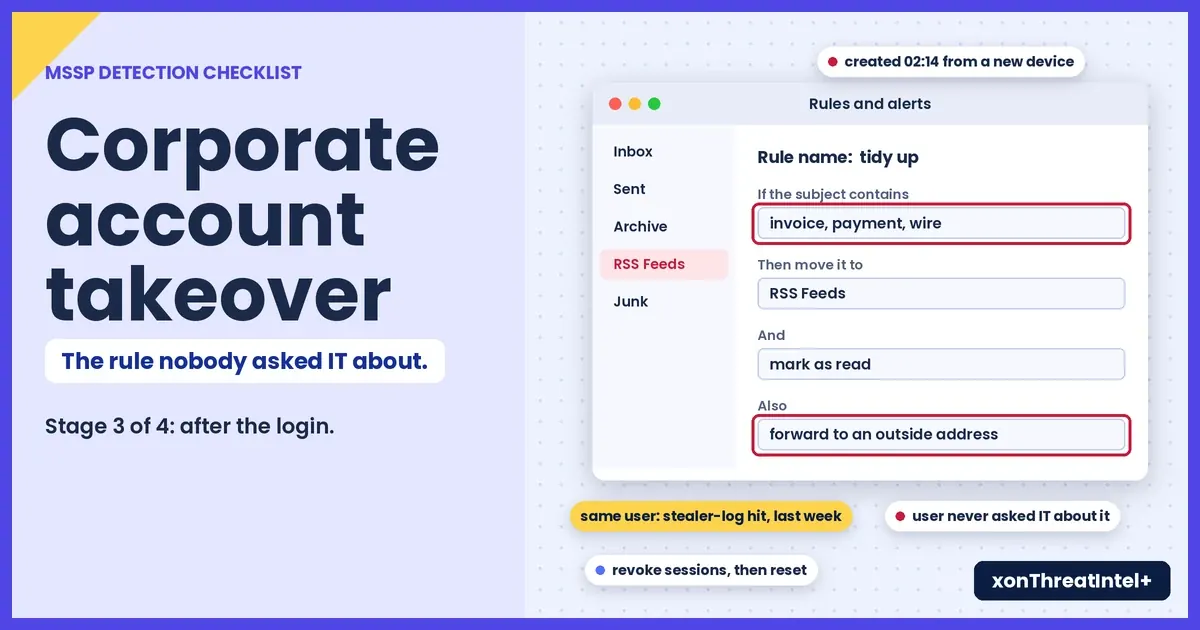
- New inbox rules that forward, delete or move mail to an odd folder (RSS Feeds is a favourite). Any rule matching "invoice", "payment" or "wire"? Same-day look.
- External forwarding switched on at the mailbox level.
- A new MFA method or recovery address registered, especially an authenticator app nobody asked IT about.
- An OAuth app granted mailbox or file access by a single user.
- Mail search for finance terms, or a bulk export of contacts.
None of these is proof by itself.
Two of them on an account that also had an exposure hit last week? That's enough to revoke sessions and talk to the user.
The money moment
The last stage is the one the 2011 guidance was written for. You'll rarely see the transaction. What you can see is the email that sets it up, and that's enough if you've agreed with each client who gets the call.
| What lands in the mailbox | Who you call |
|---|---|
| A supplier's bank details "updated", sent from a real internal mailbox | The client's bank fraud line, and the supplier on a known number |
| A salary direct-deposit change sent to payroll or HR | The payroll provider |
| An urgent payment request from an executive who's travelling | The finance lead, before anything is released |
| A reply chain where the display name matches and the reply-to doesn't | Whoever owns that thread, then the finance lead |
Why agree it in advance? The IC3 report notes takeover-related payments can run to 50 or more transactions across several banks at once (p. 17). Speed of that call matters far more than its polish.
Which client log holds which signal
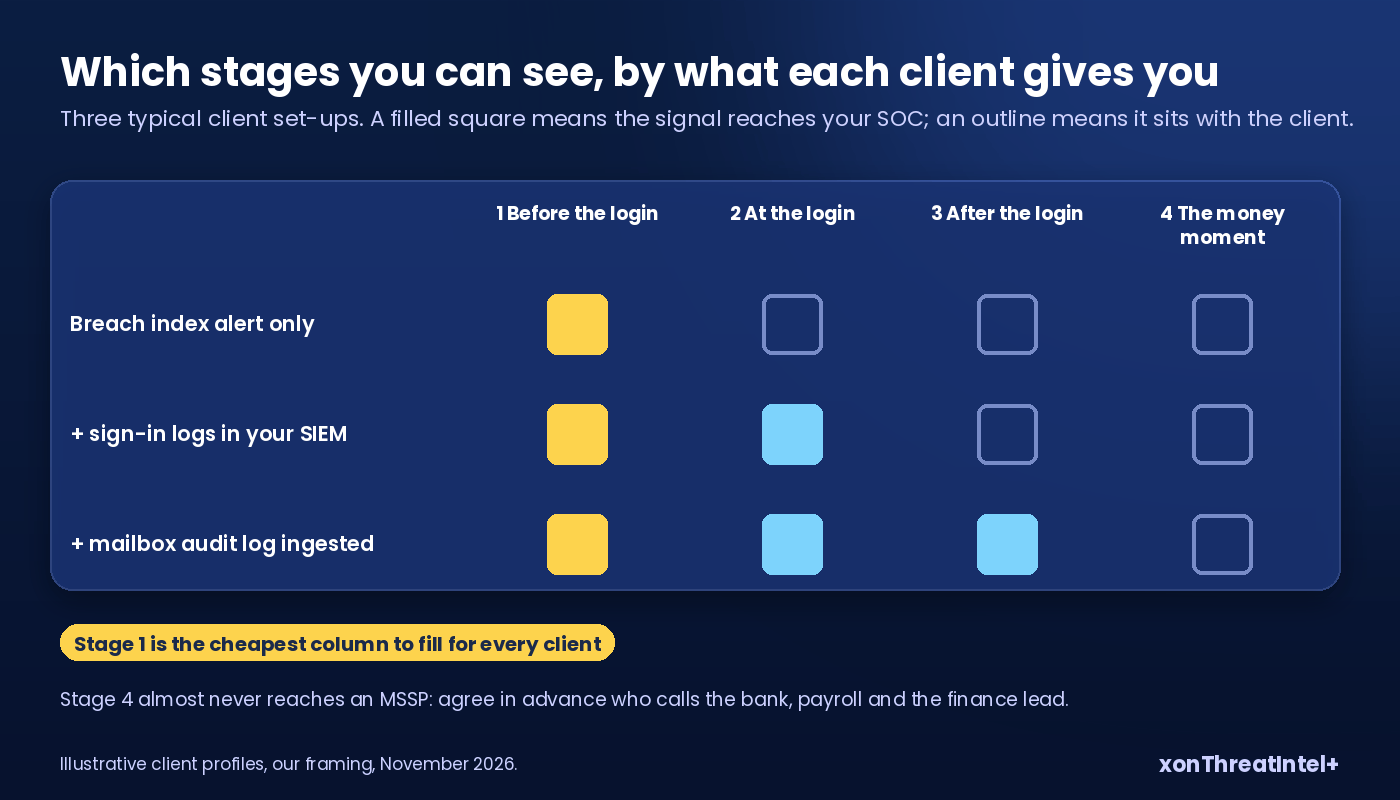
You won't hold every log for every client, and that's normal. Use the table to mark, client by client, which stages actually reach your SOC.
| Stage | Signal | Where it lives | Usually held by |
|---|---|---|---|
| Before the login | Client address in a breach, combolist or stealer log | Breach index alert (xonThreatIntel+) | MSSP |
| At the login | Spray, new location, odd ASN, MFA prompts | Entra ID or Google Workspace sign-in logs | MSSP if onboarded to the SIEM, else the client's IT |
| After the login | Inbox rules, forwarding, new MFA method, OAuth grants | M365 unified audit log, Workspace admin audit | MSSP with audit log ingestion |
| The money moment | Bank detail changes, payroll changes, urgent wire requests | Email content, ERP and payroll change logs | Client finance, the bank |
Lots of "client" in that last column for your book? That's a gap you can price. The first row, though, is cheap to cover for everyone at once.
Reading an exposure alert, field by field
What does stage one look like in your queue, then? From the $243 tier up you get one signed webhook per account, covering every onboarded domain. Here's a notification, trimmed to one domain:
{
  "event": "new_findings",
  "as_of": "2026-11-10T08:14:02Z",
  "domains": [
    { "domain": "clientco.example", "new_breaches": ["ExampleBreach"], "new_records": 42 }
  ]
}
The notification lists each affected domain with its own counts and an as_of, never email addresses. That's on purpose. You use it as the trigger, then pull the detail for that domain from the partner API, which lists the exposed addresses.
The detail is where triage happens:
| Field | What it tells you | Why it matters for takeover |
|---|---|---|
breach_type | DataBreach, ComboList or a stealer-log label | Stealer logs and combolists carry working-format logins |
xposed_data | The data classes, e.g. "Email addresses;Passwords" | No password class, much lower takeover risk |
password_risk | plaintext, easytocrack, hardtocrack or unknown | Plaintext is usable the moment it's read |
breached_date | When the source says it happened (month precision) | Old breach plus current employee is still live risk |
The domain summary also carries a seniority rollup (c_suite, vp, director) once enrichment has run, which is how executive exposure gets pulled to the top.
How common is the dangerous combination? Across the catalog, 518 of 798 entries (65%) expose passwords alongside email addresses, as of 10 November 2026. In the 52 weeks to that date, 35 of the 145 breaches we added carried passwords.
What an exposure alert proves, and what it doesn't
An alert proves one thing. An address on your client's domain, with the data classes listed, surfaced in a source we've indexed. Nothing more.
Is the password still good? No idea, from the alert alone. Nor whether anyone got past MFA, or even tried, and you won't find the password, a cookie or a session token in what we send.
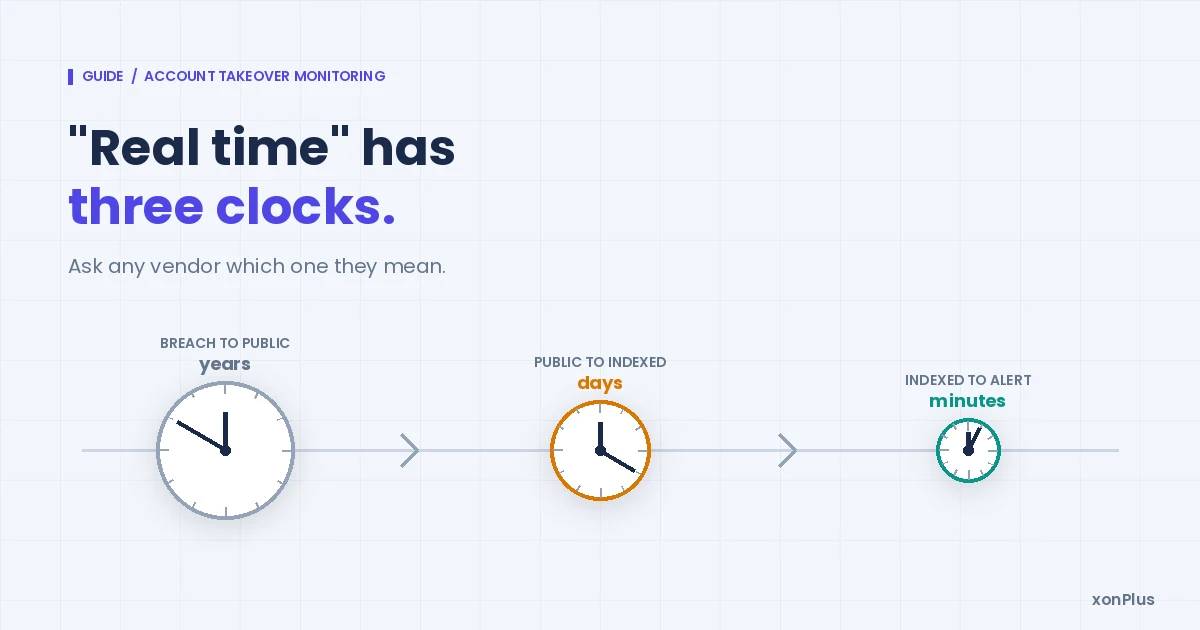
And the timing has two clocks, which is worth saying to clients plainly.
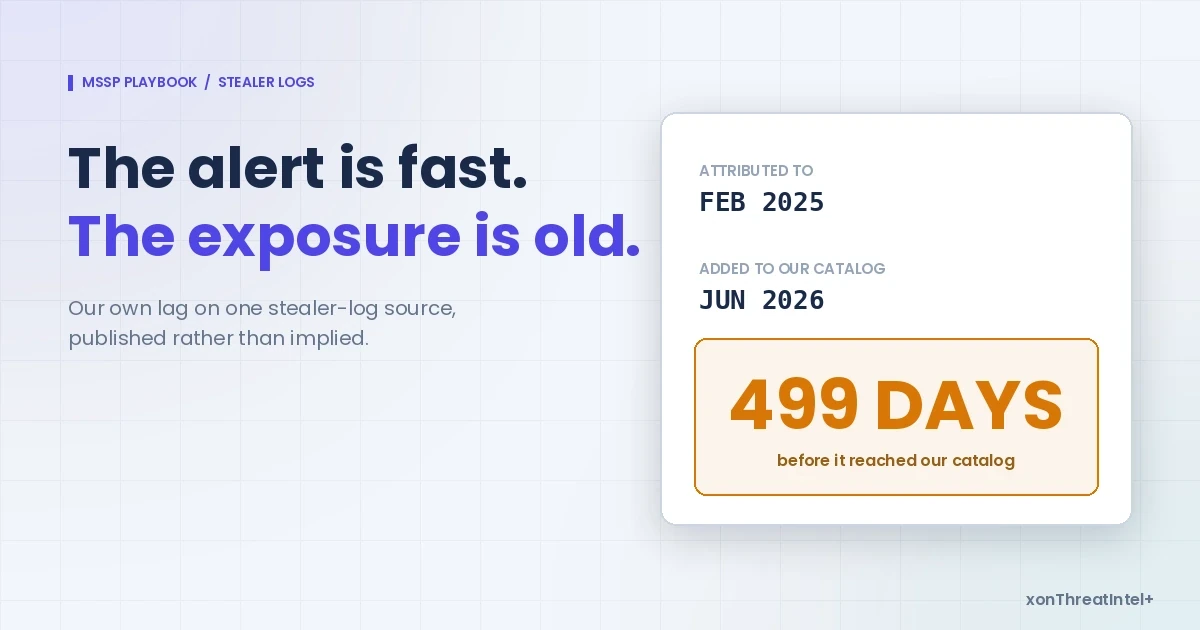
Breach to index: we measured a median of 73 days over the 145 breaches added in the 52 weeks to 10 November 2026. Rough, mind you, since sources only date a breach to the month.
Index to alert: under 15 minutes for onboarded domains, after a breach lands in our index. Both are unpacked in how the two clocks are measured.
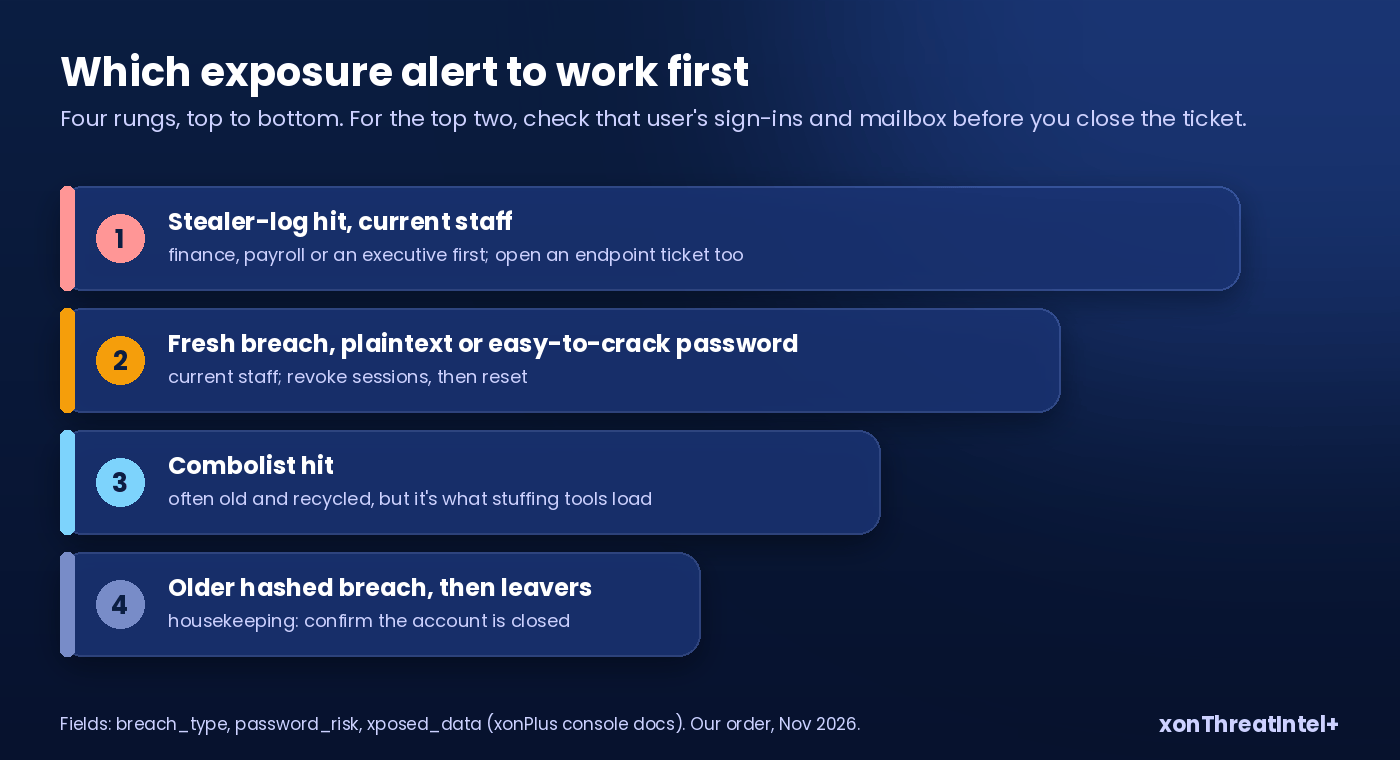
Which alert to work first
A busy morning can bring hits across a dozen clients. Here's the order we'd work them in.
- Stealer-log hits on the domain, highest first where the seniority rollup shows executives. The domain detail names the addresses, so match them against the client's staff list and pull finance, payroll and executive mailboxes to the top. Malware was on a device, so open an endpoint ticket too (why stealer logs read differently).
- Fresh breaches with
password_riskplaintext or easytocrack, current staff. - Combolist hits. Often old, often recycled, but they're exactly what credential stuffing tools load.
- Older breaches with hashed passwords, then leavers' addresses (a housekeeping job: confirm the account is closed).
For each of the top two, check the stage-two and stage-three signals for that user before you close the ticket. A reset without a session revoke leaves a stolen token working.
NIST says a session that looks wrong should be reauthenticated, ended or reported to support (Sec. 5.3). We'd do all three, in that order. Every time.
Running it across 50 client domains
This part's mostly plumbing. One account, one API key and one domain quota cover every client domain. There's no client or group object: the domain is the unit, and you keep the client-to-domain map on your side.
So routing is a lookup: the webhook's domain field tells you which client's queue the ticket goes to. Slack and Teams delivery works too, and alert rules can be set per client domain.
Weekly, monthly or quarterly CSV reports carry the client domain on every row, so one file splits cleanly into one per client. Multi-tenant monitoring for 50 clients walks through that table.
On price, it's flat: $99, $243 or $447 a month for 10, 25 or 50 domains, custom above 50. (The account webhook and JSON feeds start on the $243 tier.) Plan detail sits on the MSSP page.
Want to show a prospect what stage one looks like for them? Run their domain through the free exposure check before the first call. Your own company's domain is free to monitor, by the way, on xposedornot.com/domain .
Quick answers
What is corporate account takeover?
Someone logs into a business account (the mailbox, the identity provider, the bank portal) with real credentials that were stolen, and carries on as if they were the employee. Usually it ends in a payment going somewhere it shouldn't. It started as a banking term (2011 guidance tied it to wire and ACH fraud).
How is corporate account takeover different from business email compromise?
Think of takeover as the break-in and BEC as what's often done with it: a hijacked (or just spoofed) mailbox asks someone to pay, and they do. It's big money, too. US victims reported $3.05 billion lost to BEC in 2025, across 24,768 complaints to the FBI.
Does a breach alert mean someone took over the account?
No. It tells you a client address turned up in a breach or a stealer log, and what came with it; whether anybody's used it is a question for the sign-in and mailbox audit logs (hence the checklist keeping the two side by side).
How fast can an MSSP detect corporate account takeover?
It depends which stage you mean. For exposure, xonThreatIntel+ alerts arrive under 15 minutes for onboarded domains, after a breach lands in our index. For the login and mailbox stages it's however long the client's identity and audit logs take to reach your SIEM (minutes for some clients, never for others).
Where the numbers came from
- Catalog figures: XposedOrNot public API (
/v1/breachesand/v1/metrics), pulled 10 November 2026: 798 breaches, 11,718,210,957 records; 518 entries expose passwords with email addresses; 145 breaches added in the 52 weeks to 10 November 2026, 35 with passwords; median breach-to-index gap 73 days over the same window, month-precision breach dates. Counting rules on our data page. - FBI IC3, 2025 Internet Crime Report : account takeover about 4,700 complaints and $359.7 million (p. 12); BEC 24,768 complaints (p. 7) and $3,046,598,558 (p. 8); multi-bank ATO transactions (p. 17).
- FBI IC3, Account Takeover definition page, read 10 November 2026.
- Texas Bankers Electronic Crimes Task Force, Best Practices for Banks: Reducing the Risks of Corporate Account Takeovers (2011, hosted by CSBS), p. 1.
- Verizon, 2025 Data Breach Investigations Report : stolen credentials 22% (p. 21); token theft 31% of MFA-bypass attacks in one managed security provider's Microsoft 365 logs (p. 47); BEC median about $50,000 and wire transfer about 88% of proceeds (p. 48).
- Microsoft, Digital Defense Report 2025 : more than 97% of identity attacks are password spray or brute force (p. 16).
- NIST, SP 800-63B-4 , Sec. 5.3 Session Monitoring (July 2025).
- K. Thomas et al., Data Breaches, Phishing, or Malware? Understanding the Risks of Stolen Credentials , ACM CCS 2017, p. 10.