Domain Breach Check vs Monitoring: What a Free Scan Misses
Is a free domain breach check enough, or do you need monitoring?
It depends on whether you care about next month as well as today. A check tells you which known breaches hold email addresses on your domain as of the moment you run it. Monitoring runs the same check again every time a new breach is added, and emails you when one matches.
(By a domain breach check we mean looking up every address on a company domain, such as yourcompany.com, against a catalog of breaches in one go. Some sites use the same words for "was this company itself breached?" or for spotting lookalike domains, which are useful jobs but not the one this post is about.)
Breaches keep surfacing long after they happen.
In the 30 days to 16 November 2026 we added seven breaches to our index, and none of them had happened inside those 30 days: one dated back to 2021, one to 2024, and the other five had happened between May and August of this year. They all existed when somebody ran a scan in mid-October, they just hadn't reached our index yet. That scan came back without them.
We run XposedOrNot , a free and open-source breach search and alert service that has been running in the open since 2017, and its catalog held 801 known breaches on 16 November 2026. For your own domain, both the check and the monitoring are free there. If you look after domains for other people, the watching part is xonThreatIntel+, built on the same index.
What does a free domain breach check show?
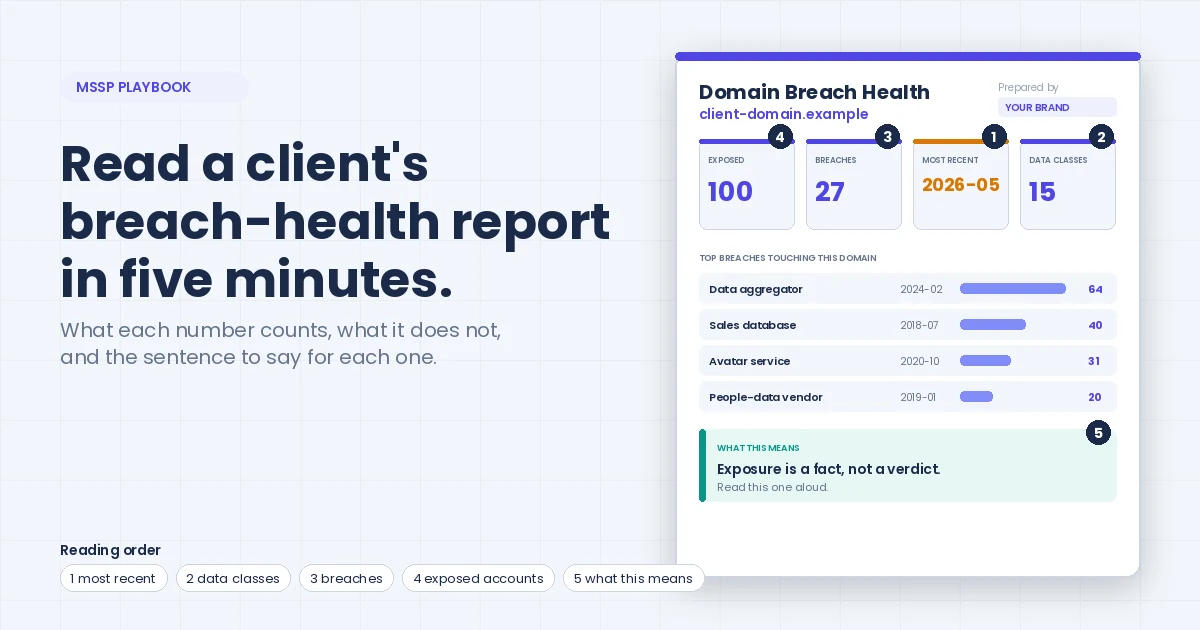
Type a domain into the free domain check and you get four numbers back: the breaches that hold addresses on the domain, the distinct addresses, the total records, and the month of the most recent breach.
Until you prove you own the domain, that's all you get. We built it that way on purpose: anyone can type any domain into that box, and the open version shouldn't hand a list of a company's staff addresses to whoever asks.
(Very large domains also get their counts trimmed above 10,000, and the lookup runs in memory, so the domain you typed isn't stored.)
As a first look it does the job, because in a few seconds you know whether your company sits in two breaches or two hundred and whether the latest one is from this year or from 2014.
It can't tell you anything about tomorrow.
What a one-time scan misses, in numbers
We took our own catalog and asked what a scan run 30, 90, 180 or 365 days ago would have missed if nobody looked again.
| You scanned | Breaches added since | Records added since | Already breached before your scan | With passwords exposed |
|---|---|---|---|---|
| 30 days ago (17 Oct 2026) | 7 | 10,778,851 | 7 | 1 |
| 90 days ago (18 Aug 2026) | 25 | 144,536,420 | at least 10 | 3 |
| 180 days ago (20 May 2026) | 71 | 922,850,076 | at least 32 | 10 |
| 365 days ago (16 Nov 2025) | 148 | 1,236,509,915 | at least 53 | 36 |
Source: XposedOrNot public catalog, pulled 16 November 2026. Breach dates are recorded by month, so a breach dated to the scan's own month isn't counted as earlier, which is why the column says "at least". Our data page explains why records aren't people.
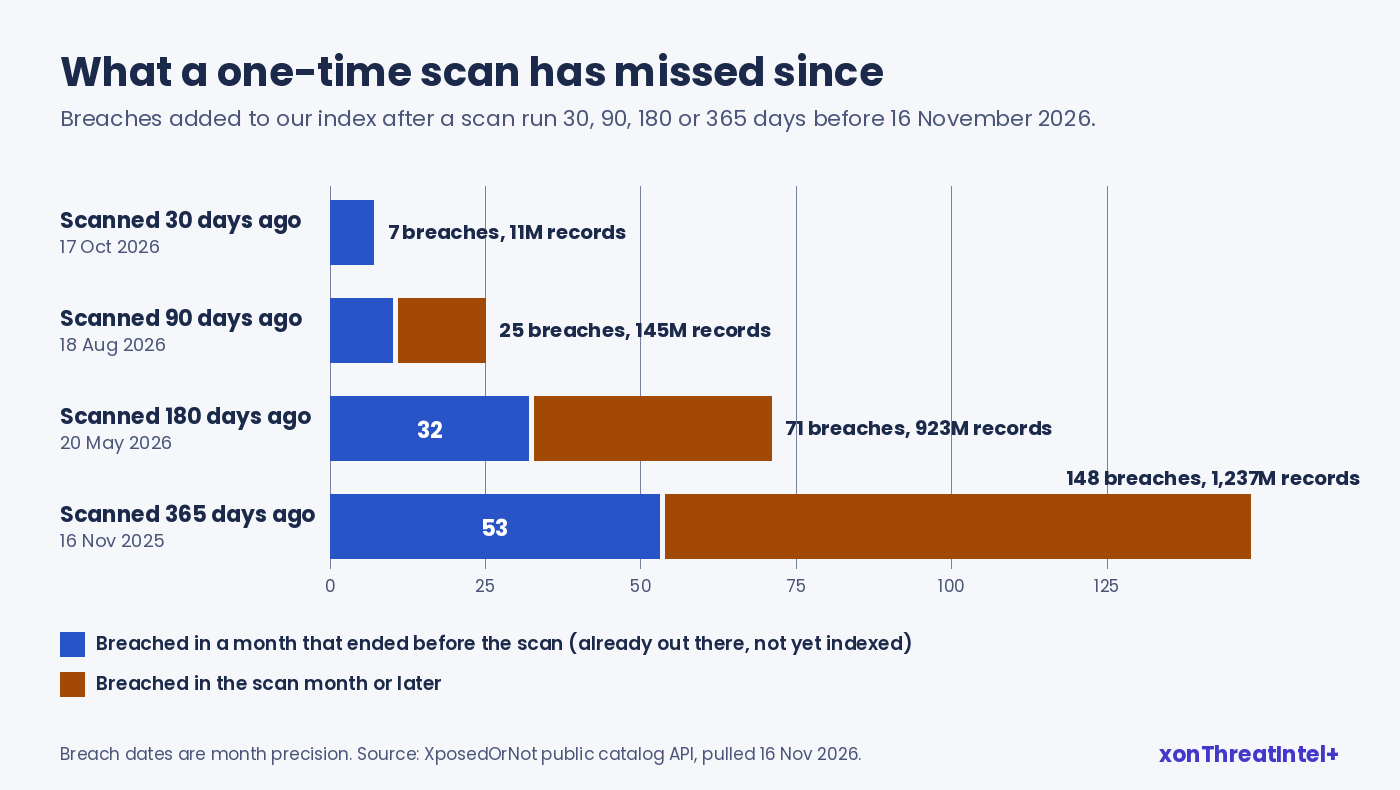
The fourth column is the uncomfortable one. A good share of what a scan misses isn't new trouble at all, since every one of the seven from the last 30 days, and at least 10 of the 25 from the last 90, had already happened by the time the scan ran.
Breaches reach our index late, and sometimes years late. Across the 148 breaches we added in the 52 weeks to that date, the median gap between the breach date and the day it entered our index was 74 days. Forty-one of them (28%) took more than a year, and the oldest had happened in December 2011.
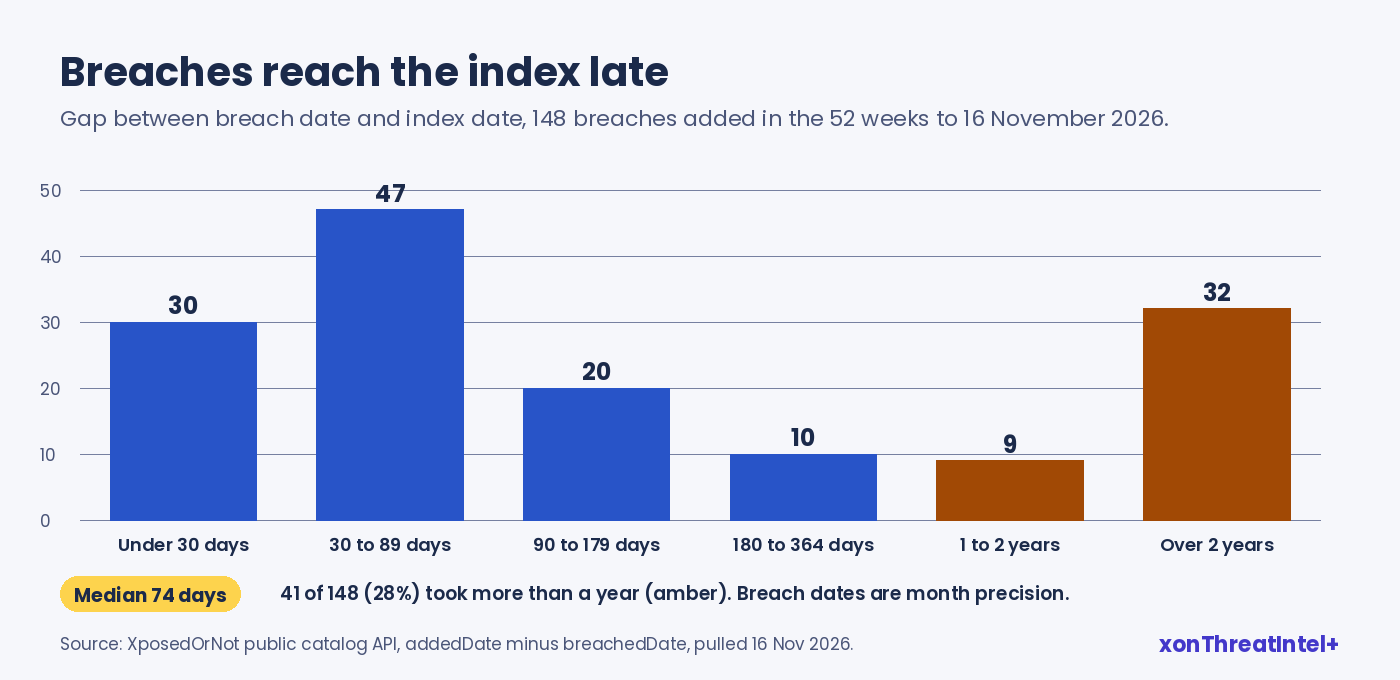
So a clean result is accurate for our index on the day you ran it, and often quietly out of date within a week. New breaches landed on 107 separate days in those 52 weeks, which leaves no quiet season to wait for.
Your own side of the picture moves too. Every new hire, alias and shared mailbox created after the scan is an address the scan never saw, whereas monitoring checks whatever is on the domain when the next breach arrives, so last month's starters are covered without anyone remembering to rescan.
Why would your domain show up in breaches you've never heard of?
Most of what a domain check finds didn't happen at your company at all. Staff sign up for webinars, trials, travel sites and forums with their work address, and when one of those services is breached, your domain ends up in the dump without anyone at your end being told.
People rarely hear about it on their own. In a peer-reviewed study of 413 people, participants were unaware of 74% of the breaches that had exposed their email address (Mayer and colleagues, USENIX Security 2021), and it's worth picturing what that means across a 200-person domain.
The exposure is worth acting on, too. A Google study of stolen credentials found that people whose current password turned up in a breach dump had roughly 10 times the odds of having their account hijacked compared with a random user (Thomas and colleagues, ACM CCS 2017). That's the real case for watching rather than checking once a year.
Scan, free monitoring and xonThreatIntel+, side by side
Monitoring can't see a breach before it surfaces, and nothing else can either. What it changes is when you hear: on the day the breach lands in our index rather than at your next scan, and on xonThreatIntel+ the alert reaches you under 15 minutes for onboarded domains, after a breach lands in our index.
| Free domain check | Free domain monitoring (verified) | xonThreatIntel+ | |
|---|---|---|---|
| Whose domain | Any domain | Domains you own and verify | Your clients' or your users' domains |
| What you see | Four counts | Every exposed address, the breach names, data types, stealer-log hits | Same detail per client domain, through the console, API and reports |
| Breaches added after today | No, run it again | Yes, every new breach is checked against your domain | Yes, across every onboarded domain |
| Alerts | None | Email when a new breach holds addresses on your domain, plus a quarterly summary | Under 15 minutes for onboarded domains, after a breach lands in our index; email, Slack and Teams on every plan, account webhook and JSON feeds from $243 |
| Price | Free | Free, no size limit | From $99 a month for 10 domains |
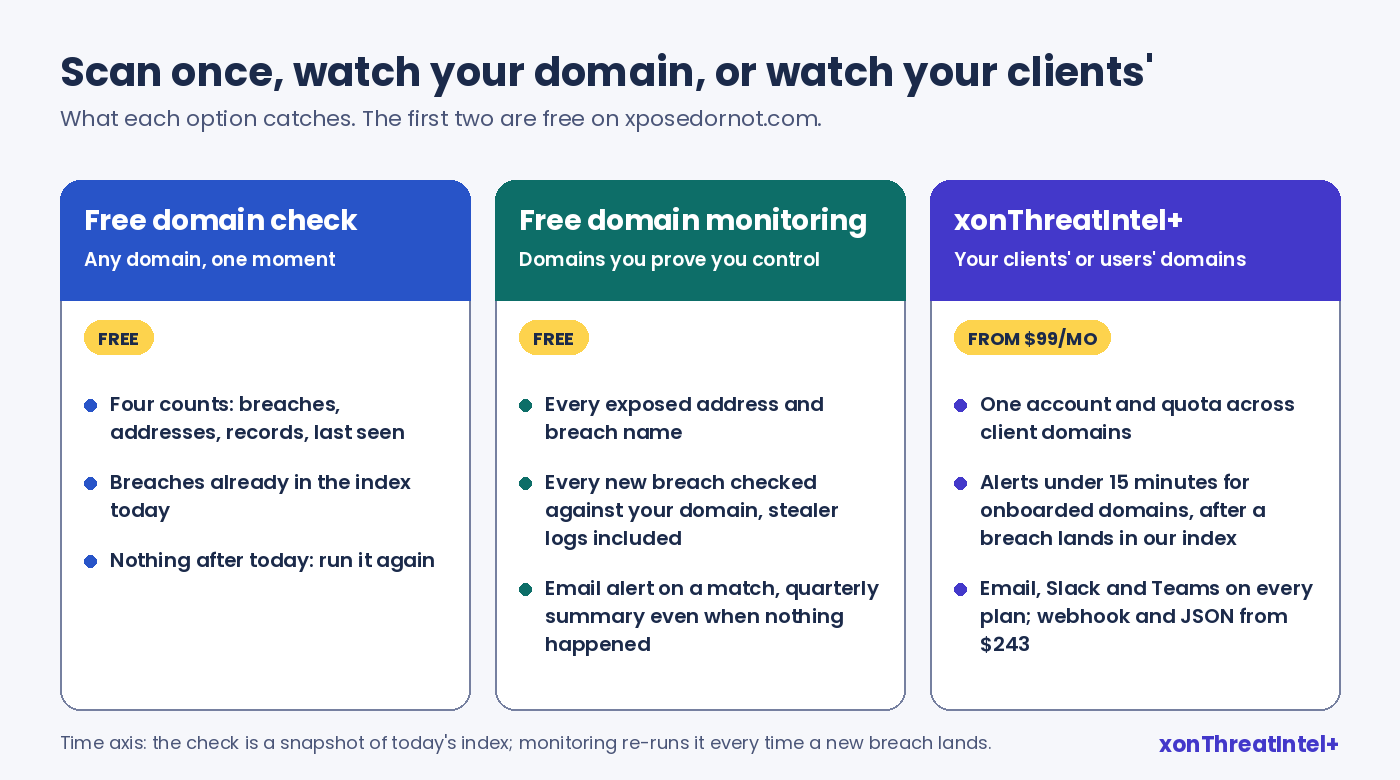
People tend to skip the middle column. Monitoring your own domain is the free tool, and the scan is really just its front door.
Your own domain: from scan to monitoring in one step
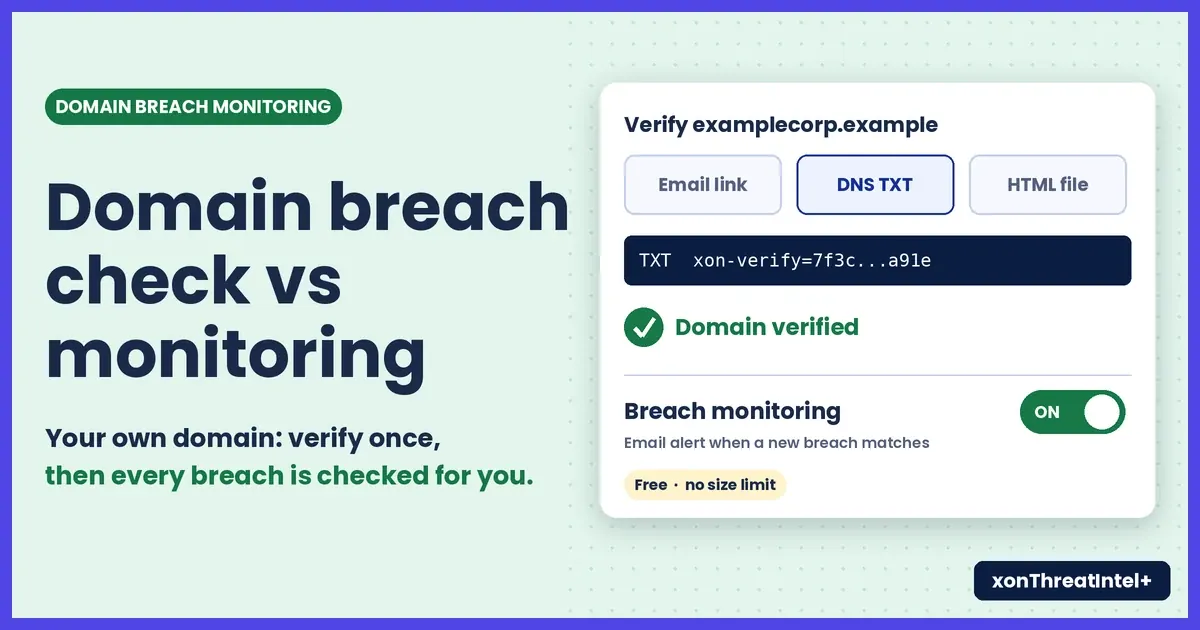
If the domain is yours, closing the gap doesn't cost anything. You verify it, through domain verification , in one of three ways:
- An email link sent to an admin mailbox on the domain (a couple of minutes).
- A DNS TXT record, if you'd rather not involve a mailbox (allow for propagation).
- An HTML file on the site's web root.
After that the counts open up into addresses and breach names, and the breach dashboard shows the yearly trend and your top breaches. Every new breach we index gets checked against your domain, stealer logs included (what a stealer-log hit on your domain means is its own post), and an email goes out when one matches. A quarterly summary arrives even when nothing happened, which is handy if an auditor ever asks how you know.
We'd add a couple of habits. Verify every domain that still receives mail, old brand domains included (in our experience they're where the forgotten 2016 signups live). And send the alerts to a shared mailbox, not to one person who might be on leave.
When an alert lands for your own domain
Open the breach in the dashboard and look at what leaked alongside the addresses. Email addresses on their own mostly mean more phishing, so a short heads-up to the people named is usually enough.
If passwords were in it, the affected staff should change that password anywhere they reused it, and it's a good moment to check that their work account has multi-factor sign-in switched on. And tell them where it came from, because "a travel site you signed up to in 2019 was breached" lands a lot better than "your account was exposed".
Client domains: the scan opens the conversation, monitoring is the service
For an MSSP, the free check makes a good first meeting: run it on a prospect's domain, show the four numbers and talk through what they mean. Our guide to reading a domain breach-health report has a plain-language sentence for each count.
Keeping watch over that client's domain afterwards is a different matter, because free monitoring is for domains you own and the line between free and paid is whose domain it is, not how many. So the ongoing work runs on xonThreatIntel+. One account and one domain quota cover every client domain, each notification lists the affected domains with their own counts, and reports go out weekly, monthly or quarterly with the client domain on every row.
Pricing is flat and public: $99 a month for 10 domains, $243 for 25, $447 for 50. Every tier alerts by email, Slack and Teams, and the account webhook and JSON feeds come with $243 and up.
No free trial, but a 30-day money-back guarantee on every plan, and your partner agreement and DPA are signed during onboarding. The MSSP page has the details, and when an alert does land, the 15-minute triage workflow covers what your analyst does next.
When is a one-time scan enough?
Sometimes it is:
- A one-off question. A board member asks "are we in any breaches?" before a meeting. The free check answers it in seconds.
- Sizing up a prospect or an acquisition. You want a first read on exposure, not a service.
- Before you verify. Run it, see the numbers, then verify the domain so the next breach comes to you.
It stops being enough when:
- You have staff. They keep signing up for things, and some of those things will be breached next year.
- The domain still receives mail, even if the brand is retired.
- Someone (a client, an auditor, an insurer) expects you to hear about new exposure as it's indexed, not at the next annual check.
- You look after domains for other people, which is ongoing work by definition.
Start with the free check today. If the domain's yours, verify it and the alerts come to you; a client's domain is a job for xonThreatIntel+.
Quick answers
Is a free domain breach check enough?
Enough for a one-off answer, since it reflects what our index held on the day you ran it. It won't catch breaches that surface afterwards, and seven surfaced in the 30 days to mid-November 2026 alone, every one of them older than that window.
How fast will I hear about a new breach?
Not before the breach comes to light, and that takes a while: half of the 148 breaches we added in the year to mid-November 2026 took more than 74 days to reach our index. Once one lands, free monitoring checks it against your domain. On xonThreatIntel+, alerts reach you under 15 minutes for onboarded domains, after a breach lands in our index.
Is domain breach monitoring free?
For domains you own, yes, on xposedornot.com, with no size limit. Watching domains that belong to clients or to your product's users is xonThreatIntel+, from $99 a month for 10 domains.
Why does my domain show breaches when we were never hacked?
Usually because staff used their work address on another service, and that service got breached. The breach name is normally the service that leaked, not your own systems. Read the name before you assume anything about your own network.
Where the numbers came from
- XposedOrNot public catalog,
api.xposedornot.com/v1/breaches, pulled 16 November 2026: 801 breaches, 11,727,783,489 records. Fields used:addedDate,breachedDate,exposedRecords,exposedData. Breach dates carry month precision (each sits on the first of its month); a breach counts as "before your scan" only if its whole month ended before the scan day. - Breach-to-index gap: median 74 days from the recorded breach date (about 46 days from the end of the breach month) across the 148 breaches added in the 52 weeks to 16 November 2026. Other posts use different date windows; our data page explains each.
- Mayer, Zou, Schaub and Aviv, "Now I'm a bit angry": Individuals' Awareness, Perception, and Responses to Data Breaches that Affected Them , USENIX Security 2021, n=413.
- Thomas et al., Data Breaches, Phishing, or Malware? Understanding the Risks of Stolen Credentials , ACM CCS 2017.
- Product facts: free domain check , domain verification , xonThreatIntel+ and the MSSP plans, read 16 November 2026.