
Employee Credential vs Dark Web Monitoring: Which Do You Need?
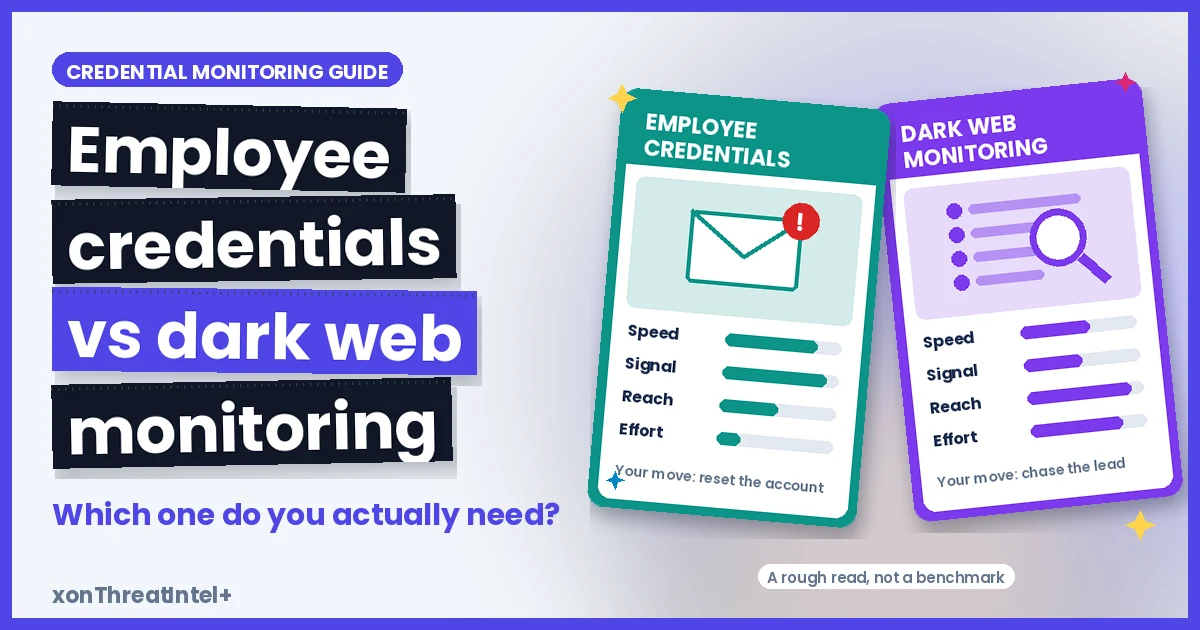
Most teams need employee credential monitoring first. It's cheaper, quieter, and it hands you something you can fix the same afternoon.
Dark web monitoring is the add-on. It earns its cost when someone would target you by name, and when there's a person on hand to chase what it finds.
The two get sold under the same label all the time. Even CISA's #StopRansomware Guide runs them together. It tells organisations to "consider subscribing to credential monitoring services that monitor the dark web for compromised credentials."
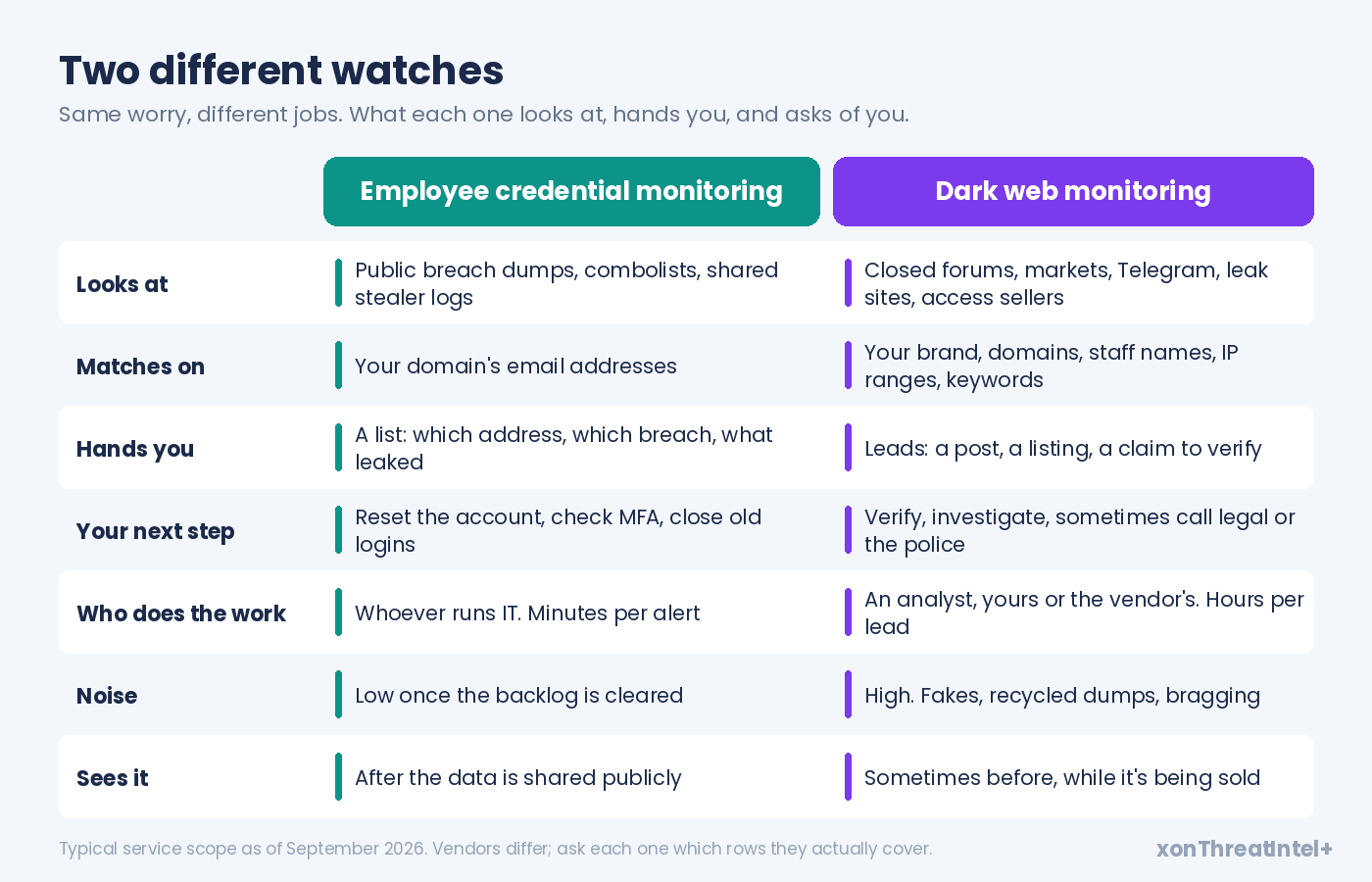
So here's the difference in one table, before anything else:
| Aspect | Employee credential monitoring | Dark web monitoring |
|---|---|---|
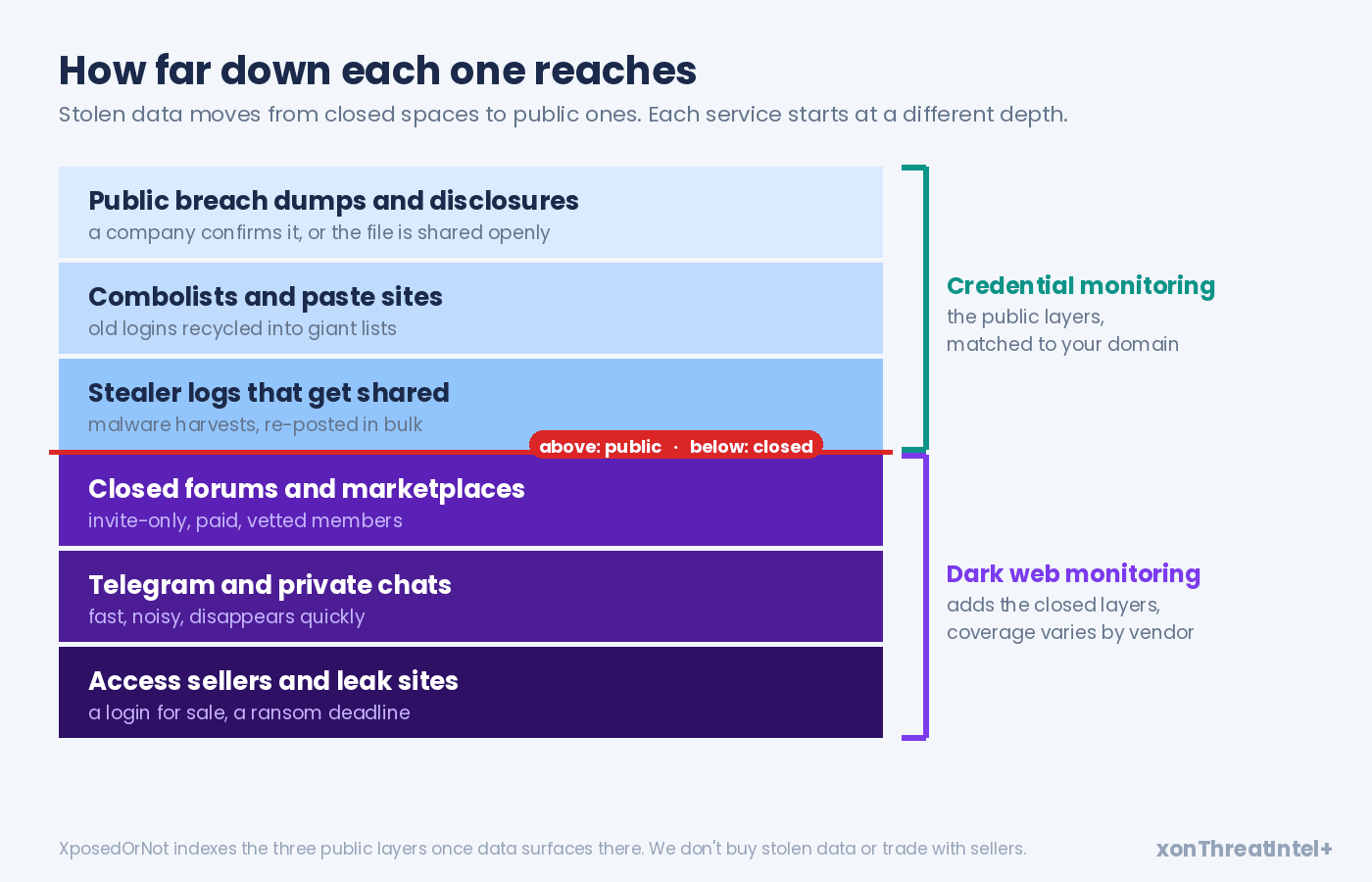
| What it watches | Breach dumps, combolists and stealer logs once they're shared | Closed forums, marketplaces, Telegram, ransomware leak sites, access sellers |
| What it matches | Email addresses on your domain | Your brand, domains, staff names, IP ranges, keywords |
| What you get | A list: which address, which breach, what leaked with it | Leads: a post, a listing, a claim somebody has to verify |
| What you do next | Reset, check MFA, close forgotten accounts | Investigate, confirm, sometimes call legal |
| Who does the work | Whoever runs IT, minutes per alert | An analyst, yours or the vendor's, hours per lead |
The rest of this guide is the evidence behind that table.
What the 2025 and 2026 reports say about stolen logins. How quickly they get used, where each service can and can't see, and a four-question path to the right answer for your company. Or for your clients, if you're an MSSP.
What is employee credential monitoring?
Employee credential monitoring is a continuous check of breach data for email addresses on the domains your organisation owns. When a staff address turns up in a newly indexed breach, you get told which address, which breach, when it happened, and what was exposed alongside it. (Here's how to read that report once it lands.)
That's the whole product. Narrow on purpose.
It runs over data that has already escaped into circulation. Breach dumps a company confirmed or a journalist verified. Combolists (email and password pairs stitched together from older dumps).
And stealer logs, once they've been posted in bulk. That's the harvest of malware that sat on somebody's laptop.
What leaks next to the address matters more than people expect. Across the 785 breaches in our public catalog on 28 September 2026, every one included email addresses, because that's how we match. Here's what else came out with them:
| Exposed alongside the email | Breaches in our catalog | Share of 785 |
|---|---|---|
| Passwords (in some form) | 517 | 66% |
| Names | 411 | 52% |
| Usernames | 395 | 50% |
| Phone numbers | 277 | 35% |
| IP addresses | 276 | 35% |
| Physical addresses | 220 | 28% |
| Dates of birth | 197 | 25% |
Just under two in three breaches in our catalog carried a password of some kind. How it was stored changes everything, though. Of those 517, we've tagged 83 as plaintext and 206 as easy to crack, which leaves 154 stored strongly and 74 we couldn't classify.
(Those are breaches, not people. One address can sit in a dozen of them.)
What is dark web monitoring?
Start with CISA's glossary. The dark web is "parts of the internet that are not easily accessible and hard to find since they do not show up in search engine results and/or are not accessible with standard web browsers." It adds, drily, that it's often used for "exchanging leaked credentials."
Dark web monitoring is a watch over those spaces for anything about you. Not only email addresses.
A forum thread selling VPN access to your network. A ransomware group's leak site with your logo on the countdown. Somebody in a Telegram channel offering your customer database, or claiming to.
Wider net, then. And a much messier catch.
Look at who's doing the selling. Initial access brokers break in and then sell the way in. Europol's 2025 Internet Organised Crime Threat Assessment says they "are increasingly advertising these services, along with related commodities, on specialised criminal platforms." ENISA's 2025 Threat Landscape says the same about infostealers "sold on cybercriminal marketplaces", used for "credential theft, session hijacking and access brokering."
That's the case for dark web monitoring in a sentence. Some of those sales happen before the data ever becomes public, and a vendor with access to the right rooms can see the listing while it's still a listing.
But "the right rooms" is doing a lot of work there. Coverage depends on which closed forums a vendor can get into, and stay in. It varies more than anything else in this market.
A lot of what gets posted is recycled, faked, or plain bragging, too. Somebody has to read each hit and decide whether it's real.
Why do stolen employee logins still matter in 2026?
Because they're still how a lot of breaches get going, even if the headline number moved this year.
Verizon's 2026 Data Breach Investigations Report has a real shift in it. Exploited vulnerabilities are now the most common way in, at 31%. Credential abuse as the first step fell from 22% to 13% (partly, Verizon notes, because it now tracks pretexting as its own entry point).
Fair enough. But the same report also counts credential abuse at any point in a breach, and on that measure "it still sits on top at 39%."
So attackers don't always open with a stolen login anymore. They still use one, somewhere along the way, in roughly two breaches out of five.
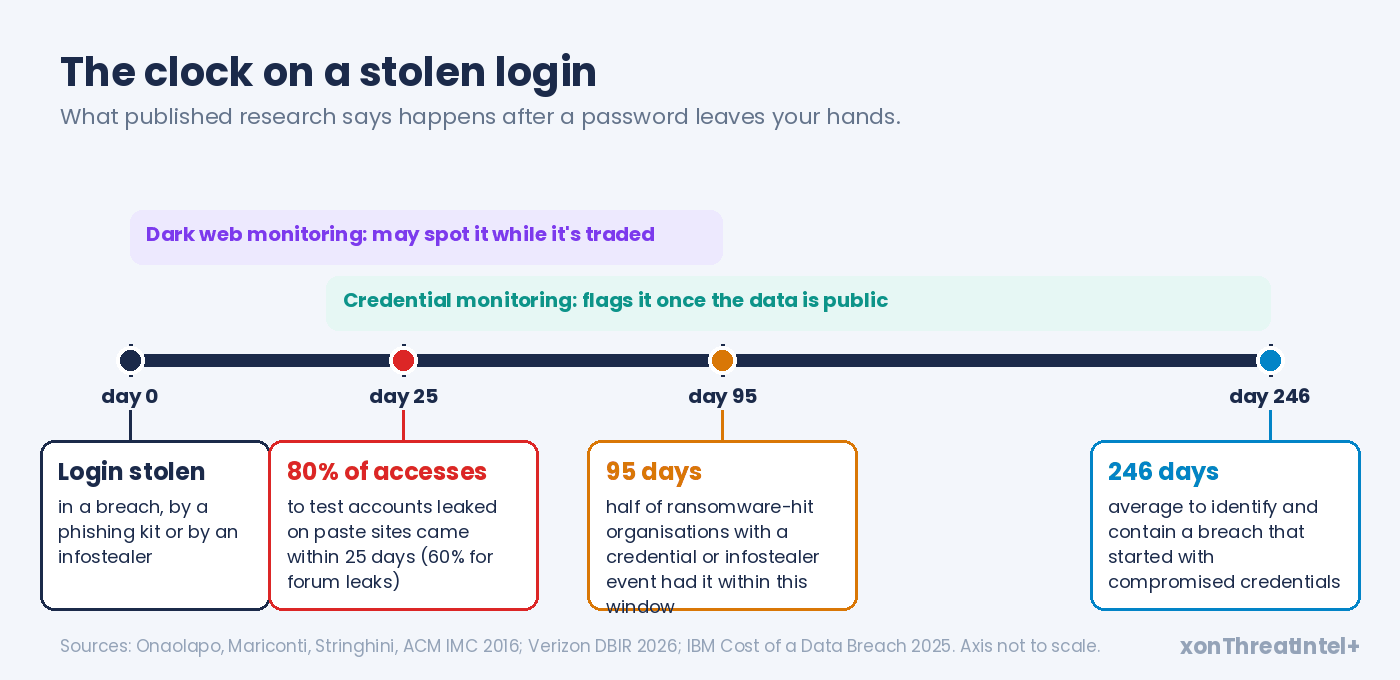
The ransomware link is the number we'd put in front of a board. Of the organisations hit by ransomware in DBIR 2026 that had a credential or infostealer event in the prior year, half had it within 95 days of the attack. The 2025 edition found that 54% of ransomware-hit organisations had their domains show up in credential dumps, and 40% had corporate email addresses in the stolen data.
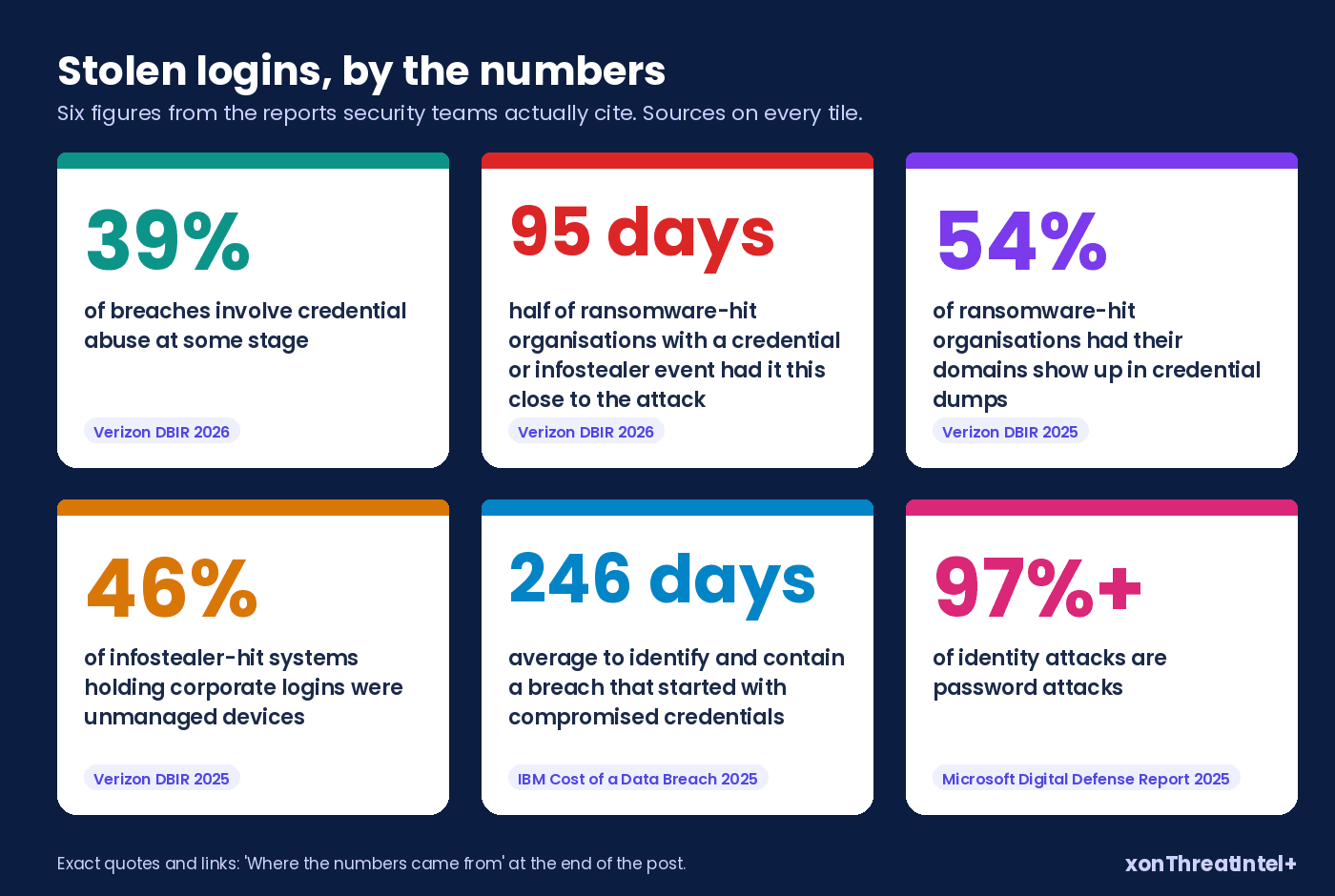
And then the one that makes IT leads wince. In DBIR 2025, 46% of infostealer-infected systems holding corporate logins were unmanaged, "hosting both personal and business credentials." A home PC, basically, with a work login saved in the browser.
Your endpoint tooling never sees that machine. A credential alert may be the only sign you get that a work login left it.
Slow detection costs money, too. IBM's 2025 Cost of a Data Breach study found breaches that began with compromised credentials took 186 days to identify. Containing them took another 60, and they cost USD 4.67 million on average.
Across all breaches, the ones wrapped up inside 200 days averaged USD 3.87 million. The ones that dragged on past 200 averaged USD 5.01 million. (IBM's 2026 report, out in July, puts the overall average at USD 4.99 million.)
How fast does a stolen login get used?
Faster than most monitoring can react, for the stuff that leaks openly.
In a study published at ACM IMC 2016, researchers at University College London leaked the logins of 100 test Gmail accounts through paste sites, underground forums and malware, then watched. 80% of the unique accesses to the paste-site accounts came within the first 25 days, and 60% for the forum leaks. Malware-leaked accounts behaved differently, with access spiking around 30 days and again after 100.
Google's own research team, writing at ACM CCS 2017, studied 1.9 billion usernames and passwords exposed in data breaches. It estimated that between 7% and 25% of those passwords still matched the owner's Google account.
People whose passwords sat in a breach were about 10 times more likely to have an account hijacked than a random user. For keylogger infections it was about 40 times, for phishing about 400.
Now our side of the clock, since we'd be asking a lot of you to trust the rest otherwise.
Our catalog added 127 breaches between January and 28 September 2026, and the median gap from breach date to our index was 61 days. 34 arrived inside 30 days and 74 inside 90. Another 35 were more than a year old when they surfaced.
Not instant. That's the honest shape of public breach data: it becomes indexable when it becomes public, and some of it takes years.
Which is exactly where dark web monitoring earns its fee. Say a listing for your data appears in a closed forum on day 10. A vendor watching that forum can warn you weeks before the file reaches a public dump.
If they're watching that forum, that is. Ask them (our 12-question vendor checklist has the exact wording).
Where do the two overlap?
More than the marketing suggests.
Most dark web monitoring products include credential matching, because leaked logins are the easiest thing in those spaces to act on. So ask for a sample report before you buy.
If it's mostly staff email addresses and the breaches they turned up in, that's credential monitoring, whatever it's called. Price it as such.
What genuinely sits outside credential monitoring:
- access-for-sale listings naming your company
- ransomware leak-site posts, and the stolen files they link to
- chatter about your brand, executives or infrastructure before anything is leaked
- stealer logs bought directly from sellers rather than picked up once they're shared (coverage of this varies widely, and we cover it in stealer logs, explained for MSSPs)
If none of those four would change what your team does next week, you probably don't need the second service yet.
Which one do you need?
Four questions, asked in order. Most companies can stop at the second.
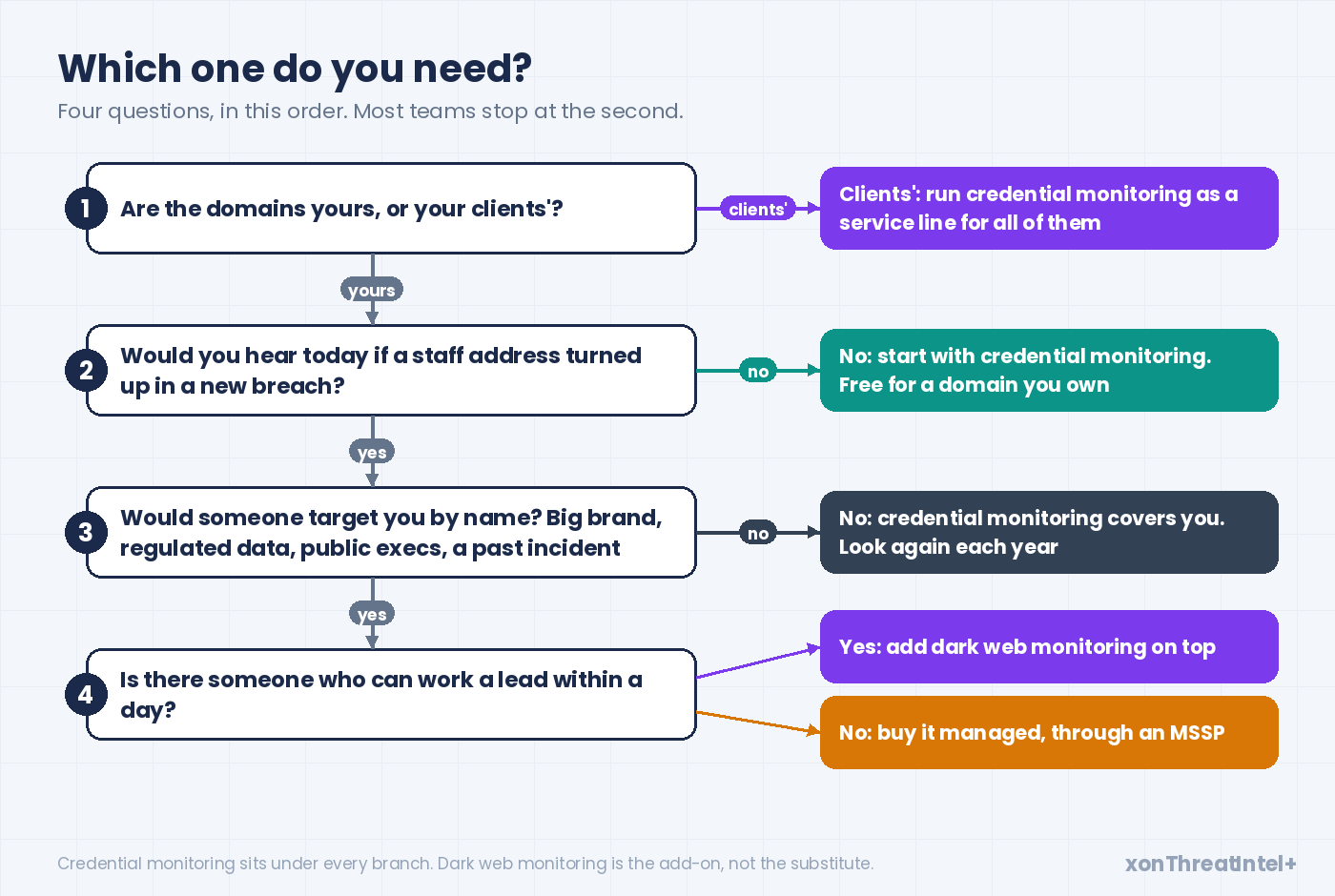
1. Are the domains yours, or your clients'? An MSSP or IT provider is buying for a roster, so this becomes a service design question.
Credential monitoring across every client domain is the base layer, with dark web monitoring added for the handful of clients who'd justify it.
We wrote up how to answer the client who asks about the dark web separately.
2. Would you hear today if a staff address turned up in a new breach? If the honest answer is no, start there.
Nothing else on this page matters much until the basic alert exists. Our employee credential monitoring setup guide takes you through the first hour, week and month.
3. Would someone go after you by name? This is the question that justifies dark web monitoring.
Think of a consumer brand people have heard of, regulated data like health records or payment details, executives with public profiles. Or a past incident that put you on somebody's list. Any of those, and the closed spaces are worth watching.
4. Is there someone who can work a lead within a day? A dark web alert is a lead, not an answer.
Nobody on staff with the time or the skills to verify a forum post? Then buy it managed, through an MSSP, rather than adding another inbox nobody reads.
Three quick sketches. A 60-person accounting firm with one domain needs credential monitoring, full stop, and a fresh look in a year.
A 900-person healthcare provider with a known brand and a security team of three? Both, with the dark web feed routed to whoever owns incident response.
And an MSSP with 30 small-business clients runs credential monitoring for all 30, then talks dark web coverage with the two or three that handle payment data. (When one of those clients does get hit, the first 48 hours is its own playbook.)
What does each one cost you?
Money first, since it's the easy part.
Credential monitoring for a domain you own doesn't have to cost anything. Domain monitoring on XposedOrNot is free once you've proved the domain is yours, and it sends an alert when a staff address appears in a newly indexed breach. The breach dashboard shows the backlog, and our community blog has the small-company version of the setup.
The paid side begins when the domains belong to someone else. Our xonThreatIntel+ plans for MSSPs were $99, $243 and $447 a month for up to 10, 25 and 50 client domains when we read the page on 28 September 2026. Where exactly we draw that line has its own post.
Dark web monitoring prices vary far too much between vendors for a single number to mean anything, and most don't publish them. Ask for the price at your actual size, in writing, and ask what's excluded.
The bigger cost is time. A credential alert takes minutes: confirm the person still works for you, reset the password, check MFA is on. (Or close the account, if it's some forgotten SaaS login.)
A dark web lead can eat an afternoon and still turn out to be a dead end. We'd budget analyst hours before dollars.
What can't either one do?
Neither service stops a login. They tell you a credential is out there, and the fix still happens somewhere else.
Microsoft's 2025 Digital Defense Report puts it bluntly: "more than 97% of identity attacks are password attacks." Phishing-resistant MFA, it adds, "can stop over 99% of this type of attack even if the attacker has the correct username and password combination." That's the control that makes a leaked password boring.
NIST's password guidance, SP 800-63B-4 (July 2025), points the same way from the other side. Verifiers "SHALL compare the prospective secret against a blocklist" that can include "passwords obtained from previous breach corpuses."
They also "SHALL force a change if there is evidence that the authenticator has been compromised." A credential alert is precisely that evidence.
One more gap, and it's the uncomfortable one. Infostealers take session cookies too, and Europol's IOCTA 2025 says those cookies let criminals into websites and apps "as an authenticated user." A live session skips the login step, MFA included, until it expires or you revoke it.
So when an alert comes from a stealer log, revoke sessions as well as resetting the password. And treat the device as suspect (the account takeover prevention guide has the full order of operations).
Where XposedOrNot fits
Plainly: we're employee credential monitoring, built on public breach data.
When we pulled our public breach catalog on 28 September 2026 it held 785 breaches and 11,626,299,217 records, 751 of them marked verified. By type that's 778 breach dumps, five combolists, one stealer-log collection and one scrape. The catalog API needs no key, so you can check those numbers yourself.
We index data once it's public. Our data page says it more bluntly: we "do not purchase stolen data, trade with threat actors, or commission breaches. If a dataset is not already exposed, it is not in our index." So we won't see a listing in an invite-only forum on day 10, and we don't pretend to.
What you get instead is the part most companies actually need, done carefully. Free domain monitoring for your own domain.
The exposure check, which gives a point-in-time picture of any domain with no account. And for MSSPs, xonThreatIntel+, which runs credential monitoring across every client domain, each client isolated from the others, with alerts and reports under your brand.
If you need the closed spaces as well, pair us with a specialist. Ask them the questions in our vendor checklist, especially the one about which forums they're actually in.
Start with the free check on your own domain. It takes a couple of minutes, and you'll know which problem you actually have.
Quick answers
What is the difference between credential monitoring and dark web monitoring?
Credential monitoring watches breach data that's already circulating for email addresses on your domain, and tells you which accounts to reset. Dark web monitoring watches closed criminal spaces, such as forums, marketplaces and leak sites, for anything about your organisation, including access for sale. Most dark web products include credential matching; credential monitoring doesn't include the closed-space watch.
Is dark web monitoring worth it for a small business?
Usually not as a first purchase. A small business gets most of the protective value from credential monitoring plus MFA, and it's free for a domain you own. Dark web monitoring starts paying off when you'd be targeted by name and someone can investigate the leads it produces.
Do government agencies recommend credential monitoring?
Yes. The #StopRansomware Guide from CISA, the FBI, the NSA and MS-ISAC, under compromised credentials as an initial access vector, advises organisations to "consider subscribing to credential monitoring services that monitor the dark web for compromised credentials." NIST SP 800-63B-4 requires a forced password change when there's evidence a credential has been compromised.
Can credential monitoring stop an account takeover?
Not on its own. It tells you a login is exposed so you can reset it, revoke sessions and confirm MFA before the credential is used. Phishing-resistant MFA does the stopping; Microsoft reports it blocks over 99% of password-based identity attacks.
Where the numbers came from
- Catalog figures (785 breaches, 11,626,299,217 records, 751 verified, 778 / 5 / 1 / 1 by type, data classes, password storage, 2026 additions and gaps): api.xposedornot.com/v1/breaches , pulled 28 September 2026. Records, not people; the total is a sum of per-breach counts, so an address in five breaches is counted five times.
- 13%, 31%, 39%, 22% (the 2025 comparison figure) and the 95-day ransomware window: Verizon 2026 Data Breach Investigations Report , May 2026.
- 54%, 40% and 46% (ransomware-hit organisations in credential dumps, corporate emails, unmanaged devices): Verizon 2025 Data Breach Investigations Report , April 2025.
- 186 + 60 = 246 days, USD 4.67 million, USD 3.87 million vs USD 5.01 million: IBM Cost of a Data Breach Report 2025 , July 2025. USD 4.99 million: IBM Cost of a Data Breach 2026 , July 2026.
- More than 97% of identity attacks are password attacks; phishing-resistant MFA stops over 99%: Microsoft Digital Defense Report 2025 , October 2025.
- Blocklist and forced-change requirements: NIST SP 800-63B-4 , section 3.1.1.2, July 2025.
- Credential monitoring recommendation: #StopRansomware Guide , CISA, FBI, NSA and MS-ISAC, October 2023.
- Dark web definition: CISA Project Upskill Glossary .
- Initial access brokers, infostealers and session cookies: Europol IOCTA 2025, "Steal, deal and repeat" , June 2025.
- Infostealers sold on marketplaces for access brokering: ENISA Threat Landscape 2025 , October 2025.
- 25-day access figures for leaked test accounts: Onaolapo, Mariconti and Stringhini, "What Happens After You Are Pwnd" , ACM IMC 2016.
- 1.9 billion credentials, 7% to 25% still matching, 10x / 40x / 400x hijack risk: Thomas et al., "Data Breaches, Phishing, or Malware?" , ACM CCS 2017.
- xonThreatIntel+ prices: the plans table on plus.xposedornot.com/products/threat-intel/mssp, read 28 September 2026. Data sourcing stance: plus.xposedornot.com/our-data, same day.